
 Email article
In an earlier article, I showed you how to get Windows Media Center for free in Windows 8. Additionally, I explained the issue that it changed my product key from Windows 8 Pro to Windows 8 Pro with Media Center. Despite removing Windows Media Center, the product key didn’t come back to normal. If you want to reinstall Windows 8 with your purchased product key, this is an article you may read.
HOW TO COME BACK TO WINDOWS 8 PRO
First of all, you need to have the Windows 8 installation. It may be a DVD or a mounted ISO installation file. The other thing you have to prepare before starting is your valid product key of Windows 8 Pro.
Then, you should follow these steps.
- Open Registry Editor by pressing Windows key then type “regedit” (without the quotes) and choose “regedit.exe” result on the left. If you are using a table, you should wipe from the right screen edge, select “Search” then type “regedit” and choose “regedit.exe” result.
- In the left side, you should navigate to this location
HKEY_LOCAL_MACHINE\SOFTWARE\Microsoft\Windows NT\CurrentVersion
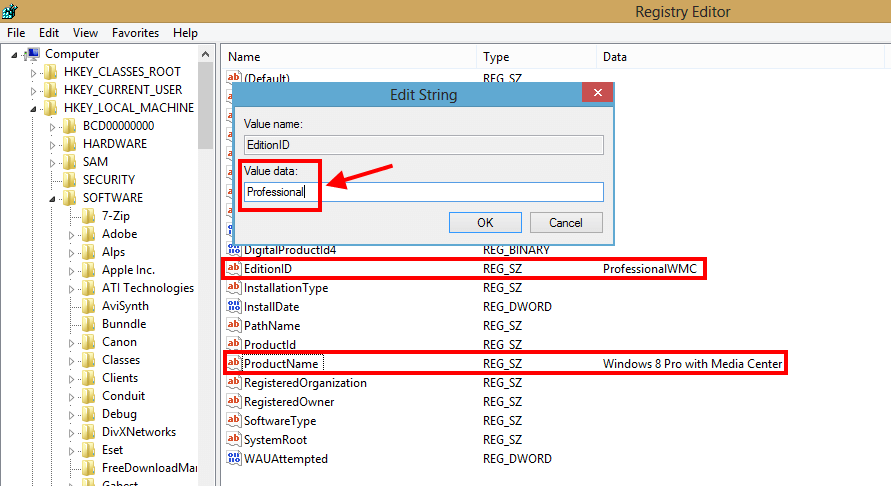
- In the right side, you should change these followed values by double click on a property then change the field “Value data.”
- Change the value of “EditionID” from “ProfessionalWMC” to “Professional.”
- Change the value of “ProduceName” from “Windows 8 Pro with Media Center” to “Windows 8 Pro.
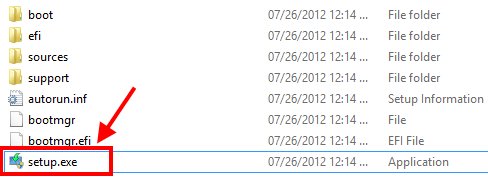
- After that, you need to go to your Windows 8 installation drive and run “setup.exe” file in order to open Windows 8 Setup.
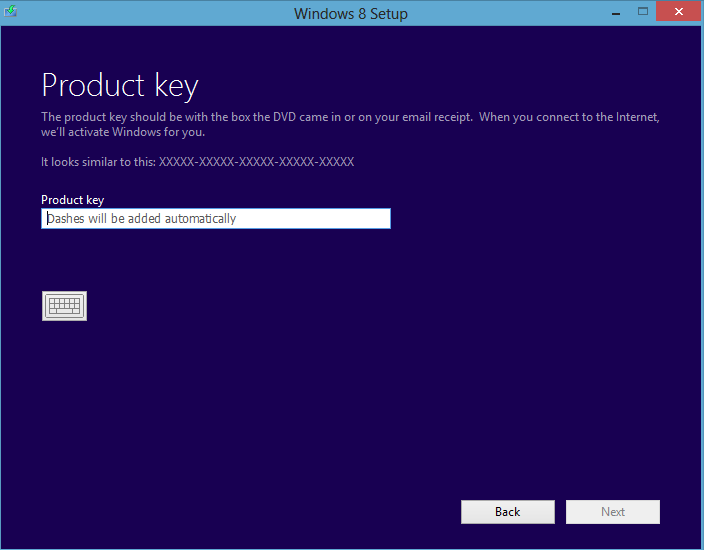
- In “Windows 8 Setup” window, you will be asked to enter your product key. Then you have to choose “Keep Windows settings, personal files and apps” in the “Choose what to keep” step.
- Now, what you need to do is just wait for the process to complete.
CONCLUSION
Enjoy!




