
 Email article
This freebie was originally posted about on November 5, 2009. However, the same freebie is being offered from various sources again this year so I wanted to remind everyone that EVEREST Ultimate Edition (v4.6) is still available for free. Instead of creating a whole new post, I have brought this old post to the front.
EVEREST Ultimate Edition is an excellent and very handy PC diagnostic/benchmark utility. Usually it would cost you $39.95 but today learn how you can grab v4.6 for free (the latest is v5.02).
Update: Just to clarify, v4.6 is two years old – it may not properly identify newer hardware/software.
These are the “key features” of EVEREST Ultimate Edition as per the developer:
Generic features:
· Low-level hardware information: 44 pages
· Software and operating system information: 44 pages
· Security related information: 6 pages
· DirectX information including Direct3D acceleration features
· Diagnostics module that simplifies troubleshooting
· Tweaking featuresBenchmarking features:
· 10 benchmark modules to measure CPU, FPU and memory performance
· Benchmark reference results to compare measured performance to other systems
· Cache & Memory Benchmark Suite
· Hard disk, optical drive and flash drive benchmarking with RAID array supportUnique features:
· UpTime and DownTime statistics with critical errors counter
· Monitor Diagnostics to check the capabilities of CRT and LCD displays
· System Stability Test with thermal monitoring to stress CPU, FPU, memory and disks
· Hardware Monitoring to monitor system temperatures and voltages on the System Tray, OSD, Vista Sidebar or Logitech keyboard LCD
· Temperature, voltage and fan RPM data logging to HTML and CSV log files
· Smart Battery information
· Web links: IT portals, software and driver download
· Manufacturer links: product information, driver and BIOS download
· Hardware information database for over 52000 devices
· Overclock information
· Fully localized user interface: 35 languages
· No installation or setup procedure required
These are the things EVEREST Ultimate Edition can provide you information about as per the developer:
Hardware Information
Motherboard & CPU
Accurate low-level information about motherboard, CPU and BIOS, including chipset details, DMI enumeration, AGP configuration information, SPD memory modules list, DRAM timing information and CPU instruction set support.Video adapter & monitor
Detailed information about the video adapter, video drivers and monitor, including DDC information, monitor serial number and supported video modes detection, low-level GPU details, OpenGL and Direct3D features list.Storage devices
Information about all hard disk and optical disk drives, including IDE autodetection, S.M.A.R.T. disk health monitoring, ASPI SCSI devices list and partitions information.Network adapters, multimedia, input devices
Exhaustive information about network adapters, sound cards, keyboard, mouse and game controllers, including NIC MAC address detection, IP and DNS list, network traffic monitoring, DirectSound, DirectMusic and DirectInput information.Misc hardware
Information about PCI, PnP, PCMCIA and USB devices, communication ports, power management information, device resources list, printers information.Software Information
Operating system
Detailed Windows information, including operating system installation date and product key, system services and system drivers list, process information, environment variables list, system folders list, system files and Event Logs content, AX and DLL files list, UpTime information.Server and display
Information about network shares, users and groups list, logged on users list, account security settings, opened files list, fonts list and Windows desktop configuration details.Networking
Large amount of information about networking status, remote access and mailing accounts, network resources and Internet settings. List of network routes, Internet Explorer cookies and history of visited web pages.Installed software
Detailed information about installed programs, scheduled tasks and startup programs.Security
Windows Security
Operating system security information including DEP (Data Execution Prevention) status, list of installed security patches and system restore status.Security applications
Firewall, anti-spyware and anti-trojan software list. Anti-virus software information including virus database details.Diagnostics
CPUID Panel
EVEREST CPUID panel to provide a compact overview on CPU, motherboard, RAM and chipset. Invaluable information on overclocked systems, dynamic refresh to support Enhanced Intel SpeedStep and AMD Cool’n’Quiet technologies.Hardware monitoring
Sensor information including system, CPU and GPU temperature, fan status, CPU, GPU, AGP and DRAM voltage monitoring, S.M.A.R.T. disk health status. Support for Corsair Xpert memory modules.Sensor icons
Sensor icons feature to display actual system temperature and voltage values on the System Tray.CPU and FPU benchmarks
State of the art multi-threaded benchmark methods to measure performance of both old and brand new processors. References list to compare actual performance with other systems.Memory benchmarking
Memory read and write speed, memory latency measurement to stress the memory and cache subsystem, including references list to compare actual performance with other systems.Disk Benchmark module
Disk Benchmark module to measure performance of hard disk drives, optical disk drives (CD/DVD/Blu-Ray) and USB flash drives. Graphical overview of disk performance measured on different areas of the disk surface.Tips & suggestions
Detection of possible hardware and software misconfiguration and compatibility issues.Reporting
Report Wizard
Easy-to-use method to produce report files of the system, by either using pre-configured report profiles or custom selection of information.Report formats
Three different report file formats: plain text, customizable HTML and the unique MHTML format. MHTML reports including icons are ideal for printing purposes.Report e-mailing and printing
Built-in e-mail transfer client using SMTP, also support for MAPI and Outlook protocols. Instant report display and one-click printing capabilities using IE4 technology.
After reading all that if you still want EVEREST Ultimate Edition (v4.6), just following these simple directions:
***EVEREST Ultimate Edition v4.6 works on 32-bit and 64-bit Windows 95/98/ME/NT/2000/XP/Vista/2008/Win7
Note: Unless specifically stated otherwise in this article, EVEREST Ultimate Edition has not been tested or reviewed by dotTech (aside from ensuring that this giveaway is valid). All the information about the program in this post is based off the information provided on the developer’s website. Please do not take this post as an endorsement/rejection or review of the program. This article is simply to inform about the availability of this program as a freebie; nothing more, nothing less.
- Visit Pro.de’s promotion page and register:
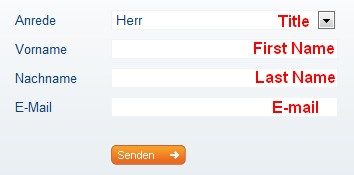
I don’t know if Pro.de spams or not so feel free to make use of Mailinator or Trashmail. Please do not use 10MinuteMail because it takes a while to get your registration key.
After you hit “Senden” you should see a confirmation page:

- After you see that confirmation page, go check your e-mail. You should have an e-mail from “Pro.de <aktion@pro.de>;” with the subject of “Aktion com! Everest Ultimate Edition”. In the e-mail there will be a link you must click on to confirm your registration:
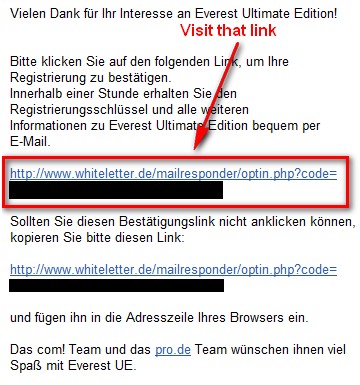
Click on the link and you should see a confirmation page again:
Now you must wait for the registration key to arrive in your inbox. Officially you should get the key within the hour. It took me 45 minutes.

- While you wait, go download EVEREST Ultimate Edition v4.6.
- Keep checking your inbox for an e-mail from “Pro.de <aktion@pro.de>” with the subject of “Lizenschlüssel für Everest UE”. The e-mail will contain your registration code:
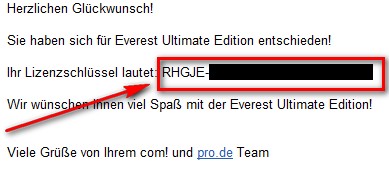
Copy the registration code once you get the e-mail.
- Install EVEREST Ultimate Edition v4.6 and run it. You should be prompted to enter a registration code. Paste in your code.


- Enjoy your new and free EVEREST Ultimate Edition v4.6:
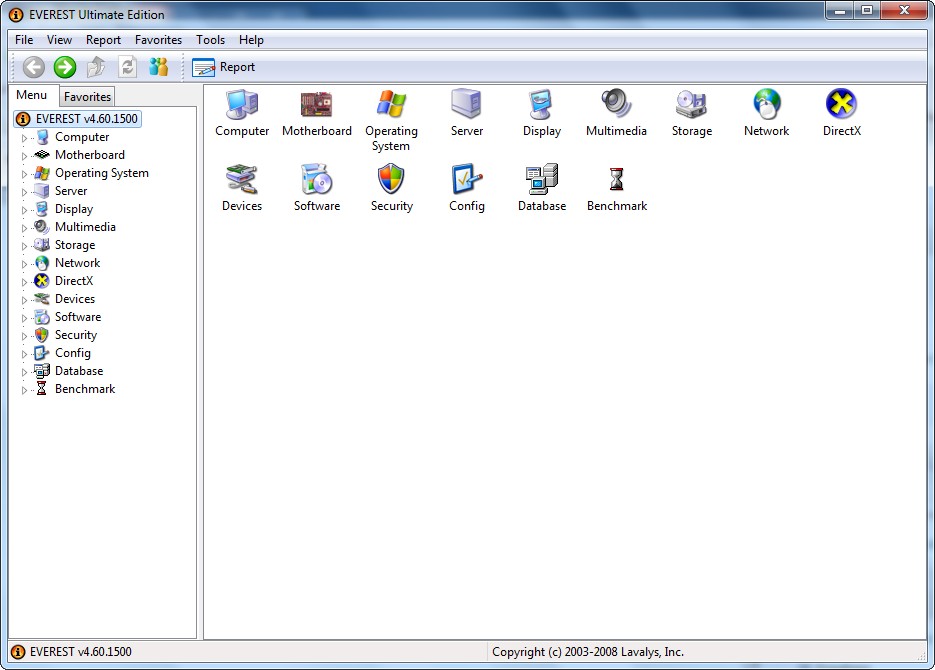
If you have any problems, please post below – I will try to help.
Thanks djhightek!
