CleanMem: RAM/memory cleaner that actually works

September 6, 2009 65 Email article | Print article

I have never really been a fan of memory optimization programs. The reason for this is most of the memory optimization programs I have come across actually make your computer slower(as opposed to faster) because of the way they are designed to work and the lack of effectiveness. Up until now whenever asked to recommend a memory cleaner, I have always pointed people towards AnVir Task Manager. AnVir Task Manager has a really nice memory cleaning tool that works differently than the average memory cleaner. In layman’s terms, instead of the industry standard of “overloading” the memory to force Windows to clean up memory usage (this is the reason why you will notice many memory cleaning programs almost freeze your computer while cleaning up your memory) AnVir Task Manager sort of “resets” the memory usage of a program as if the program was just turned on. This approach to memory cleaning is about the best memory cleaning approach you will find because it is quick and effective for memory leaking software.  Now that does not mean a AnVir Task Manager will solve your RAM woes (only buying more physical RAM will do that), but it is a nice supplement to have.

While I have been recommending AnVir Task Manager, many dotTechies have been telling me “Ashraf, Ashraf, be cool like us and get CleanMem – it actually works!” Today I thought my self “Enough is enough… I want to be cool too!” So I decided to give CleanMem a go; and I must say the buzz around CleanMem is well deserved because it actually works.

You see CleanMem works a lot like AnVir Task Manager in terms of cleaning memory. For the more technical people the developer has a more technical explanation of how CleanMem works (calls API, blah, blah) on his website so read that if you are interested. I will rather explain it for us simple people this way: instead of the typical lets-overload-the-memory-to-force-memory-cleanup approach, CleanMem sort of “resets” the memory usage of a program just like AnVir Task Manager. To make the cake taste even better, CleanMem does not stay on in the background like other programs. Instead when you install CleanMem it sets itself (via Windows Task Scheduler) to run every 30 minutes (you may change this… just go to Windows Task Scheduler). So every 30 minutes CleanMem runs automatically and instantly “resets” the memory usage of all running processes. It does it very quickly (it comes and goes in literally half a second) and without putting any load on your computer (uses ~1 MB RAM and little to no CPU) so you may even forget it is running. Please note that there is no interface to CleanMem. It does its thing and goes away so you never see it. While CleanMem is set to automatically run, you may manually launch CleanMem at any time but you will still never see an interface to it.

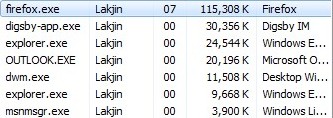
To convince the skeptics, I did a real-life test of CleanMem. Here is my memory usage of some running processes before I run CleanMem:
2009-09-05_2359402

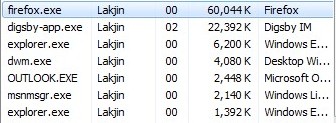
Here is after I run CleanMem:

2009-09-06_0000092

Amazing isnt it? Especially note the drop in RAM usage of the most notorious memory leaking program out there: Firefox. Keep in mind this memory cleaning was done instantly and without any load on my computer by CleanMem. As I already mentioned, CleanMem does this memory cleaning every 30 minutes automatically so even when the programs go back to leaking memory, they will be dealt with on a regular basis.

As I already mentioned, if you have a RAM shortage problem, the best way to solve that is to purchase more RAM. Memory cleaners are just supplement programs – they are not replacements for the actual hardware. In terms of supplement memory cleaners, CleanMem is one of the best ones out there. I highly recommend it.

You may download CleanMem from the following link:

Supported OS: Windows 2000/XP/2003/Vista/ 2008/7

Version Reviewed: v1.4.2

CleanMem homepage

[Direct link download page - installer version]

65 Comments »

  1. A. S. September 10, 2009 at 2:30 PM (comment permalink) -

    Hi,

    Can anyone tell me how to determine whether my ‘installation’ of CleanMem has been successful?

    When I first tried to install it, Threatfire killed it, saying something along the lines that it was trying to copy itself, I think – I can’t remember, exactly. Threatfire also attacked my installation of e-magazine reader, Zinio – it seemed to take on a life of its own.

    After removing Threatfire (which I don’t want to be a permanent situation), the re-installation seemed to go fine and the P.C. seems to perform noticeably faster, but I can’t find any mention of it in XP‘s Windows Task manager.

    Can anyone offer any advice?

    Thanks.

    26
  2. Evan September 13, 2009 at 7:35 AM (comment permalink) -

    @A. S.: Sorry to get back to you so late on this but you should come over to our (PcWinTech’s) forums and look at the CleanMem thread located here.

    If you can’t find the answers you are looking for there then just ask in the thread and the developer will be more than happy to answer for you.

    Two quick thoughts I have though are to make sure you aren’t using the Zip version (if you are you have to manually add it to Task Scheduler) or there are some other security apps that are blocking it. Just so you know, you can always run CleanMem.exe manually via a shortcut and it will do the same thing.

    -Evan
    PcWinTech

    27
  3. Mike September 14, 2009 at 11:14 AM (comment permalink) -

    Have been using CleanMem for a week now, and it works fine. Having said that, I find that Firefix still leaks memory with it, albeit at a slower pace. There seems to be nothing like a restart of a system to handle that with Firefox.

    28
  4. Ashraf September 14, 2009 at 11:48 AM (comment permalink) -
    Mr. Boss

    @Mike: Ya I agree with you. Less actually modifying the code of a specific program, you can never truly deal with memory leakers – only mitigate.

    29
  5. Mike September 14, 2009 at 11:12 PM (comment permalink) -

    @Ashraf: Thanks for your impression–was getting afraid it was me. ;)

    30
  6. A. S. September 15, 2009 at 4:26 PM (comment permalink) -

    @Evan: Thanks for the reply.

    My mistake was to look in the Windows Task Manager and not the Task Scheduler.

    31
  7. drbooth September 17, 2009 at 3:41 PM (comment permalink) -

    I have to agree 100 percent with your positive comments on the cleanmem software. I also never cared for memory cleaners (optimizers) and you can believe I have tried many. Many years ago, I ran across a program called bmx which was a sysinfo/memory cleaner program. This software was developed years ago and has not been updated for at least eight years as
    the sight no longer exists. I would try out a memory “cleaner” program only to fall back to bmx. I recently ran across cleanmem and thought I would give it a try. It definitely works and works well. I installed it and more or less forgot it. Every once in a while at random times, I would run bmx to check out my memory status and it was always clean. (out of 1gb, I have always had 820 or more available. This used to go down to
    600m and I would manually clean up the memory with bmx. Although it is apparent that I do not really have a memory problem (600m left) but part of keeping my system running smoothly is getting rid of excess baggage. I have found that cleanmem is a small and effective software that contributes to this goal and has been a real asset to friends that I know that have low memory on their systems. Outstanding software.

    32
  8. Liam K September 20, 2009 at 7:53 PM (comment permalink) -

    Ashraf –

    Did you check the VM Size in Task Manager? Some memory cleaning programs just transfer the memory to the other column.

    33
  9. 4624Raymond September 21, 2009 at 2:08 AM (comment permalink) -

    I have installed on my comp: XP Free Ram Pro. which has a display in the task bar?

    On installing cleanmem I noticed a big difference, whilst my XP would idle at around 1500meg (I have 2 gig of Ram) when clean mem cuts in I find my available Ram increases by as much as 10/12%.

    This prog. is a winner for me!

    34
  10. 4624Raymond September 21, 2009 at 4:13 AM (comment permalink) -

    Have just scheduled it to run every once every min and I find out of 2gig of ram, I have 1795mb whilst writing this! Excellent!
    My op system is XP Pro.

    35
  11. uno October 21, 2009 at 5:59 AM (comment permalink) -

    DISCOURAGED WITH VISTA/WIN7
    because it makes the clever Superfetch mechanism useless and the loading of applications will be slow again.

    36
  12. PTLdom October 26, 2009 at 1:45 PM (comment permalink) -

    Hi. How does it perform against the also free Iobit’s smart ram?

    37
  13. PTLdom October 26, 2009 at 1:49 PM (comment permalink) -

    @uno:

    Hi. How much ram takes the superfetch feature?

    38
  14. tOM Trottier December 4, 2009 at 11:58 AM (comment permalink) -

    A hidden advantage is that CleanMem can also aid installs. If you get a “cannot register xxxxxx.dll”, then running CleanMem may release the old version from memory so the new version installs.

    tOM

    39
  15. Bob December 7, 2009 at 8:20 PM (comment permalink) -

    I’ve been using this program without problems until today. All of a sudden with the 12/7/09 virus definition update Avira thinks it is a trojan, TR/dropper.gen. VirusTotal says it’s not except for Avira and one other scanner. Just thought others may be encountering the same thing today if using both CleanMem and Avira. I reported it to Avira as a suspected false positive.

    40
  16. Liam K December 7, 2009 at 8:36 PM (comment permalink) -

    @Bob: I just updated, and I’m having the same problem as you.

    41
  17. Evan December 8, 2009 at 6:54 AM (comment permalink) -

    @Bob: Thanks for finding and posting this. Shane (the developer) has already submitted this to Avira as well and I assure you it isn’t to worry about and that the code hasn’t changed. Avira just updated their detection algorithm and CleanMem got “caught” in the net. If you find anything out of the ordinary or have any questions feel free to post a question for myself or Shane over at PcWinTech’s Forums.

    -Evan
    PcWinTech Admin (Home of CleanMem)

    42
  18. future hacker December 13, 2009 at 5:44 AM (comment permalink) -

    the numbers conviced me…DOWNLOADING IMMEDIATELY =P

    43
  19. Steve March 2, 2010 at 7:40 AM (comment permalink) -

    I downloaded CleanMem and installed it (several times. Both the icons for 32 and 64 bit have a red x on them and when I try to find a way to run the program (clicking on the 32 bit icon) it tells me there is no program associated with the link. Does this just automatically run in the back ground or is there a way to launch an interface? I am using XP SP3.

    Thanks

    44
  20. Thom Porter March 2, 2010 at 11:01 AM (comment permalink) -

    Yet another great find on your site! So good I had to review it myself and will now be logging into all of the computers I administrate remotely and installing it!

    45
  21. Herbie April 4, 2010 at 11:27 AM (comment permalink) -

    This is great.  I installed and memory usage went from 1.09gb to 566mb and no loss of speed.  Never had memory usage that low, EVER.  I am running Windows 7 on a Toshiba Laptop Dual Core.  Not exactly the top of the line model.
    I am one of those guys that likes to keep memory usage to a minimum.  Why?  Guess  I’m just anal about it is all.  If a program uses lots of ram, then how can it be efficient, is my credo.  I wrote a program in C#, sort of a Control Panel program, and I worked hard at keeping memory usage to about 400k while running.
    Anyway, I digress.   Thanks  for the tip on Clean Mem

    46
  22. samer April 4, 2010 at 3:34 PM (comment permalink) -

    Hi Ashraf, I wanted to try this after reading ur review, it says that it supports windows 7 … but after I install it on windows 7 nothing happens .. no icon in taskbar and the program doesn’t seem to launch .. only an empty ms-dos window opens and closes… is this normal ? any possible fix if it’s not :) ? thank u for everything u do

    47
  23. Emrys April 13, 2010 at 5:03 PM (comment permalink) -

    I installed Cleanmem but can’t see that it is running. Doesn’t seem to be there on task manager or CCleaner’s start menu viewer.

    48
  24. Taz April 16, 2010 at 11:07 AM (comment permalink) -

    CleanMem upgrade available. Details here.

    49
  25. Tran May 12, 2010 at 2:50 AM (comment permalink) -

    It doesnt work on my vista.. I think the UAC prevent it to run automaticly from schedule task.. there is a vista shield on the
    EXE icon of it… How to get raid of it without turning off the UAC.

    50

Leave A Response »