
 Email article
Everyday, I spend hours in my college’s library to do my homework and I am always disturbed by the startup sound from people’s computers. By default, when you start your computer, it will make a sound to get your attention. However, in the classroom or the meeting, it’s not a very good function for you — people may stare at you due to that sound. Therefore, in this article, I will show you how to turn off startup sound in Windows 8.
HOW TO DISABLE STARTUP SOUND IN WINDOWS 8
This tip is very easy to do, you just need to follow these steps.
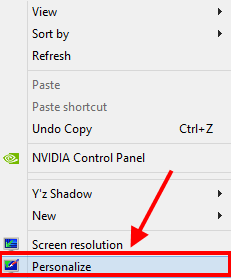
- Go to the desktop (if you are in Windows Store app or the Start screen) then right click/long tap on the empty space.
- Next, you have to choose “Personalize.”
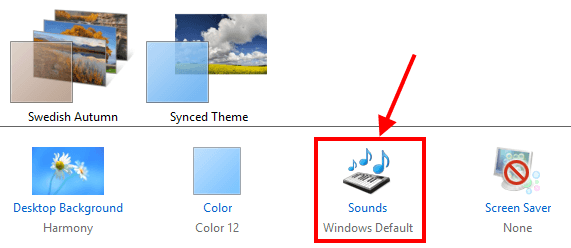
- In the Personalization window, you can see many options to change the theme, wallpaper, and what you need to do is looking at the bottom of that window then choose “Sounds.”
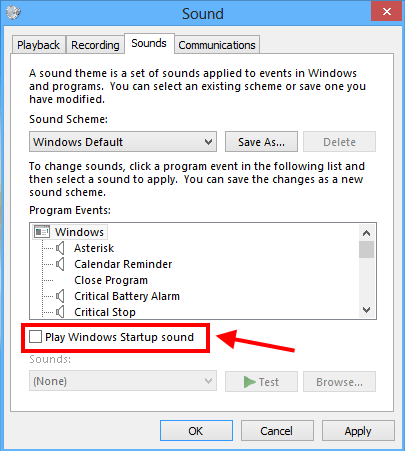
- Then, in the Sounds window, you just have to uncheck the option “Play Windows Startup sound” to turn off startup sound in Windows 8.
- After that, click/tap OK button to finish and you are good to go.
CONCLUSION
Enjoy!




