
Author/create and burn DVDs with DVDFlick

September 15, 2011 32 Email article | Print article

I have noticed there is a bit of confusion out there when it comes to DVDs. People want to burn movie DVDs which they can play on their DVD player but often mix up the action of burning a movie DVD and authoring a movie DVD. This confusion cannot solely be blamed on consumers because often many programs have the ability to burn DVDs but not the ability to author them. Both burning and authoring a DVD accomplish the same goal of creating a movie DVD which is watchable on an average household DVD player. The difference lies in the actual process of creating that movie DVD.

When you burn a movie DVD you are simply putting DVD compliant videos (i.e. .VOB) onto a DVD; if you burn non-DVD compliant videos onto the DVD, like AVI or MP4, the DVD just acts like a VCD instead of a proper DVD. When you author a movie DVD you take non-DVD compliant videos (i.e. AVI, WMV, MP4, etc.), convert them to DVD compliant format (i.e. .VOB), and burn them onto a DVD. In the process of authoring a DVD you may also be able to create custom DVD menus depending on which software you use.

Ashampoo Burning Studio is a prime example of a disk burning software that can burn a DVD (data or movie) but not author one. DVDFlick, on the other hand, is an example of a software that can author DVDs:
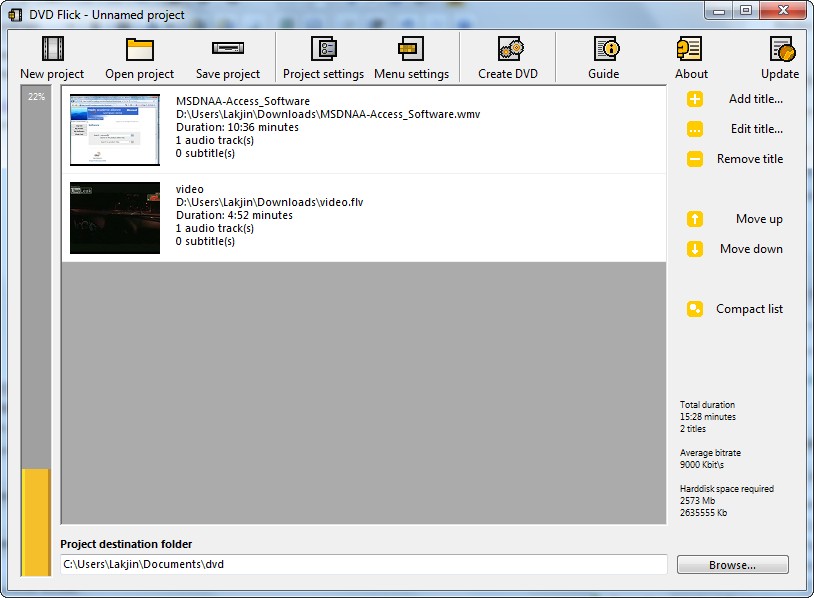
2009-09-15_174852

DVDFlick is an excellent open source DVD authoring utility. It is extremely easy to use, featured filled, and effective. With DVDFlick you can author a DVD with many different video formats (i.e. these all are supported input video formats):
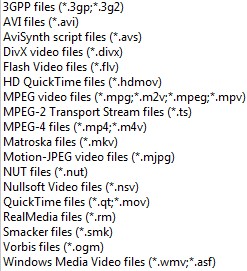
2009-09-15_175200

In total, 45+ video formats, 60+ video codecs, and 40+ audio codecs are supported as per the developer.

You can select just one video to add or you can add multiple videos. All videos added into one project will be turned into the same DVD.

To your DVD you can add custom subtitles…
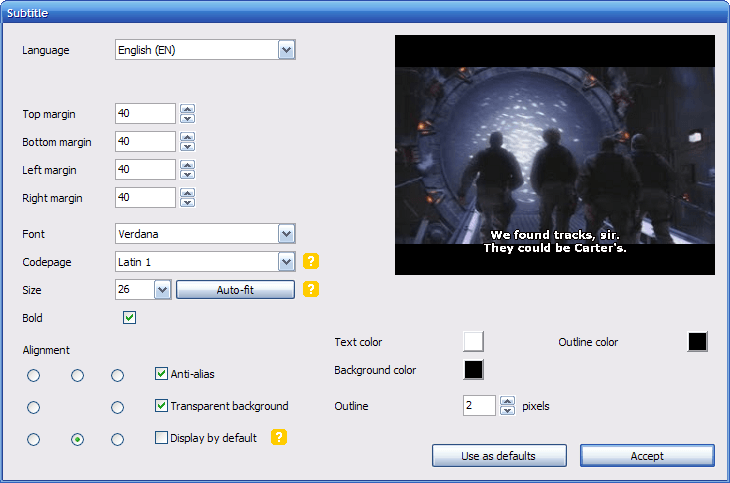
subtitle

Screenshot by the developer.

…custom sound tracks…
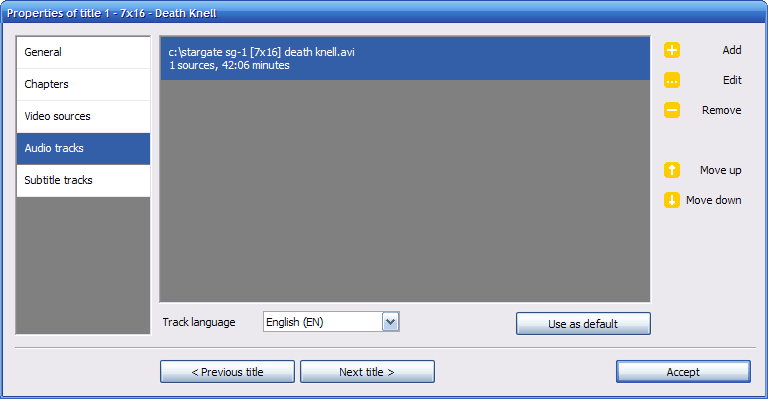
audiotrack

Screenshot by the developer.

…and custom DVD title menus:
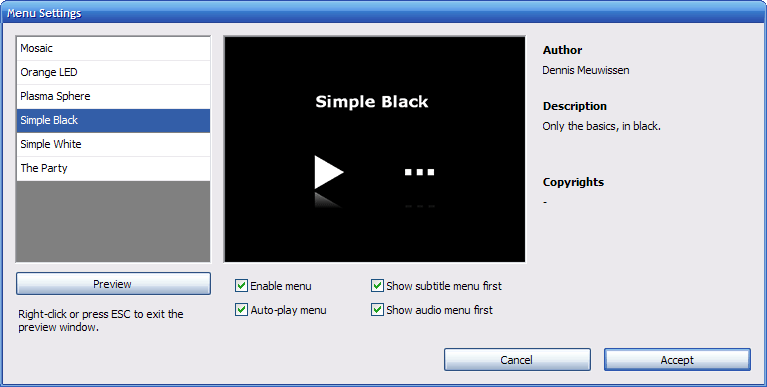
menusettings

Screenshot by the developer.

Additionally you have the ability to change various settings including, but not limited to, DVD format (NTSC, PAL, etc.), aspect ratios, and when/if to create custom chapters. When all is set and done, you can burn your movie directly onto a DVD or save it as an .ISO for burning at a later time (or both):
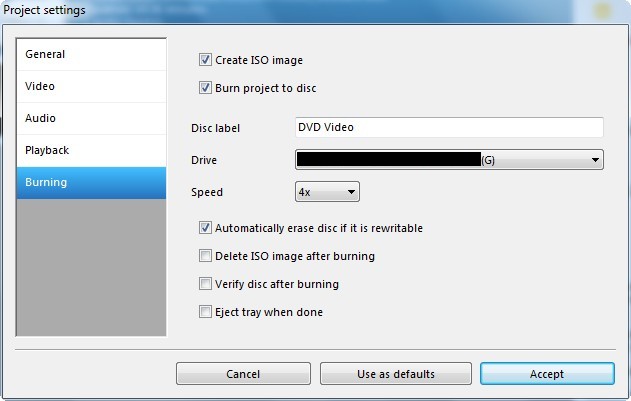
2009-09-15_181931

If you are confused on how to use DVDFlick the developer has even written up an extremely useful how-to guide on DVDFlick explaining topics like how to create a simple DVD, add subtitles, add audio tracks, or add a DVD title menu.

I have been using DVDFlick for something like 2 years now and I absolutely love this program. It is my go-to program for authoring DVDs. For anyone that needs an excellent DVD authoring program, I highly recommend DVDFlick. There are, however, two things I would like to point out about the usage of this program:

  • Take note these are two different “places” to edit “settings” within DVDFlick. One is “Project Settings” where there are settings concerning the whole DVD such as DVD format (NTSC, PAL, etc.). The other one is when you select one of the titles/videos you added and click on “Edit Title…”. The settings under “Edit Title…” are specific to that title only. You will find things like adding subtitles, sound tracks, and aspect ratios there.
  • The DVD title menus are kind of limited (there are only 6 template choices by default). However, thankfully, the DVDFlick community have created custom templates you can download from here. Once you download the template you want, just put it in its own subfolder in the “templates” folder in the “DVDFlick” folder under “Program Files”. For most of us this will be C:\Program Files\DVD Flick\templates. If you are a talented artist, you may also create your own by following the directions here.
  • In my experience DVDFlick can be a bit slow. In the past it has taken me 1-2 hours to create a DVD (from the start of adding titles to the finish of burning it onto a DVD). However considering the type of work DVDFlick does, it is sort of given that it will take a while.

You may download DVDFlick from the following link:

Version Reviewed: 1.3.0.7

Supported OS: Windows 2000 (Pro only)/XP/Vista/Win7

DVDFlick download page [direct download]

32 Comments »

  1. amnesia September 15, 2009 at 6:49 PM (comment permalink) -

    Thanks, I looked into making some DVDs up sometime back, but I could never work out how to do it.

    1
  2. Mick September 15, 2009 at 8:01 PM (comment permalink) -

    I have recently started using DVDFlick (less than 1 month). It is a good app. And the price is right.

    A few personal observations :
    1) It IS slow. I think 1-2 hrs is generous, assuming you’re including your assembly time – which you indicated. 4 TV episodes of about 45 minutes each take >2 hrs to convert to VOBS. 6x 25 minute TV episodes take >90 minutes to convert. It then takes additional time to process the sound and then the subtitles as well.
    2) The program is very light (6?) on the DVD Menu possibilities. It would be nice if the developer or someone else with the talent and time could create additional options.
    3) I have one disc of 4 TV episodes where the 1st episode lsat 54 SECONDS and the other 3 episodes air all 40+ minutes correctly. I would guess that it’s some kind of problem with the AVI of that 1st episode. However DVDFlick does indicate on the “edit title” screen that it is 42 minutes or so. I re-burnt the VOBS and got an identical disc. I wiped the VOBS are let DVDFlick re-process the whole thing and ended with an identical disc. For some reason, it just does not like that AVI.

    However, all that said, I am generally VERY VERY happy with DVDFlick. It does allow you to author DVDs… free of cost. And most of the discs I’ve created have worked well. Far better than the experience with the full (trial) version of Ashampoo Burning Suite 9. Uggg, that disc was ugly!

    I say set up your project and let it process overnight, and hope for the best! Results are generally *very* good.

    PS. Thank you for the site. It’s a recent discovery, and very useful. Only wish I hadn’t missed out on the SafelyRemove promotion….urg. :)

    2
  3. Naf September 15, 2009 at 8:14 PM (comment permalink) -

    Have you tried DVDStyler? It is another free dvd authoring software. I haven’t use it yet though.

    3
  4. Ashraf September 15, 2009 at 9:40 PM (comment permalink) -
    Mr. Boss

    @Mick: I totally agree with you on the DVD menus being limited. In fact I should have mentioned that in my post… I will add now. However Mick, you wish has come true before you even wished it. Check out http://dvdflick.net/forums/viewtopic.php?f=1&t=1200 for custom templates =).

    Also, you are welcome =).

    @Naf: No I have not even heard of it until you mention it. I will check it out later and see how it puts up against DVDFlick inshAllah.

    4
  5. John Bull September 16, 2009 at 2:16 AM (comment permalink) -

    Using your link, I got the source files rather than the installation. I had to use the “direct link” on the source forge page to get the install.

    5
  6. Ron September 16, 2009 at 3:31 AM (comment permalink) -

    Ashraf

    While Ashampoo Burning Studio 2009 only burns as you said, I thought you’d like to know about their latest shareware. I happily abandoned Nero a few years back for Burning Studio 7. Studio 8 was even better software, and Burning Studio 9 finally adds a video editor to the mix. To be honest, I haven’t explored it much (movie making is not a habit), but it looks pretty decent and it’s nice to have integrated into the package. I’ll be inclined to use it when the mood strikes, and refuse to regret buying Sony Platinum Studio (one of those “fabulous deals” impulses).

    Best

    6
  7. Mario September 16, 2009 at 5:33 AM (comment permalink) -

    I’ve been using DVDFlick for 2 or 3 years now and it is really slow, but quality is good and resources are plenty, so that doesn’t bother me – the computer is working not me, and I don’t do that much authoring, that time would be an issue. I only have one problem with it, and I think it is something with my computer : I just can’t make the menus work. I gave up, so if I put more than one show or film on the same DVD I keep on pressing next chapter until I get in there.

    7
  8. Jyo September 16, 2009 at 1:20 PM (comment permalink) -

    when I actually used and devoted 3 hours to burn around 700mb of mkv video files onto a dvd, I ended with videos with audio that were out of sync(about 2 months ago). has this ever happened to anybody here? it happened to me with version 1.3.0.7, latest one now. is there a possibility it might be my error?

    8
  9. david roper September 16, 2009 at 4:08 PM (comment permalink) -

    Great article. I knew DVDs had to be in VOB format but i never had success with any free ones that were supposed to do the job. This is a terrific find for me. Watch out Hollywood.

    9
  10. Julie Samford October 4, 2009 at 5:09 AM (comment permalink) -

    Thanks for this information! I downloaded several programs yesterday and none seemed like a good fit for someone just trying to get a project done and not make a career investment out of the job of DVD authoring. Found you from your super comprehensive review on GOTD… thanks so much!

    10
  11. Sue D. Nymme October 25, 2009 at 8:09 AM (comment permalink) -

    Seems not to work under Vista. I downloaded it and installed it and when I run it, right away I get:

    “An error occurred during startup. Number 339 from dvdflick: Component ‘mscomct2.ocx or one of its dependencies is not correctly registered: A file is missing or invalid”

    And looking at dvdflick’s forum, http://forums.dvdflick.net/viewtopic.php?f=3&t=10 it looks like a lot of other people are having this problem, with no apparent answer from the dvdflick people.

    Oh well. :-/

    11
  12. Sue D. Nymme October 25, 2009 at 8:33 AM (comment permalink) -

    I ignored the error and can run DVDflick. It seems “okay”. Maybe I just need to learn how to use it more effectively, but it seems to be lacking some basic features.

    One basic thing I wish to do with recorded television programs is to edit out commercials, and to set chapter marks within the program, so the viewer can jump to a desired scene. DVDflick seems to have no way to split a title into scenes, nor to delete scenes.

    The “Edit Title” button allows you to change the thumbnail for the whole title by choosing a still frame, but provides no way for you to scroll through the video. You have to manually select hour, minute, second. With no sub-second granularity.

    It allows you to make chapters, but NOT at arbitrary points within the title. You have the choice of creating a fixed number of chapters (presumably equal length), or to create a chapter every n minutes, or to create chapters on every video source.

    The developers seem to have left off a “cancel” button from the “Edit Title” section. So if you screw up, you have no choice but to hit the Accept button.

    There seems to be no way to preview the video, nor to scroll back and forth through the video as you’re setting it up.

    Maybe I’m expecting too much. DVDflick seems to do next to nothing.

    12
  13. matt November 17, 2009 at 6:16 AM (comment permalink) -

    I love it!!! Much thanks to the creator.It’s simple & fits to my computer beautifuly! (VISTA home premium).

    13
  14. Roy November 19, 2009 at 7:41 PM (comment permalink) -

    Tried many other software and could not get even one DVD to work properly in my living room DVD player.
    With DVD Flick, first attempt, first success. Thank you so much for letting us about this software. No more confusion with authoring for me…I love your website, the quality and the pertinence of its informations. Just found about dotTech a few months ago…

    14
  15. Rob December 10, 2009 at 5:44 AM (comment permalink) -

    I have downloaded 10 episodes of a TV series in AVI format.
    I have used FormatFactory to convert them to VOB.
    I have told DVDFlick to author 5 of those to an ISO (so that I can use Nero to do the burn).
    The 5 VOB files are 3.7 GB so room to spare for my Disk 1
    Why is DVDFlick going to take hours to encode it ?
    Surely the VOB files can remain untouched, and DVDFlick just adds the necessary IFO etc files ?
    And that would take lots less time, than is happening as we speak.
    I suppose I am wondering why DVDFlick has to re-encode the VOB files ?

    15
  16. manny January 22, 2010 at 10:56 AM (comment permalink) -

    Sorry people, but i need HELP…everytime i tried to burn an hd movie. i’m always getting an error message:

    W 07:57:19 Failed to Write Sectors 1279360 – 1279391 – Reason: Peripheral Device Write Fault
    W 07:57:19 Retrying (1 of 20)…
    W 07:57:19 Retry Failed – Reason: Illegal Mode For This Track
    W 07:57:19 Retrying (2 of 20)

    …it plays but only half the movie…
    i have the latest version of dvd flick.

    16
  17. Josh P February 27, 2010 at 10:50 AM (comment permalink) -

    Thanks for taking the time to clear up the burn/author confusion! This may be the last piece of the puzzle for me! I’ve been on a quest for a quality open source dvd author for a while. I had given up and was just hoping to get lucky on the GOTD site and run across a giveaway, but your suggestion sounds better. Oh, just in case there is someone else on a quality, open source quest like me, here is my choice for best open source video transcoder. http://handbrake.fr/

    I know that is kind of a “DUH” on Handbrake, but maybe it’ll help someone!

    17
  18. td1 March 9, 2010 at 7:23 PM (comment permalink) -

    One of the treats I give my grandkids (ages 2 – 8 ) is to (1) record cartoons (flash video) from YouTube, (2) convert those video files to mpeg or avi format, and (3) burn the converted files to dvd. It’s fun to do and the kids love them.

    Regarding (1) and (2), I usually use Vdownloader. Regarding (3), I’ve had disappointing results with DVD Flick 1.3.0.7 and very pleasing results with DVDStyler 1.8.0.1.

    The deal-breaker with DVD Flick is that the audio and video get out of sync. In some cases, extremely so. It seems worse when I have a multi-part cartoon that I am blending into one by adding the first title, then clicking ‘edit title’ > video > add title – and adding all other corresponding episodes/ chapters to make 1 seamless file. In fact, sometimes the audio and video are many many minutes apart (not seconds). I’ve tried some of the suggestions from DVDFlick’s forum, but with no success.

    I do not experience this trouble with DVDStyler. For now, DVDStyler is my choice.

    using Vdownloader and then burning the converte

    18
  19. mani March 10, 2010 at 5:21 AM (comment permalink) -

    i got tired of using dvdflick after i experienced so many errors!!.. it’s a pain!! so i deleted it!
    now i’m a great fan of “convertXtoDVD”! very simple and easy to use even a child can do it!

    i gave “convertXto DVD” a 5 star*****

    19
  20. shyam August 29, 2010 at 8:28 AM (comment permalink) -

    @mani
    convertXtoDVD.. i used that after dvd flick 9i have been a flick fan for years) but then i saw convertxtodvd and a new light spread.. this is an amazing software…
     

    20
  21. Lane Lester January 6, 2011 at 8:14 AM (comment permalink) -

    @td1:

    Thanks for mentioning DVDStyler! I mostly run Linux and use Win 97 only in VirtualBox. So I’m delighted to learn that DVDStyler also comes in a Linux version. I’ll try them both and see which I like best.

    21
  22. ilikefree January 23, 2011 at 1:58 PM (comment permalink) -

    I used to bother with making menus but now don’t.
    I have used DVDVidoeSoft Free Studio for about 3 years now and find it does all I need.
    I have never had a DVD that would not play on my stand alone player.
    It does ask if you would like to make Ask your homepage and ask to add a toolbar but I always say no when I install it for people as they are not needed.
    If you need a program that will make quick DVD from most video files then I would give this a try.
    The menu it makes uses your file names as titles.
    get it here.

    http://www.dvdvideosoft.com/free-dvd-video-software-download.htm

    22
  23. dorian April 3, 2011 at 8:09 AM (comment permalink) -

    I have used it exclusively now that my Windows DVD maker has problems. It is limited in features compared to WinDVD, but the simplicity wins me over.

    23
  24. Chet Morton September 16, 2011 at 10:19 AM (comment permalink) -

    I authored a couple DVD with DVDFlick. They played but the video and audio were out of sync both times. I haven’t a clue on how to fix it.

    24
  25. Jyo September 16, 2011 at 3:09 PM (comment permalink) -

    @Chet Morton: I had the same EXACT problem the first time I tried burning with mkv files. Since then I’ve used convertXtoDVD, as recommended by people above and it works great (it’s not “free” but how you obtain it is your business).

    25

Leave A Response »



