
Free WinX DVD Ripper Platinum (for a limited time so hurry)!
September 16, 2009 31
Email article | Print article
Update: WinX DVD Ripper Platinum is available for download for free until October 25, 2009 instead of the original September 30, 2009 deadline. Keep in mind after you only have to download WinX DVD Ripper Platinum by October 25, 2009. Once you download WinX DVD Ripper Platinum, you can install, uninstall, and reinstall it whenever you want – just keep the installer safe.
Back in August I wrote about WinX DVD Ripper, a freeware DRM bypassing and region lock breaking DVD ripper. Since DVD rippers are a popular topic, the post on WinX DVD Ripper has been one of the most visited pages in the past couple of weeks. Therefore when I heard the developer of WinX DVD Ripper is offering WinX DVD Ripper Platinum (a paid upgrade to WinX DVD Ripper) for free, I decided to post about it.
For a limited time you can get WinX DVD Ripper Platinum (v5.1.1)…
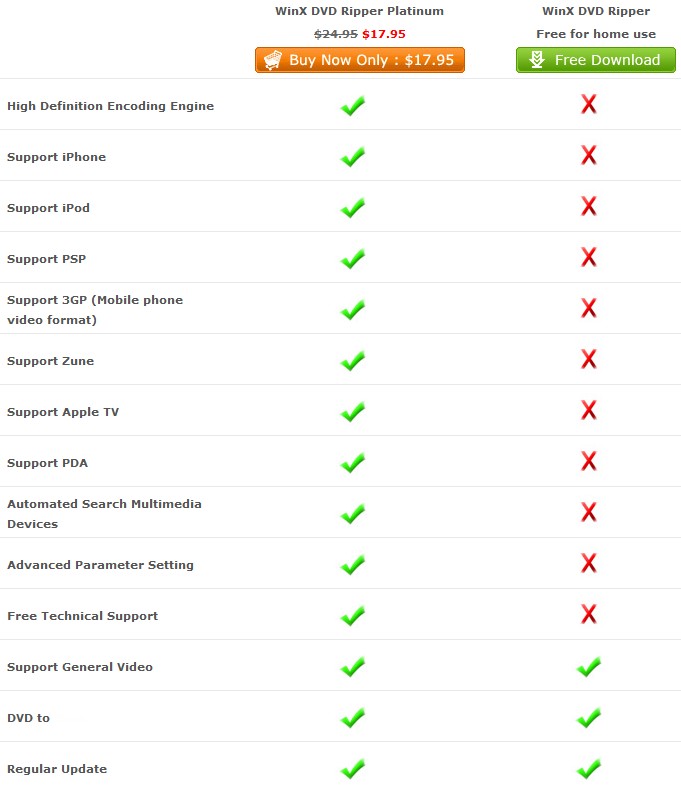
…for free (until September 30, 2009 October 25, 2009). These are the differences between WinX DVD Ripper and WinX DVD Ripper Platinum:
To give you a basic idea of what WinX DVD Ripper Platinum can do, here is a chart of what types of DVDs WinX DVD Ripper Platinum can rip and what type of output video formats it supports:
To get WinX DVD Ripper Platinum, you simply have to download and install it; there is no registration required. You can get WinX DVD Ripper Platinum from the following link:
Supported OS: Windows 98/NT/2000/2003/XP/Vista/Win7
Thanks amozai!
Disclaimer: Please note this article is for informative and educational purposes only. I am in no way encouraging piracy or any other sort of illegal action. Please only use WinX DVD Ripper Platinum within the laws of your country. I am not responsible for any illegal activities done by WinX DVD Ripper Platinum or any other software mentioned on dotTech [.org].


Do we need to install it before 9/30? or just download it before 9/30?
@Bill Gates II: As far as I can tell, you just need to download it since there is no registration required to install it (i.e. so they can’t limit it like GOTD).
@Ashraf:
Great news on the install later aspect of it.
People like this I feel like supporting later on.
and i will remember this easily.
thanks Ashraf, this is the third dvd player I installed today with having uninstalled the other two. Now, is there a way to tape macrovision copyrighted vhs through vcr to toshiba dvd player/recorder to lcd tv to computer using this dvd software? I have a complete set of the honeymooners on vhs and can’t transfer them to dvd.
This is great news for me too, thanks Ashraf.
Painlessly downloaded and installed. Now which format do I use to make a copy that will operate in a normal DVD player? I can’t seem to puzzle that one out.
Thanks Ashraf
very useful
@Emyrs
To make your video playable on a normal dvd player, you have to author a DVD file and burn it. Try Ashraf’s recommendation “DVDFlick”, just search for it in the searchbox. Anyway, your post is a bit off topic, so Ashraf can you please move it some where appropriate? Thanks.
Adrian
Thanks Ashraf… I appreciate it!
@surfriot: To be honest I am not particularly sure. When you tape the VHS to DVD is the resulting DVD in DVD format? If so then yes WinX DVD Ripper Platinum should work.
@Emrys: If you are looking to rip to a DVD format so you can reburn it onto another DVD easily you can do one of two things:
1) Use DVDSmith instead of WinX DVD Ripper Platinum. DVDSmith will rip to DVD-compliant format so you can easily reburn it onto a DVD (and it will play on a normal DVD player) with your favorite burning software without having to do any recoding or converting. Ashampoo Burning Studio 2009 will suffice for the burning job.
2) Like Adrian said, after you rip the DVD w/ WinX DVD Ripper to your choice of video format (i.e. AVI, MP4, etc.) you can use DVDFlick to author the DVD and put that video onto a DVD which will be playable in a DVD player.
For what you are looking to do I suggest the first method because the loss of quality will be negligible since you are keeping it in DVD format at all times.
@Adrian: I disagree that it is off-topic.
Ashraf, what do you think of their WinX Video Converter?
@Ashraf: I’m wondering is DVDSmith better then WinX? (the free version) I’ve used it since you first talked about it and it has never failed me but then you mentioned DVDSmith so it just caught my attention. Thanks for the help!
@Bill Gates II: I was just thinking about that the other day. I have not checked it out yet actually. I do have my doubts about it being better than FormatFactory but it may still be worth a look.
@Jon: Neither of them are “better” than the other. I say this because both rip DVDs, bypass DRM protection/region locks, and are slow. However their main purposes are different. WinX is if you want to rip your DVD directly to a common video format such as AVI, WMV, etc. DVDSmith is if you want to rip your DVD to DVD-compliant .VOB format. DVDSmith is “better” if you want to create a true backup of your DVD because it allows for reburning without lose of quality. WinX is better for storing your DVD on your computer in formats that wont take up much space and/or for converting your DVD to use on like your cell phone or something.
Of course since you can use FormatFactory after you rip w/ DVDSmith to convert to almost any format, the differences between DVDSmith and WinX become minimal. I don’t own much DVDs but if I ever have the need to rip DVDs, I personally would use FormatFactory + DVDSmith over WinX DVD Ripper. However that does not mean WinX sucks, because it doesn’t.
@Ashraf: It seems I was wrong about what I was using. I’m using WinX DVD Copy, not Ripper. It seems to work as DVDSmith does as said in you descriptions. Not sure if you’re familiar with WinX DVD Copy and now I’m honestly not sure where I got it. Maybe GOTD? Anyway, thanks for the reply and sorry for the mix up. I may check out DVDSmith and see which I like.
Thanks again! Keep up the awesome work!
If you download it before the end of this september, you can keep it as long as you can. hurry up, time goes fast.
Not quite sure if this is the place to ask, but I’ve been scouring everywhere and haven’t even found the problem, let alone an answer:
I just downloaded WinX and I love the design and simplicity of the program. It’s what I’ve been looking for for some time! …however, I just can’t seem to get the program to work! Every time I’ve attempted a conversion I get about about 60ish% into it before I get an error that reads “Conversion Error: check parameters and try again”. It gives me a file that looks about the right size but won’t play in any player. For what it’s worth, I’ve tried so far going to avi in divx and xvid as well as mpeg.
If anyone can help (or direct me to a proper place to seek it), I’d be much appreciative. Thanks!
Ha ha ha…I feel like a right fool – my problem was simply that the computer was going to sleep on the program. Got that all cleared up and voila, works like a charm.
wonder if can portabalize…
I would like to copy mp3 files to a DVD since they have a greater capacity. Can I be assured that my CD player will recognize and play these mp3′s as if they were copied to a CD?
For “Conversion wrong, please check parameter and try again” problem.
Please change “output folder” to Non-system partition.
If this will not work, please change other DVDs or other formats, parameters to have a try.
@ dan:
If you have a CD player, you can’t play DVDs with it. If you have a DVD player and want to play mp3s burnt on a DVD, first make sure that your DVD player supports MP3 player. Then use a burning prog such as Ashampoo Burning Studio and burn a Jukebox DVD and burn all your mp3s on the dvd. This way you’ll be able to play mp3s on a normal DVD player.
Adrian
As a matter of interest I am busy downloading this file now as the link is still active.
I tired using DVD smith to copy a DVD “The Secret”, unfortunately it is not working. Any better programme that one knows would be highly appreciated.
Problem: I have a FIFA 2008 that i would like to back up, to make a copy of, which i can use in exactly the same way as my original disk.
Question: How do i go about doing that.
Thanks to all of you guys for the empowering knowlege and information that you continually share with us.
Ashraf, is the Platinum version still free? On the download section here it is marked at $17.95.
Thanks,
o b
@Thamza: Um FIFA 2008 is a game not a movie so… I am not sure never tried to backup games before.
@oliviab: Download section where? Platinum version is still available for free until the end of October. Just download it from the link I provided above.