[Review] Wondershare Streaming Audio Recorder

September 19, 2009 38 Email article | Print article

{rw_text}Giveaway of the day for September 18, 2009 is:

Wondershare Streaming Audio Recorder

Version reviewed:

v1.0.8.52

System Requirements:

2003/XP/Vista 32 bit and Windows 7 Beta; Processor: >1GHz Intel or AMD CPU; Free hard disk space: 30 MB or more; RAM: 256 MB or above

Software description:

Wondershare Streaming Audio Recorder uses virtual sound card to record any sound played through your sound card.

Ashraf’s note:

Some of you may or may not know this but I am a devout Muslim. In Islam (my religion) musical instruments are technically forbidden (lots of technical details but as a general rule) which is why you may often see me not reviewing “music related” giveaways. I was debating whether or not to review today’s giveaway; however I came to the conclusion this is an “audio recorder” and not specifically a “music recorder” and since audio can consist of different things, it should be OK for me to review.

Now I am not forcing my religion onto anyone or anything like that so what you use this program for is up to you (it is totally your choice) but for the record I am discouraging the use of this software to record music.

Furthermore, since we are all civilized people, I ask you respect my views… just as I respect yours (pssst please no debate on religion in the comments but if you want to know more about Islam feel free to e-mail me and we can discuss).

Lastly, my religious views do not affect the quality of my reviews in the least. I always report from an unbias standpoint about the quality of each software just as I have done for Wondershare Streaming Audio Recorder.

:)

————————-{/rw_text} –>

{rw_good}

  • Straightforward and very easy to use.
  • Basically records any audio that you can hear through your speakers/headphones (regardless of if it is online or offline).
  • Automatically detects when an audio starts playing and when it ends.
  • Allows you to save recorded audio to multiple different formats.
  • You can edit ID3 info for each recorded audio.
  • You can set it to record for a predefined time and shut down your computer afterwards.

{/rw_good} –>

{rw_bad}

  • Program window is not re-sizable.
  • Needs a clock/ticker to show how much time is left for the “Preset” feature.

{/rw_bad} –>

{rw_score}
{for=”Ease of Use” value=”10″}Point click.
{/for}
{for=”Performance” value=”10″}Not very heavy on resources, and records audio well.
{/for}
{for=”Usefulness” value=”10″}There will come a time when everyone wants to record audio.
{/for}
{for=”Arbitrary Equalizer” value=”10″}This category reflects an arbitrary number that does not specifically stand for anything. Rather this number is used to reflect my overall rating/verdict of the program in which I considered all the features and free alternatives.
{/for}
{/rw_score} –>

{rw_verdict}[tupr]
{/rw_verdict} –>

While Wondershare is marketing Wondershare Streaming Audio Recorder (WSAR) as a software that records online streaming audio, WSAR basically allows you to record anything that can be heard by you from speakers/headphones/etc.

One thing to note while installing WSAR: you may be told WSAR is not digitally signed and/or you have to install a driver from an unknown developer. It is OK to install WSAR and any driver it asks you to.

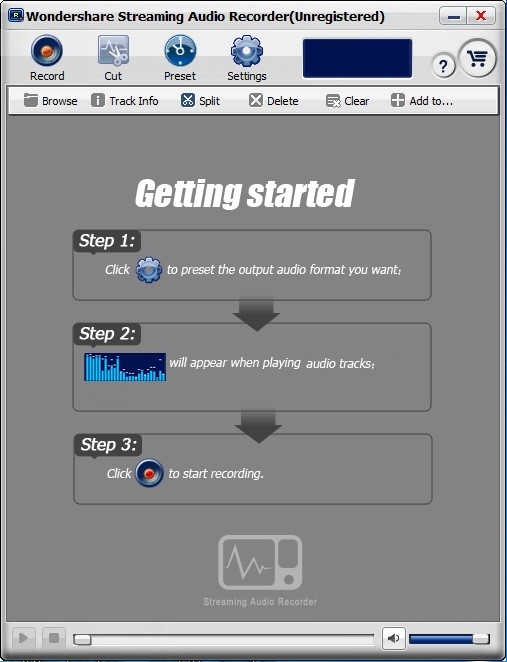
This is what WSAR looks like:
2009-09-18_233649

Using WSAR is very simple; in fact the directions are written right on the program:

2009-09-18_232409

So let walk through the three steps.

Step 1

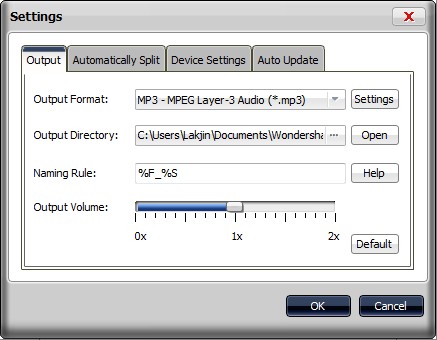
Click on the “Settings” button from the top to set what output audio format you want to record as and make a few other changes if desired:
2009-09-18_234038

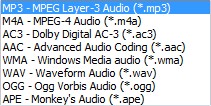
You can choose from all of these output formats:
2009-09-18_234243

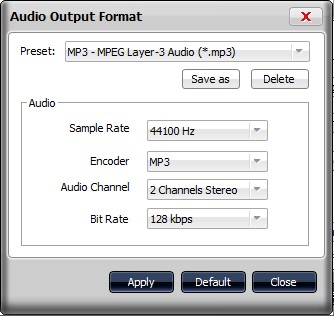
For each output format, you can customize the output settings if you wish:
2009-09-18_234256

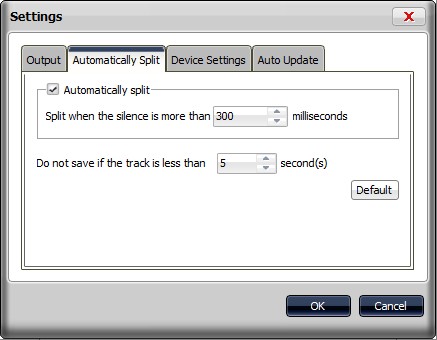
Other important settings you may want to look at are the contents under the “Automatically Splitting” tab:
2009-09-18_234443

You don’t have to change anything here (most people should just leave this as is unless they have a specific reason to change it) but you should take a look at it for informational purposes. As I mentioned in my “The Good” list, WSAR automatically detects when an audio starts playing and when it stops. The settings in this tab regulate how WSAR determines when to automatically stop recording an audio (i.e. when it knows an audio has stopped playing). As you can see by default if WSAR does not detect audio for 300 milliseconds it will think the audio has ended and “split it”, or in other words, stop recording to that file. If more audio starts playing later WSAR automatically creates a new file for it.

Step 2

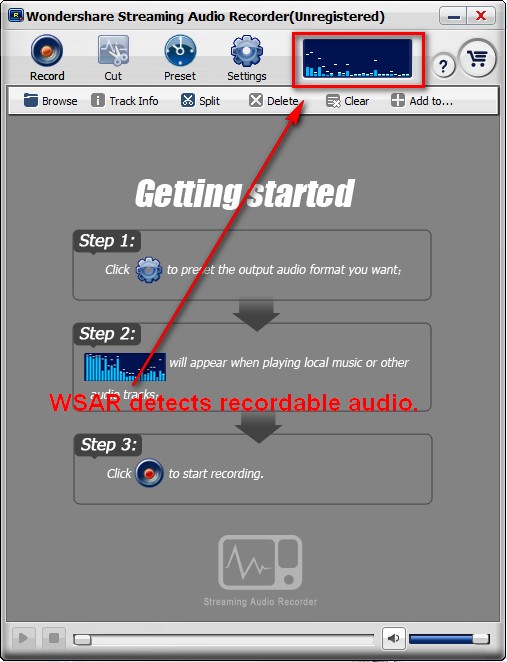
After you have set your settings, you are ready to start recording audio. Go listen to whatever audio you want to record (remember no music =P). When WSAR detects recordable audio: you will see 2009-09-18_235129 at the top of the program window:

2009-09-18_235440

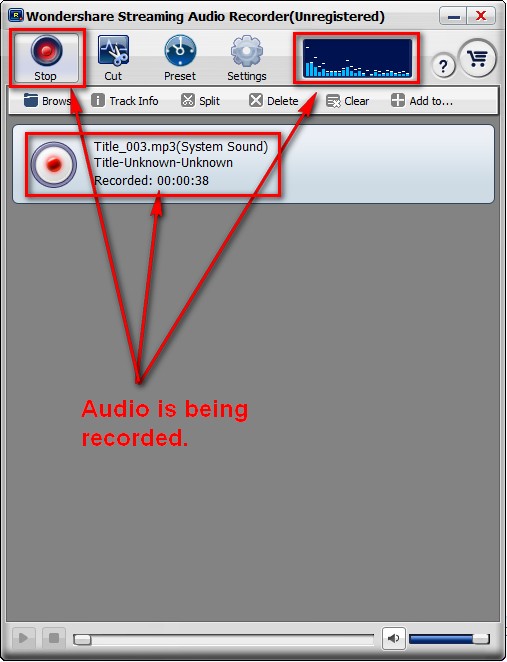
After WSAR detects recordable audio, hit the “Record” button and WSAR will start recording that audio (step 3):
2009-09-18_235414

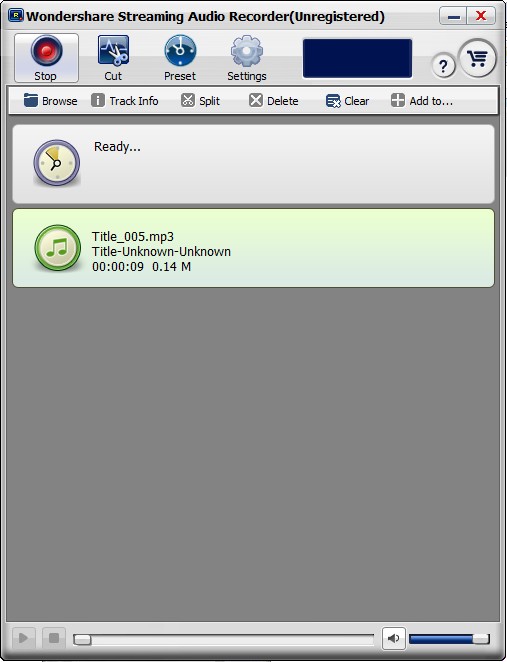
Once your audio is done playing you should see a window like this:
2009-09-19_000103

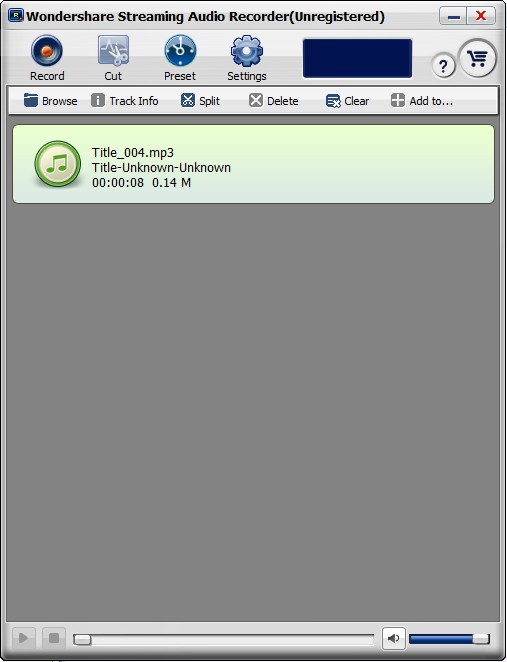
Or if you hit “Stop” you will see something like this:
2009-09-18_235948

Both methods will create an audio file for your recording. The difference is if your audio stopped playing and you didn’t hit “stop”, WSAR still is in “record mode” and it will continue to record any sound that starts to play afterwards. However if you hit “stop”, WSAR comes out of “record mode” and no further audio will be recorded if played.

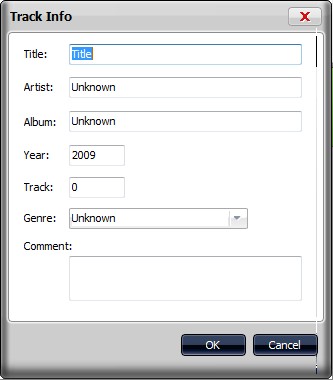
Once you have recorded you audio, you can edit the ID3 information for the audio file by clicking on “Track Info”:
2009-09-19_000425

You can also gain access to your record audio file by clicking on “Browse”.

Three more things I would like to point out about WSAR:

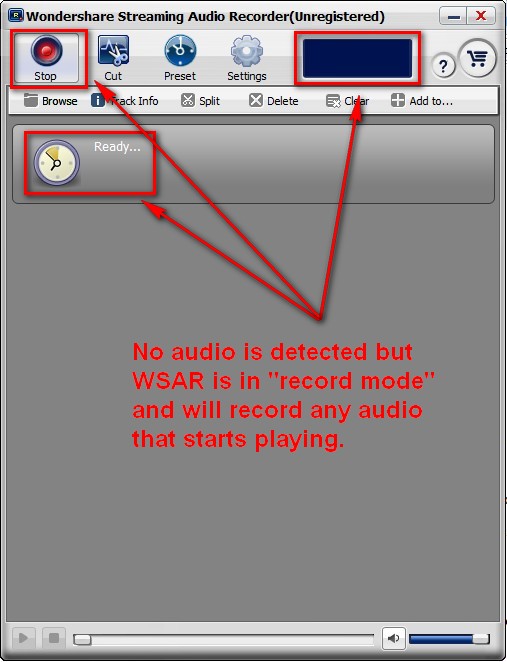
  • You can start WSAR in “record mode” before you actually start listening to any audio. In this case WSAR will look like this:
2009-09-18_235016

When WSAR detects recordable audio, it will automatically start recording it.

  • You can manually tell WSAR to “split” a recording by clicking on “Split” while WSAR is recording audio. What this does is it basically allows you to split up one recording into multiple different files.
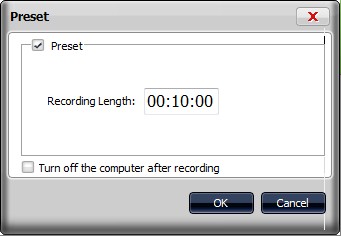
  • You can set WSAR to automatically stop recording after a user-defined amount of time regardless of if recordable audio is still playing or not:
2009-09-19_002444

This “Preset” feature works like this: you first set WSAR to record. Then you click on “Preset” and set the “Recording Length” to whatever you want (can also set it to shutdown your computer after recording). After you click “OK” WSAR’s “Preset” clock will start ticking. After your defined time is over WSAR automatically stops recording audio (and shuts down your computer if you set it to do that) even if recordable audio is still being played.

Take note that you must manually hit the “Record” button to start recording; this “Preset” feature does not automatically start the recording… it is for automatically ending the recording.

So now that I have described all the features, I have to mention the only two cons with this program:

  • The program window is not re-sizeable. Not a big con but still a con.
  • There is no clock/ticker for the “Preset” feature to show you how much time is left. The best there is the little clock that makes up the “Preset” button starts moving but it doesn’t really tell you how much time is left. Again not a big con but still a con and a feature that should be added.

This review was conducted on a laptop running Windows 7 Professional 32-bit. The specs of the laptop are as follows: 3GB of RAM, a Radeon HD 2600 512MB graphics card, and an Intel T8300 2.4GHz Core 2 Duo processor.

{rw_verdict2}Wondershare Streaming Audio Recorder is another one of Wondershare’s quality products. Thumbs up and highly recommended (but remember no music =P).
{/rw_verdict2} –>

38 Comments »

  1. gmon September 19, 2009 at 11:40 AM (comment permalink) -

    @Jim Van Damme:

    I am running the free MS XP emulator in Windows 7, and it’s worth installing for compatibility, so try it.

    26
  2. Ashraf September 19, 2009 at 1:34 PM (comment permalink) -
    Mr. Boss

    @Stephen: You are welcome.

    @Pandora: You are welcome. I probably should have mentioned that driver… except I forgot all about it after installation. :(

    @Lullu, Dave, and Lullu: I don’t see it as disrespectful at all. I am not forcing people to be Muslim or to follow our beliefs hence why I even said “What you use this program for is up to you…” I simply stated a few facts that I felt were necessary to talk about in order for me to write about WSAR.

    I knew before I wrote it I would get some backlash just as the drop in e-mail subscriptions; but as I said I have priorities. I felt for me to write about this I had to declare what I was thinking and why. I would rather keep my faith fully intact and continue my work at dotTech with half the current readers than alternatives. I know not everyone appreciates it; so you don’t have to read dotTech (which I think is rather unreasonable because my religious views are not effecting the quality of my work in the least except for which software I chose not to review). It is a free world people… do what you want =).

    I do hope no one stops reading dotTech but I recognize some people will. I made my choices they make theirs. I hold no grudge and I hope others do not also.

    Lastly, I am 100% sure more people appreciate me writing this review with my extra “note” rather then not writing this review at all.

    @peter: Thanks for the support but lets play nice =). No insults please.

    @Jim Van Damme: I am confused. What adware bar? People keep mentioning it… but I don’t see it.

    Wasalaam.

    @Quro@75: You are welcome.

    What language is that? Arabic I think? I don’t speak Arabic =(; and I must say one thing: please English only so everyone can understand =).

    @gmon: I agree with you; others apparently don’t. Here at dotTech we respect all views =). Long as we are being respectful of others.

    27
  3. Basheer September 19, 2009 at 2:06 PM (comment permalink) -

    Ashraf,

    I think that this software is not even close to what Audacity is able to do. I can record all streaming audio and control the quality using Audacity and could not do that with this product. Also, after registering, it is still showing an offer to sell me the software for $15 as a GAOTD user!

    On a fascinating note,I am surprised to know that you are a student.
    What nationality are you? Not a Keralite, by any chance?
    I am Indian, knocking 57, and started learning computers with a Spectrum 48K about 28 years ago.

    Keep up the good work. Mention anything regarding religion, and it touches a raw nerve in many people.

    Regards,
    Ahamed Basheer.

    28
  4. Ashraf September 19, 2009 at 3:14 PM (comment permalink) -
    Mr. Boss

    @Basheer: To be honest I am not on the full up-and-up on what Audacity can and cannot do so you know more than me. However I read some comments and some people think it is better than Audacity (because they can’t get Audacity to work) while others do not. *Shrug*.

    No not a Keralite.

    I agree with your statement “mention anything regarding religion, and it touches a raw nerve in many people.” It reminds of me that CNN clip I saw once when Mitt Romney (when he was running to be nominated for Presidency) campaigning. He went to go shake a man’s hand and the man refused to shake Romney’s hand because “Romney is Mormon”. -_-’. You may not agree with Mormans but at least shake the guy’s hand >.>’.

    Anyway… lets all be friends =).

    29
  5. hahaguy September 19, 2009 at 3:32 PM (comment permalink) -

    Upon looking at the review and the comments, I felt the urge to say lots of things (some having to do with religion) but again on second thoughts, it’s pointless…

    Anyway, just wanna say eid mubarak…and have a good time.

    30
  6. Janet September 19, 2009 at 3:34 PM (comment permalink) -

    Just for the record, I’m delighted for any bit of personal info about Ashraf that he is willing to give us, as he’s usually quite secretive….:-)….! For those of us who visit dottech daily, it’s sort of like a family, and I don’t think this detracts at all from the professional aspect of the site….I’m hoping some day he’ll spill where he’s from….Ashraf, when you went on vacation to family this summer, I think you said that you’d be in a place where there’s no internet, so ever since then I have been very curious about where that might be….:-)….

    Happy Holiday!

    31
  7. Madhu Vasudevan September 19, 2009 at 10:03 PM (comment permalink) -

    Dear Ashraf,
    A while ago, I was a little disappointed by your unenthusiastic response to my request for help with ripping songs off a DVD. (That Star-trek guy helped though, somewhat, Thanks.) Now I know why. And I am totally surprised; considering that the reigning world champion film music director is (OK, arguably) A R Rehman of ‘Slum Dog Millionaire’ fame – also a devout muslim.

    An erudite techie like you will have your reasons for ostracizing music. The reasons could be just as technical as the ‘continuum’ musical instrument Rehman demonstrated on stage, a few years ago in Chicago’s Sears Center. He was developing that ‘new’ musical instrument with a University of Chicago professor.

    Please forgive that insensitive request of mine. Kindly accept my apologies. I respect your right to religious beliefs, as much as I respect your insightful tech-reviews.

    But can’t help thinking aloud how much poorer my world would have been without the music of Mohammed Rafi, Noor Jehan, Ustad Fateh Ali Khan, Adnan…all devout muslims.

    Thanks for sharing, Ashraf.

    PS: Ahamed Basheer, I’m also disappointed that he is not a keralite!
    But Cheer-up, it takes all kinds…

    32
  8. Ashraf September 20, 2009 at 12:22 AM (comment permalink) -
    Mr. Boss

    @Madhu Vasudevan: Admittedly, lots of Muslims do listen to or create music. Heck sometimes I also give in and listen. Also, there are some Muslims that do disagree on the haram-ness (haram = forbidden) of music. However I am one of the ones that try to avoid it. That doesn’t make me better or worse than anyone else (Muslims or non-Muslim). It is just what I believe in.

    Do not worry about the Star Trek thing. It is ok =).

    I for one am happy most dotTechies took my views in a positive way and am glad for having the other ones who are willing to speak out and voice their opinion even if I disagree with them. dotTech has a great community =).

    33
  9. A. S. September 20, 2009 at 8:46 AM (comment permalink) -

    You can’t listen to music?

    The absurdity of religion never ceased to amaze me.

    34
  10. Ashraf September 20, 2009 at 10:18 AM (comment permalink) -
    Mr. Boss

    @A. S.: Sorry to see you feel that way =).

    @Everyone: Eid Mubarak and/or Happy Holidays!

    35
  11. Liam K September 20, 2009 at 2:19 PM (comment permalink) -

    Hi Ashraf,

    Regarding using Audacity as an alternative, I found this off of Google.

    36
  12. Ashraf September 20, 2009 at 3:00 PM (comment permalink) -
    Mr. Boss

    @Liam K: Ooooo I remember reading that page in the past before! Thanks =).

    37
  13. Liam K September 20, 2009 at 3:03 PM (comment permalink) -

    Yup. I tried it out and it works perfectly for YouTube, as long as you don’t mind editing out a second at the beginning and end ;)

    You need to download the LAME MP3 Encoder to export MP3s, though.

    38

Leave A Response »