A little while ago I wrote about a program called CleanMem. CleanMem is a program designed to optimize the usage of your computer’s RAM. However as an added bonus Shane, the developer of CleanMem, added the ability to clear file cache in the same efficient manner. O&O CleverCache 6 Professional is a program that does similar things:
O&O CleverCache 6 Professional is a unique tool that optimizes the File Cache Management for Windows Vista, NT, 2000 and Windows XP. This results in an enormous increase in performance boosting a system’s performance at times to up to twice its original speed. All this is achieved without the need for additional hardware or any reduction in your system’s stability. You simply install O&O CleverCache 6 and you’re ready to go – no need to reboot. It automatically recognizes your configuration, and within 5 minutes you can unlock the hidden resources on your Windows system! The more the file cache grows, the less memory is available for running applications. The result is a significant decrease in performance as requests for memory lead to the so-called “swapping” of memory. This occurs when unused memory segments are paged out to the hard disk’s paging file. Because hard disk access is slow relative to Memory, loss of performance is inevitable. O&O CleverCache 6.0 Professional Edition is optimized to meet the day-to-day needs of individual users. The software is optimized to run on Windows NT4 Workstation, Windows 2000 Professional, Windows XP Home Edition, Windows Vista and Windows XP Professional.
Highlights
O&O AutoSense Profile (predefined user profiles)
Applies, exports and imports individual profiles
Monitors the most important system components
System tuning and further control and monitoring through the System Tray
Improved File Cache management
Mem-O-Free for more available main memory
Mem-O-Safe for increased security in a system crash
Detailed memory use and cache statistics
System tuning and monitoring
Now will I be using O&O CleverCache 6 Professional? No. I have plenty of RAM and CleanMem covers my basic memory management needs. So I see no major reasons why I should get CleverCache especially considering I am on Win7 and O&O CleverCache 6 Professional does not officially support Win7 (if anyone has a compelling argument as to why I should use O&O CleverCache 6 Professional, please do tell). However for those that desire to get it, O&O CleverCache 6 Professional is another winner from Germany (O&O is a German developer).
To get O&O CleverCache 6 Professional, follow these simple directions:
O&O CleverCache 6 Professional works on 32-bit and 64-bit versions of Windows Vista, XP, 2000, NT 4.0.
- Visit the promotion page and register (click here):
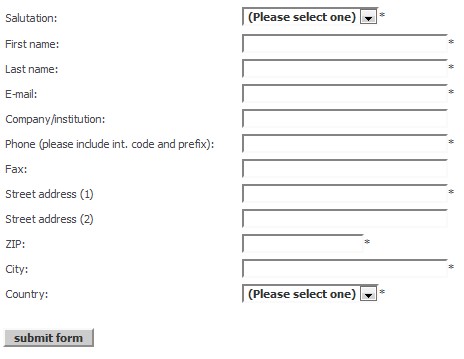
I don’t know if O&O spam so feel free to make use of Mailinator, 10MinuteMail, or Trashmail anti-spam services.
- Check your e-mail you registered with for an e-mail from “O&O Register <register@oo-software.com>” with the subject of “Your free license of O&O CleverCache 6 Professional”. I had to wait about 5-10 minutes to get my e-mail.
About half way down (in the middle) of the e-mail you should be given your registration information:
Copy the license number.
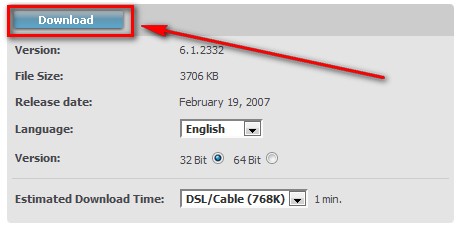
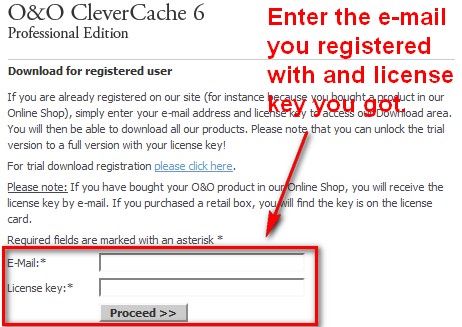
- Visit the download page (click here), enter your registration information, and download O&O CleverCache 6 Professional:
- Install O&O CleverCache 6 Professional after you have finished downloading it.
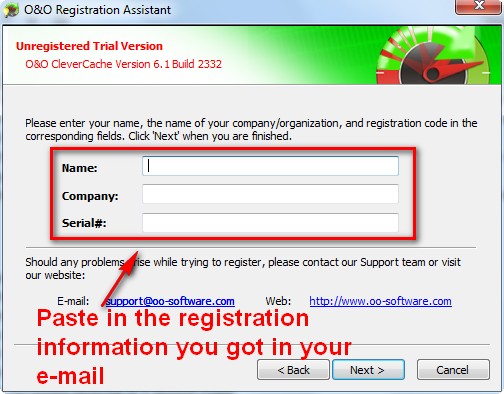
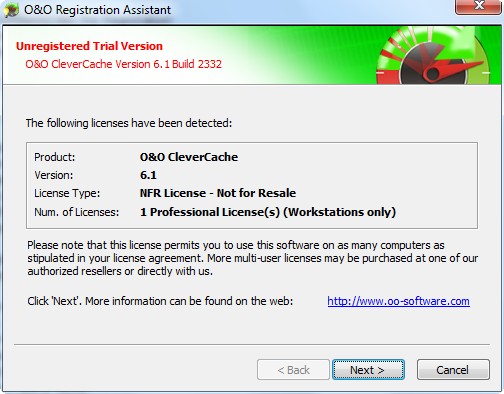
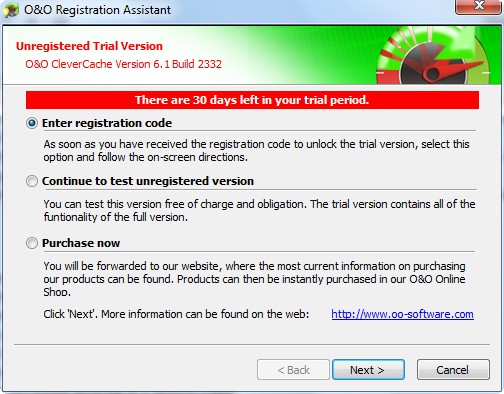
- After installation you should be prompted to enter your registration information; enter it:
- Enjoy:
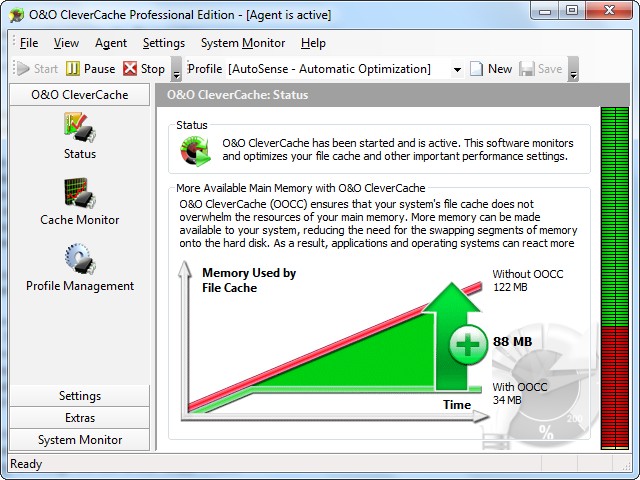
If you have trouble getting O&O CleverCache 6 Professional, please post below and I will try to help.
21 Comments »
Leave A Response »


Email article


Does this really improves the performance & booting time ?
Has any one tried this ? it’s worth to install ?
Downloaded and playing with it now. No immediate benefit seen on 64 bit Vista laptop, 4 gigs ram..
Will try it on an older xp system..
anyone else?
Should I reset all my AnVir Task Manager settings back to default (e.g., the High Normal Low etc.) on the assumption that CleverCache will know better? (I’m not that computer savvy–I just go by common sense…)
I REALLY like CleanMem–so much that I dug into its files and copied the run icon to my desktop so I could dump accumulated ram whenever I wanted. Fun to watch on my task mgr. while it’s working too!
Having said that, I’m looking froward to seeing what this new program will do, since my old PC (265 of RAM) still bogs down every few days and needs rebooted. Maybe this will help?
I’m a ‘learn as you go’ type of user and don’t really understand how this (or file cashes in general) works, but it’s worth a try.
O&O does not spam. I’ve gotten many of their freebies before.
(Okay, just a few offers per year).
I thought I’d update everyone about the wait time, for me it’s been over two hours and I still have not got their email with the details I need.
Just in case I made a mistake with my email I registered again an hour ago and still nothing happening
Mine came up in just a couple of minutes. Maybe just Sun PM traffic?
Try emailing yourself a note to make sure it’s not your email service that’s slow. Mine was down last weekend w/out warning–it took one email 36 hours (!) to get to me!
Thanks Ashraf, It stalled fine on windows 7 ultimate x64.
Hi all! Just so I understand this correctly, you install it and it runs in the background and quietly goes about its business keeping your system optimised? So can someone with more know-how about these things tell me if this then goes through periodic periods of optimisation that slow down the comp? I ask because a long time ago I tried out one of those RAM optimisers and quickly uninstalled it because it would slow down my system to a crawl at regular intervals. Aside from CleanMem, which I started using about a year ago, I’ve never looked at another of these types of things since. So, is this different in the way it goes about things? Is it just more system clutter or is this actually effective? Be grateful if you techies out there have some advice.
Bhai Ashraf,
Eid Mubarak!
JK for this!
Does use of this product mean, I no longer need to use Donationcoder ProcessTamer?
Ws
Downloaded, got the registration email, but after installation, didn’t get the ‘Unregistered Trial Version’ dialogues shown..
instead, got ‘Do you wish to activate… Yes, no.’
Yes => the same prompt. No => Error 101 – something about the agent not being activated.
Tried installing from clean boot.
After restart, trying to run Clevercache again =>
‘A copy of …. is already running..’.
Hmm, does that mean it is installed ok?
Ashraf,
Do you recommend to those of us still on XP to use MemClean as well as CleverCache?
I use windows xp sp3. i have downloaded cleanmem. not only do you not know that its running,but when i went into system information,i noticed that my (available physical memory) went from 686 to 804..wow!! what a difference. i only have one gig of ram,but every little bit extra that i can get really does help when running multiple programs at a time. although i tend to shy away from most programs like this,only because i have used them in the past,including registry cleaners,and other so called memory optimizers,i would definitley recommend this to everyone :)SWEET!!
@etim: You can also run CleanMem from the run box. The quickest way is to bring it up via a hot key combination of Win+R (or Start Menu->Run) and just type “cleanmem” (without quotes) and hit enter. You should find that easier than clicking a shortcut once you get used to it.
-Evan
http://www.PcWinTech.com Site Admin
Home of CleanMem
Ashraf says – “Now will I be using O&O CleverCache 6 Professional over CleanMem? No. I see no major reasons why I should….”
Do you mean that you see no reason to use CleverCache ***instead*** of CleanMem. Or do you mean that you see no reason to use CleverCache ***in addition to*** CleanMem?
Thanks.
The download link takes me to O&O CleverCache 7, and tells me that I can’t register V7 with V6 registration details. Does anyone have the correct link please? Thanks.
I have exactly the same problem as No._16. I might add that it still claims that you can get CleverCache6 free, but then, as in No._16, in the next step it takes you to CleverCache7.
@Ray Wright:
I found it here
< http://www.oo-software.com/corp/en/download/archive/index.php?product=ooclevercache6pro>
Its here:
http://www.oo-software.com/corp/en/download/archive/index.php?product=ooclevercache6pro
the offer is still valid as I checked again in order to download to another PC…
But now you get the new version!
dated November 10, 2009
v.7.0.2689
Thanks #18 and #19. With that information I could install CleverCache6.
Jumbi – I earlier tried installing CleverCache7 without success (#16 and #17). Has it now changed that one can install CleverCache7?