
 Email article
If you did not know this already, let me tell you now: The Internet is not a private place. It was never designed to be a private place. The architecture, the core and the pillars, of the Internet was built in a very transparent manner. If you desire privacy, the Internet is not the place to get it (although there are more, and more techniques out there nowadays to improve Internet related privacy).
That being said, almost every website on the internet runs “web bugs“. Simply put, a “web bug” is a script on a website that monitors user behavior. Web bugs are mostly used to allow webmasters to collect and analyze statistics related to the traffic on their websites, and to serve ads which supply a source of revenue that keep websites going. Even dotTech uses them (see dotTech Privacy Statement for more information).
Although they sound like horrible, big brother type ordeals, for the common user, web bugs are not that big of a deal; at worse, the most “personal” information web bugs collect are IP addresses. I put personal in quotes because IP addresses are actually pseudo-personal in the sense that IP addresses give general geographic information about users (most of the time they can tell the city where the IP originates from), but can’t be personally tied to individual users or households without a subpoena forcing an ISP to reveal that information. Plus IPs are usually issued in a dynamic fashion nowadays, meaning your IP will change at regular intervals, and IPs are owned by an ISP and not you.
Generally speaking, only a privacy nut (and I say “nut” in a loving way) or someone who is genuinely doing something illegal should worry about web bugs. However, even if you are not a privacy nut (I still say “nut” in a loving way), it is still nice to know if your are being tracked and what is doing the tracking when you visit a website. This is where Ghostery comes in.
Ghostery is a Firefox add-on that notifies users if a website is running web bugs, what web bugs the website is running, and allows users to block the web bugs (if desired). Currently Ghostery notifies users of over 200+ web bugs:

How Ghostery works is simple. After installation, Ghostery places a button/toolbar in Firefox’s bottom toolbar:

When a web bug is detected on a website, the Ghostery button/toolbar will tell you the number of web bugs found, and a small popup box will appear at the top right of your Firefox window and will tell you exactly which web bugs were found:
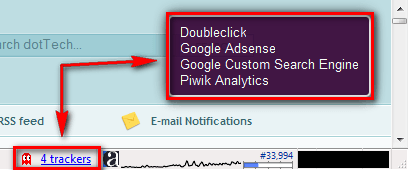
(This screenshot is of dotTech. Doubleclick, Google Adsense, and Google Custom Search Engine are all part of the ad serving system of Google Adsense; Piwik Analytics is the main statistics plugin I use.)
If you click on the Ghostery button/toolbar (single left click) you can get more information about each tracker and optionally block it (any web bug you block will be blocked for all websites you visit that run it – not just the specific website you block it for):
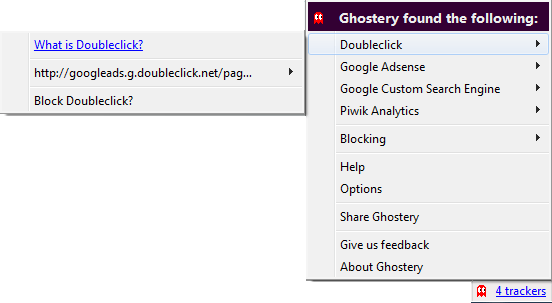
Although the *purpose* of Ghostery is not to be an ad blocker, if you block an advertisement related web bug, the ads associated with that web bug will also be blocked. Now let me make something clear. As a webmaster, I do not appreciate people blocking ads. Even if a website visitor doesn’t click on them, each time a visitor loads a web page, each ad gets one “impression”; and when it comes to advertising, impressions are as important as clicks. I never block ads, on any website I visit, because I understand ads are the main source of revenue for websites; without ads most websites wouldn’t exist. I just ignore ads (I only block offensive adult ads). However, while I would rather people didn’t block my ads (or my statistical plugins for that matter), I do understand some people have their reasons for doing it and will do it… but I can say please and make you feel like a jerk, right? :P
One thing I am sure you will get tired of while using Ghostery is the fact that the popup box appears every time you load a web page. For example, every time you load a page on dotTech you will get the box. Even though the box disappears automatically after 15 seconds, this can get annoying real quick. So I suggest considering either turning off the popup box and relaying on the button/toolbar to notify you, or lowering the “disappearing” time to something lower like 2-3 seconds. To do this, simply click on the button/toolbar and go to “Options”:
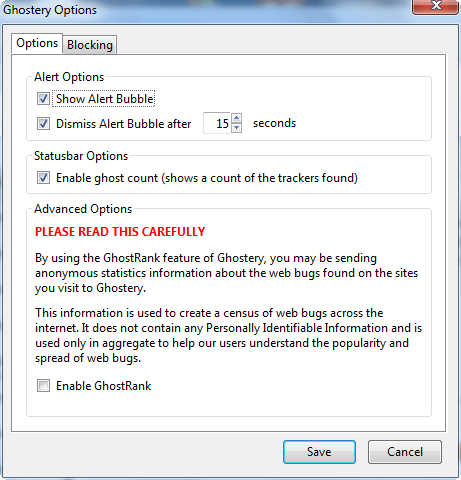
The popup box is controlled via the settings under “Alert Options” and the button/toolbar is controlled via the settings under “Statusbar Options”.
Last but not least, you can control what web bugs you have blocked from the “Blocking” tab under “Options”:
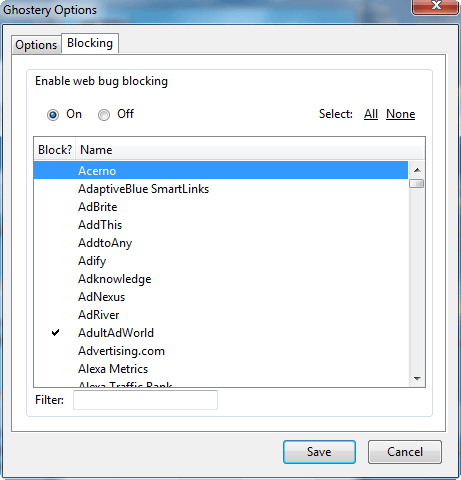
You can block/unblock all web bugs supported by Ghostery from here.
Users can grab Ghostery from the following links:
Version reviewed: 2.0.1
Supported platform: Firefox 3.0-3.5.x




