Tip: Use Ctrl+Shift+Esc instead of Alt+Ctrl+Del to quickly bring up Windows Task Manager
January 15, 2012 24
Email article | Print article
I first learned about the joys of Alt+Ctrl+Del while watching my otherwise computer illiterate dad restart a frozen Windows 98 desktop. Ever since then I have been relying on Alt+Ctrl+Del to bring up Windows Task Manager, which allows me to fix issues like frozen programs. However, Alt+Ctrl+Del for Windows Task Manager is a legacy shortcut. On newer computers, depending on what version of Windows you are using – e.g. Vista and Win7 – and/or the way you have Windows configured (e.g. multiple Windows users), Alt+Ctrl+Del doesn’t directly bring up Windows Task Manager but rather brings up the Windows Security screen from where users can launch Task Manager.
If you don’t mind having to go through an extra step to get Task Manager, then by all means continue to use Alt+Ctrl+Del. However, if you are an impatient little cretin like me, then the most efficient way from point A to point B is a straight line; or, in this case, a different keyboard shortcut.
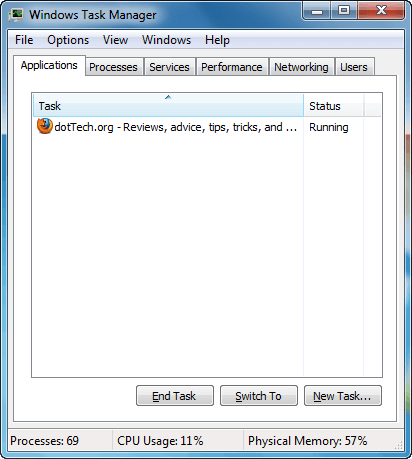
Instead of using Alt+Ctrl+Del to access Windows Task Manager, press the Ctrl+Shift+Esc keys on your keyboard to directly access Windows Task Manager. Unlike Alt+Ctrl+Del, Ctrl+Shift+Esc does not bring up the Windows Security screen but rather directly opens Windows Task Manager. Pretty cool, huh? Now all we need to do is break old habits…
[Thanks Patara!]
24 Comments »
Leave A Response »


Another quick way I have found is just to right click on the task bar and click “Start Task Manager”. Quick and easy way in which only requires only one hand >.< rather than using both hands……
@PCbasics: What if Windows Explorer freezes? :-P
BTW I can do Ctrl+Shift+Esc and Alt+Ctrl+Del with one hand. :-P
Works for XP as well.Not that it matters,but the most popular teaching is Ctrl+Alt+Del
@chuck (detailer): Is it? I’ve always said Alt+Ctrl+Del. o_O
PCbasics: Nice tip, I never noticed it there before, Thanks!
Ash: Why would it matter if Windows Explorer freezes?
The task bar is not part of Windows Explorer.
@Ashraf: I’ve actually never heard it as Alt+Ctrl+Del before. :P
3.1m results for Ctrl+Alt+Del, including a webcomic in its name:
https://www.google.com/#sclient=psy-ab&q=“ctrl%2Balt%2Bdel”
601k results for Alt+Ctrl+Del, including the same webcomic as before:
https://www.google.com/#sclient=psy-ab&q=“alt%2Bctrl%2Bdel”
EDIT: And Wikipedia says Ctrl+Alt+Del.
http://en.wikipedia.org/wiki/Control-Alt-Delete
@Ashraf: Yup. Over here in California I learned Ctrl+Alt+Del. I suppose both work, however.
@Ashraf: Well not all people can do it with one hand >.< (like me)
@Dunkerella: The Task Bar isn’t part of explorer? I didnt know that…
@Dunkerella: It is actually. Open Task Manager and close explorer.exe — you will see the taskbar gone. If Windows Explorer freezes you won’t be able to right-click on the taskbar.
@Locutus: Jerks. Just kidding. Now that I think of it Ctrl+Alt+Del does sound better…
@Liam K: I think it’s because of how I always used the right-alt and right-ctrl which lists Alt before Ctrl.
@PCbasics: Hehe, I know I was only teasing. Whatever works for you.
And when will Ctrl+Shift+Esc become an old habit?
Ashraf and PCbasics, I will be sending officers from the Windows 7 team around to see you both.
One of the main design rules for Windows 7, was to make everything -
- a little more obscure (hard to get to)
- no longer just one or two clicks
And here you are (guys) breaking that major design rule.
Why is the comment text showing up as bold? o_O
EDIT: Something in PC bascis’ comment was making everything bold. I think I fixed it.
@Ashraf
you holy cow (just kidding)! terrific shortcut that actually works and works so better than Ctrl+Alt+Del. arguing whether it should be Ctrl+Alt+Del or Alt+Ctrl+Del is useless, IMO, because order does not matter here. i always like to say Ctrl 1st because this is the most useful key when you want to apply a keyboard short-cut (and, i remember Ctrl key related short-cuts better). and, oh yes, i can do Ctrl+Shift+Esc in one hand!
@Jacal: I’ve been using it since Vista came out. It’s my habit now :)
And I’ve just used 30 minutes to learn the ambidextrousness of our fellow members. Now I am able to throw my computer against the wall using either hand, or both. lol, and another 5 minutes composing this insightful post. ;-)
ambidextrousness: Am`bi`dex´trous`ness
n. 1. The quality of being ambidextrous; ambidexterity.
Webster’s Revised Unabridged Dictionary, published 1913 by C. & G. Merriam Co.
Thanks a lot. Ctrl+Shift+Esc is awesome since I keep Task Mgr open constantly.
Great tip — thanks for it!
Hi Ashraf,
thanks for all your education-effort!
Just a note and a question:
If you have ProcessLasso run in the background, you get the ProcessLasso-Window by Ctrl+Shift+Esc.
Is it possible to avoid this without stopping ProcessLasso?
rudi
@rudi:
I don’t know if this is up to date, but the FAQ on -
http://bitsum.com/docs/pl/faq.htm#shortcut_key
says -
How do I assign a shortcut key combination to show the Process Lasso main window?
While there isn’t a built in shortcut key to show the Process Lasso main window, you can easily add one yourself. To do this, right click on the Process Lasso start menu shortcut and select ‘Properties’. There is a field ‘shortcut key’. Using that field, you can assign Process Lasso a shortcut key (e.g. CTRL+ALT+K). Now when you press that shortcut combination, you’ll see Process Lasso’s main window pop up.
Might be worth going to your start menu entry, and checking the shortcut field in it’s Properties dialog.
There are a few ways a programmer can assign Hot Keys.
If you are lucky, he may have done it via that Start Menu shortcut.
Won’t do any harm to experiment with it.
Ah, the Three Fingered Salute. Many a time have I used it, mostly with my left first and fourth fingers, and right middle finger, uttered with a curse on Bill Gates. I use it on Linux too; I set Ctrl-Alt-Del to start XKill, which kills a bad program. Seldom use it, but when I need it, it’s a reflex action. Too late for me to learn new keystroke combinations because I have CRS Syndrome.
(can’t remember stuff)
Can anyone do Ctrl+Alt+Del or Alt+Ctrl+Del with only two fingers (one hand)?
But you can with Ctrl+Shift+Esc.
Good find Ashraf or whoever did.
Thanks Ashraf, I didn’t know that.
No probs Ashraf. Pleased I was able to pass something useful on. Still have some more tips like that but have had no time to add them as yet. A programmer, Ian, who I do some beta testing for on his program Mystic Thumbs, gave me the shortcut one day when I mentioned I’d used the old method. My Explorer had crashed and all I had was a blank screen and so I brought up the Task Manger to Restart it.
If anyone ever wants to have thumbnails for many of the image formats not natively supported by Windows then I’d advise taking a look at Mystic Thumbs. Fantastic program that adds the thumbs right into Windows Explorer. One of the best Utilities I have ever purchased and I appreciate it every day while working with graphics etc.
also
@rudi:
I have Process Lasso and Ctrl+Shift+Esc doesn’t bring up the program for me but the normal Task Manager.
That’s a great thing, but when my game freezes and i click Ctrl + Shift + Esc nothing happens, so i have to click CAD to get the task manager and to minimize the game