
 Email article
Remember Stickies? Well the developer of Stickies has some other note worthy programs; one of them is Caffeine. Caffeine is a very simple program designed to accomplish one task and one task only: to prevent your computer from locking/going to sleep/turning on the screensaver/turn off monitor/etc.
What Caffeine does is it “simulates a keypress” every 59 seconds. In other words it tricks the computer into thinking you pressed a key on your keyboard. Therefore as long as Caffeine is turned on your computer will never lock, go to sleep, turn on a screensaver, turn off your monitor, or any other task your computer is set to do if you go idle.
Caffeine is very small (40 KB), lightweight (~1.8 MB of RAM usage), standalone and portable. It sits in your system tray:

When the icon, which is a coffee pot, is full that means Caffeine is on. When it is empty Caffeine is off. To switch from on to off and vice-versa just double click on the icon. Easy enough, no?
For the more advanced user Caffeine also works via command line:
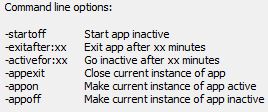
Now I don’t know about every one else but I find Caffeine to be particularly useful when watching a movie on my laptop: it 1) stops the monitor from turning off every XX minutes (depending on your settings) and 2) prevents the laptop from going to sleep every XX minutes.
Another use I found for Caffeine is when I leave something to download overnight – I just turn on Caffeine for the night and turn it off when I wake up.
Of course all the uses of Caffeine can be solved with other methods. For example, when watching a movie I could just move my mouse every XX minutes. Or when I leave something on to download overnight I can either change my power plan or change the power plan settings. However what makes Caffeine useful is how simple and easy it is to use – turn it on and get rid of your worries. Also since Caffeine needs no installation, people who use computers where they don’t have enough privileges to change computer settings (for example turn off the screensaver) no longer need to fear being locked out of their own machine if they accidentally go idle for too long.
If you think Caffeine is a worthy program, you can download it from the following link:
***Caffeine works on all Windows




