
Google is the best spell checker around, use it when you cannot spell a word [Tip]

October 2, 2012 7 Email article | Print article

I am notoriously bad at spelling. I heavily depend on spell check when writing articles. Most of the times, the spell checker built into WordPress and Firefox work well enough. However, there are times that I have absolute no idea about how to spell a word, so I sound it out to try my best. These “sound outs” are so bad that often the spell checkers cannot provide a correct suggestion. And that is when I turn to Google.

Google, as I’m sure most of us agree, has one of the best search algorithms out there. Did you know that, in the process of trying to provide users with relevant search results, Google has developed what, in my opinion, is the best spell checker around. In fact, I find Google’s spell checking abilities to be far superior than that of spell checking tools found in programs like Microsoft Word. For example, when trying to find the proper spelling for “awkward”…
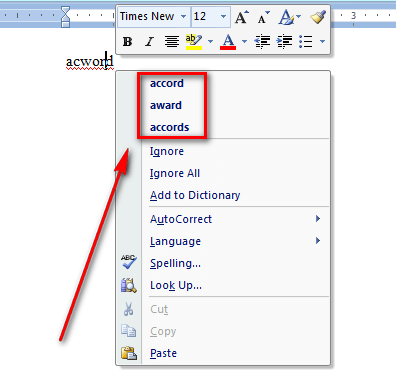
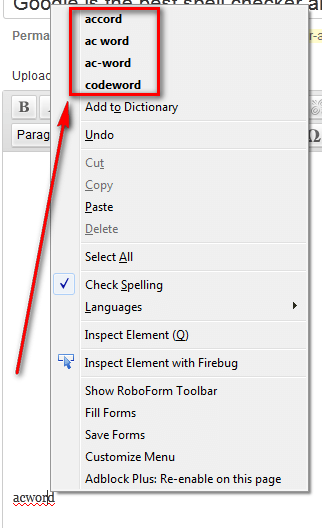
 

(For what it is worth, I know how to spell awkward… now.)

Of course this is only one example but I have run into the same situation time and time again, and Google always provides the correct recommendation. Now if only Google would release some sort of spell checker browser add-on…


7 Comments »

  1. J.L. October 2, 2012 at 8:04 AM (comment permalink) -

    If you’re willing to send whatever you type to Google servers, then there’s a Chrome checkbox for that (last bullet):
    https://support.google.com/chrome/bin/answer.py?hl=en&answer=114836&p=settings_privacy

    I might actually use it, if it limits itself to the chosen words instead of all my typing (i.e. on-demand, not real-time switch).

    1
  2. jipy October 2, 2012 at 1:47 PM (comment permalink) -

    Instead of my main browser Firefox, I use sometimes “Maxthon” browser (from China) and this one has a Google translator integrated which gives me the best translations English/French. The spell checker is effectively very reliable and useful. I ‘ve tried other online translators before and Google is really the best.

    2
  3. Grantwhy October 2, 2012 at 7:36 PM (comment permalink) -

    another tip, if you type the word “dictionary” along with your misspelt word you can often see if the word’s meaning/usage in the google search results.

    eg: for Ashraf’s “acward”, a google search with the word dictionary (should) give the following google search page

    >> *edit* replace to long http link with tiny url link that goes to a google search result page (I promise) < <

    http://tiny.cc/97zklw

    3
  4. Ashraf October 2, 2012 at 8:22 PM (comment permalink) -
    Mr. Boss

    @J.L.: Thanks, I didn’t know about that. Sounds like a great tip.
    @jipy: Maxthon is Chinese? Really?!
    Thanks for concurring with my tip!
    @Grantwhy: Shortened URLs, ughhhh.
    Thanks for the tip!
    @J.L.: Okay Mr. Canadian. :-P

    5
  5. mukhi October 2, 2012 at 11:52 PM (comment permalink) -

    @J.L.: kewl, that gives a dictionary definition with audio pronunciation at the top!

    6
  6. David March 16, 2013 at 10:14 AM (comment permalink) -

    Thought it was spelled awkward! Quess I better check GOOOOOOOOOgle!

    7

Leave A Response »


