The best free screen capture/screenshot tool.

2009-03-11_215738 Oh PrintScreen how well you have served us over the years; always there, willing and able, when the need arrived to capture that very special moment in our computing lives. So simple, yet so empowering: press PrintScreen, paste into Paint and go. Life was grand with your help. However your days are numbered.

Lets take a quick count: how many people have taken, or have had the need to take, a screenshot (of a program, window, chat, text, etc.) in the past? How many anticipate taking, or needing to take, a screenshot in the future? How many people have used a method besides pressing PrintScreen and pasting it into an image editor like Paint? I am sure there will be more Vista users that answer in the affirmative to the previous question then other users because of a built-in feature for Vista that Microsoft was generous enough to include: Snipping Tool. Snipping Tool is/was a step above the orthodox PrintScreen method. With Snipping Tool, in addition to the traditional capture-the-whole-screen, one is able to capture individual windows or define specific areas of the screen to capture. After the desired region is captured, it is placed into the Snipping Tool editor where one could use a pen tool to manually write on it or use a highlighter tool to highlight something specific. After the desired edits are made, one can save the snip into JPG, GIF or PNG format. However, being able to do all that with Snipping Tool is good and all, but why stop there? And what about the people who don't have Vista? Must they suffer and stick to the PrintScreen method? Nahhhhhhhhhh. Ladies and gents, FastStone Capture is here to save the day (actually it has been saving the day for a while now):

capture

FastStone Capture, in my opinion, is the best free screen capture/screenshot tool out there. In fact FS C is the screen capture/screenshot tool that I use to take screenshots of programs for use on this blog. Yes it is the program I use to make those awesome arrows, write text, and outline areas with boxes.

FS C is feature filled, has a very small footprint computer resource wise, and is extremely easy to use. With FS C you can take a screenshot of the current active window, capture a window (does not have to be the active window - you get to chose), capture a specific region (via rectangle or free form tool), capture the full screen and capture a scrolling window (like in a web browser if you have to scroll up/down or left/right on a webpage, FS C will capture the whole webpage). You can do all that by either clicking on the respective buttons on the "capture panel" that you see above, use hotkeys to active a feature, or right click on the FS C system tray icon and chose what you want to do.

Once you make a screen capture the image is sent to the FS C "image editor":

capture1

From this editor you can highlight and select specific parts of the screenshot and save just them instead of the whole image:

untitled1

You can crop the image:

untitled2

capture2

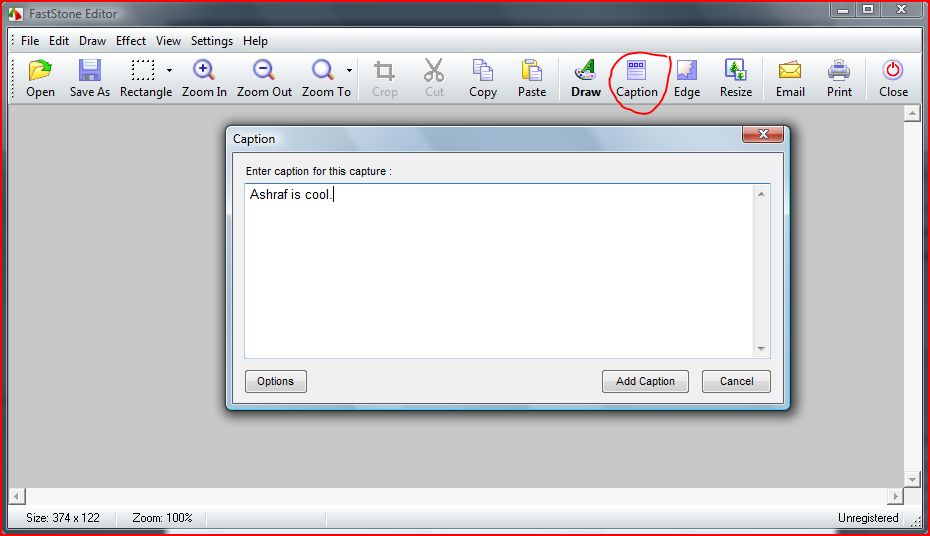
You can add captions to the image:

capture3

capture4

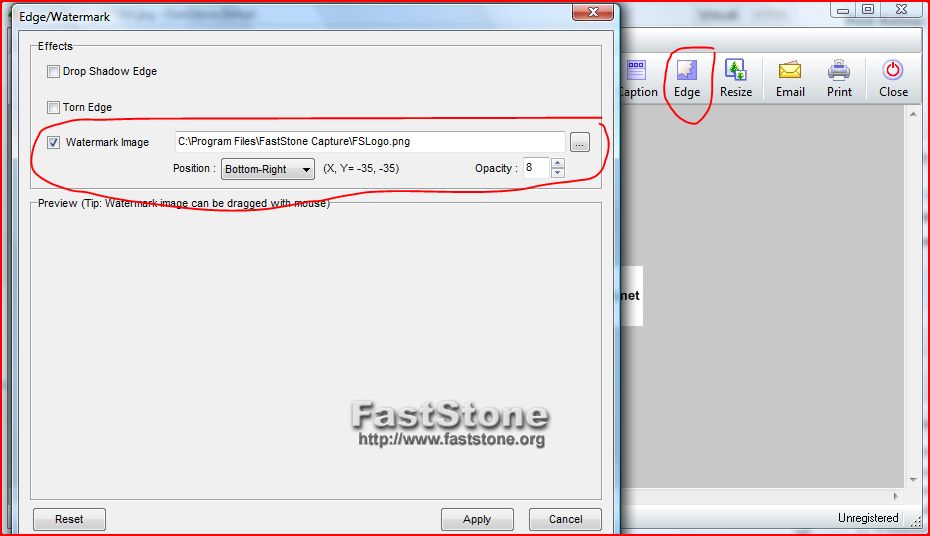
You can add a watermark to the image:
capture5

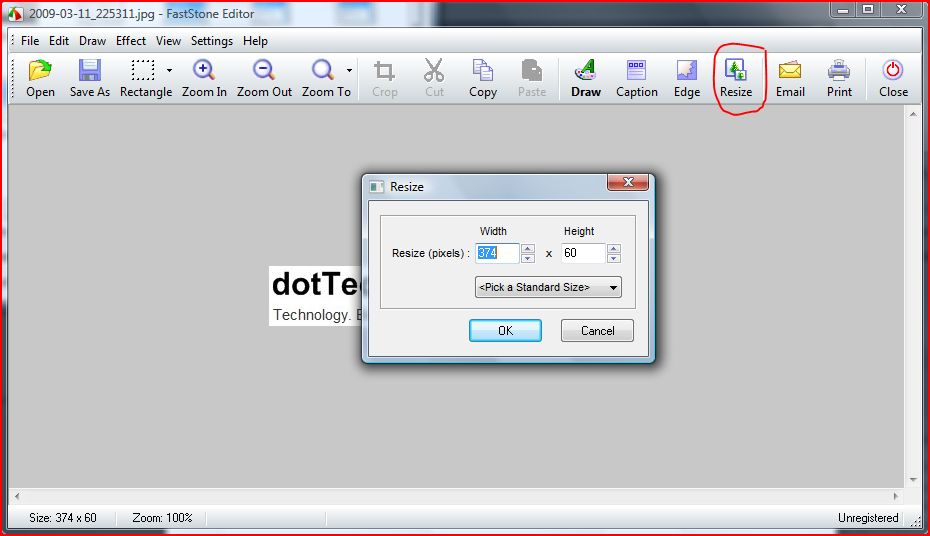
You can resize the image:

capture6

If you hit capture7 you will be able to do all the fun things that I do for my screenshots:

capture8

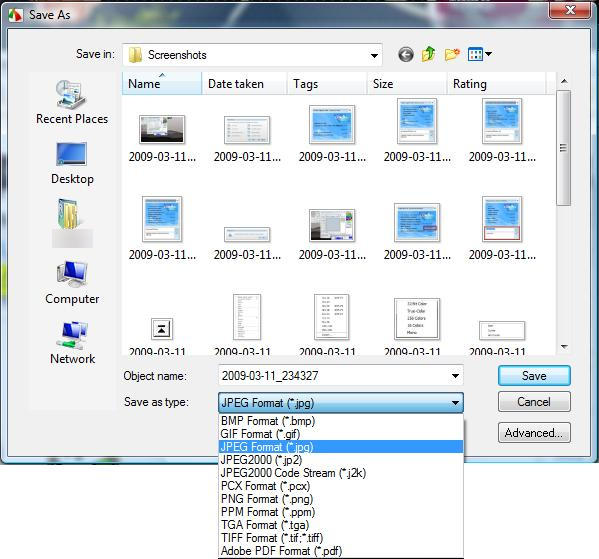
When all is set and done and you are happy with everything, you can save your image by clicking the capture9 button:

untitled4

You have the choice of choosing multiple different formats and you since FS C applies a naming scheme to all your screenshots, you don't have to enter a custom name for the screenshot if you don't want to; however you can if you want.

Now of course if you are the busy type you may just want to take screenshots and skip the whole "send-to-editor- process. No problem...FS C can do it all:

untitled5

Now there are still a few features left to this program (such as automatically add a watermark, hotkeys, etc.) so I have not done full justice to this program but I think you get my point: FastStone Capture is awesome. I truly recognized how much I rely on FS C when I had to take screenshots for this post: I obviously could not use FS C to take screenshots of itself, so I used Snipping Tool. I felt like crying.

Before I give you the download link to FastStone Capture there is an important thing to note: FastStone Capture used to be a free-for-home-use program; it is now a shareware program ($19.95 for lifetime license). However you can still download and use the last free version (v5.3). Version 5.3 is actually the version that I use and it is the one I have discussed it this post. I like FS C so much, and I use it so much, that I would buy the latest version if it was within my price range ($20 is too much for me...).

Anyway, I am sure you just want me to stop talking and give you the download link now:

Click here to download FastStone Capture (v5.3).

Click here for the portable version (v5.3).

>>jv16 PowerTools - The Ultimate System Cleaning and Error Fixing Utility Suite

About the Author, Ashraf:

Ashraf is the founder of dotTech. Ashraf spends insane hours on dotTech (usually writing articles but sometimes doing absolutely nothing except staring). Yes he is weird, but he is also very friendly.

35 Responses to “ The best free screen capture/screenshot tool. ”

  1. 1
    March 12 2009 at 6:33 AM
    janet

    Hi Ashraf!

    How does this compare to Irfanview’s screen capture, in your opinion?

    Thanks,
    Janet

  2. 2
    March 12 2009 at 9:44 AM
    West Coaster

    This link is for version 5.3 that is OVER TWO YEARS OLD!

    Go to the faststone.org website and get the latest 6.3 release dated 18 Oct 2008.

  3. 3
    March 12 2009 at 11:54 AM
    Ashraf

    It may be old but its free. v6.3 costs $19.95.

  4. 4
    March 12 2009 at 1:51 PM
    x

    West Coaster … you [Removed by Ashraf. Reason: Lets play nice =)].

  5. 5
    March 12 2009 at 2:35 PM
    Ashraf

    Janet,
    FastStone Capture is undoubtedly the better software for screen capture/screenshot.

  6. 6
    March 12 2009 at 6:17 PM
    Ozzie

    Hi Ashraf. First off let me say I love your reviews! In regards to this section on screen capture utilities, I was wondering how you rate PicPick (another freeware offering)? I use this one and find it a great little program. Is Faststone a better tool? I’d love to hear what you think.

  7. 7
    March 12 2009 at 6:42 PM
    Ashraf

    Ozzie,

    PicPick is an excellent tool. The differences between PicPick and FastStone Capture are really only in the ‘bells and whistles’ category.

    In my opinion, it just comes down to personal preference. If you use PicPick and are used to it, by all means stick with. I personally like the floating window of FS C thus I use it.

  8. 8
    March 12 2009 at 6:45 PM
    Ozzie

    Thanks Ashraf! Much appreciated! I guess I’ll stick with PicPick then. Better the devil you know, as they say ….

  9. 9
    March 14 2009 at 3:51 PM
    Liam K.

    I use PrintScreen and Paint.Net :D Seems to be good enough for me. I’ll try this out if I get around to it.

  10. 10
    March 14 2009 at 5:45 PM
    Jean-Luc Picard

    @liam K:
    I use PrintScreen + GIMP.
    GIMP>>>>Paint.NET!

  11. 11
    March 14 2009 at 5:47 PM
    Ashraf

    Jean,

    I disagree. I find Paint.NET to be much better, and more lightweight, for more simple tasks. GIMP I reserve for more advanced work (which I usually never do anyway).

  12. 12
    March 15 2009 at 8:05 AM
    MCHAL

    Hi there guys:

    Here it is a really free, improving-all-the-time alternative to the above:

    http://picpick.wiziple.net/

    Hope you like it or that it somehow suits your needs of such a tool.

    Regards from Brazil

    MCHAL

  13. 13
    March 17 2009 at 2:14 PM
    Anonymous RSS User

    Ashraf, you are a little wrong with your statement that only Vista is able to take screen shots of single Windows without need of an external program. In Windows XP (and some previous versions of Windows I believe), you can hold Alt + Print Screen to only copy a single window to the keyboard. However, it only copies the active window, so is still inferior to the various programs you have recommended.

  14. 14
    March 17 2009 at 2:14 PM
    Anonymous RSS User

    Typo: “keyboard” should be “clipboard”. Lack of sleep does that to you.

  15. 15
    March 17 2009 at 2:46 PM
    Ashraf

    Anonymous,

    I am not going to lie: I did not know holding Alt + PrintScreen would take a SS of your just active window.

    However I don’t recall making any such state about Vista being able to take screenshots of a single window without an external program while XP can’t. I did, however, talk about Snipping Tool which is Vista only.

  16. 16
    April 1 2009 at 11:41 PM
    Rob

    I have been using PicPick for a wee while now and love it -
    - Does everything I need
    - Does it very well (hard to think of any needed improvements)
    - Has Tabs (see below)
    - Can minimize to Taskbar or the Sys Tray
    - Does not require installation
    - And is free (FastStone is $20 US)

    It just grabs image, when you press the Print Screen key of your keyboard, and can be set to save as jpg (and remembers it). And can be told where to Save (a default that it remembers). Those last two were my main major irritation with Paint.

    Lately I am using it as a reference tool.
    When I am programming, I often have to look up other parts of the program, or into the DB design (using MS Access). AND I have to get back to those, to get the names or spelling, etc of things.
    Now I am just hitting the Print key, and merrily proceeding with what I was doing. Then when needed, I can just bring up PicPick, and choose the relevant Tab

    Regards,
    Rob

  17. 17
    April 2 2009 at 5:56 PM
    Dave

    Ashraf,
    I agree completely. I’ve been using Fastone Capture 5.3 for a couple years now and love it.

    And thanks so much for the work you do. I just discovered your site a couple weeks ago and really appreciate your reviews and tips.

  18. 18
    April 8 2009 at 8:00 AM
    Taz

    Ashraf,
    Got 403 Forbidden at your link for Fastone Capture 5.3. Maybe it changed? I found it at:
    http://www.aplusfreeware.com/categories/mmedia/FastStoneCapture.html

    Also here is a link to more info on the portable version:
    http://www.portablefreeware.com/?id=775

    Taz

  19. 19
    April 8 2009 at 8:57 AM
    Taz

    I currently have both Version 8 and version 9 of Snagit. Version 9 was a major upgrade and it has not been well received – by me and many others. Interface is completely changed, it is very complex and hard to work with and is a resource hog. I mostly fall back on version 8. I’m sorry I paid 20 bucks to upgrade.

    Even Version 8 is probably overkill for someone like me. It’s probably a great tool for professional use though.

    I’m going to download FastStone Capture and try it out. I really like the idea of the portable version. I’m just starting to build a USB drive with portable apps I can use when I help out friends/family on their PC’s. (not that I’m some sort of expert – probably just a little above the “average” PC user).

    Taz

  20. 20
    April 8 2009 at 10:56 AM
    Ashraf

    Thanks Taz; I think they dislike me linking directly to the download link.

  21. 21
    April 12 2009 at 3:55 PM
    Ashraf

    Did someone link to this review somewhere? Insane amount of traffic to this page today.

  22. 22
    April 24 2009 at 1:40 AM
    Robert

    Ashraf
    First of all, I have to congratulate you on the work you have done commenting on GOTD giveaways and reviewing software applications – much appreciated! I’ve clicked through some of the Google ads, so I hope they add a few cents to your account!

    Up to now I have been using snippy (http://www.bhelpuri.net/Snippy/default.htm), a free, portable utility to capture areas of a screen. However, based on suggestions here, I’ve tried FastStone and PicPick and I have to say that for me the feature in PicPick that makes it win for me is the ability to take multiple snapshots, each on their own tab in the viewer. This means that you can do all of your snapshoting, then work on your documentation pasting as you go instead of having to keep switching back and forwards.

    Robert

  23. 23
    April 24 2009 at 1:43 AM
    Ashraf

    Robert,

    I admit I really wish FastStone also had that new-tab-for-each-screenshot feature. Great feature imo.

  24. 24
    April 24 2009 at 2:15 AM
    Rob

    Robert,
    I agree 110%
    PicPick is fantastic.
    It does everything that I could want, and it does it so simply.
    I can be doing something(s), and can merrily be hitting the Print keyboard button, and continuing with what I was doing.
    Love it.

    PS One wee enhancement I would like is the ability to save all, and exit. It would ask for a prefix eg dog, and just automatically save -
    dog_image1 dog_image2 dog_image3 etc.

  25. 25
    May 2 2009 at 6:22 AM
    dex

    i use horizon33 , i find it easy and fast capture tool , http://horizon33.weebly.com/ .

  26. 26
    August 24 2009 at 10:06 AM
    david

    Greenshot is a nice, open source screenshot program w/ a number of great features.

  27. 27
    August 24 2009 at 9:49 PM
    RobCr

    Hi David and Dex,
    I have a 2nd dream (whilst the 1st dream for highlighting web pages prior to saving as .MHT is still slumbering).
    It would involve the use of another capture program, like one of your suggestions.
    My question is -
    Can either of those be configured to NOT use the keyboard’s Print key ?
    (I want to continue allowing picPick to use that key)

  28. 28
    August 25 2009 at 12:23 AM
    RobCr

    David and Dex,
    I have tried both.

    Horizon33 does not require the Print Key, but it does need some improvements. I have written to it’s author with suggestions.

    Greenshot is better than Horizon33. It only allows the Print Key, but can be used without it.
    I like that it can autosave (aka directly save) in my pre-chosen format, to my pre-chosen folder. With the choice to either let it choose the name, or pop up a dialog asking for the name.
    Those were some of the suggestions I sent to Horizon33 author.

    If neither of you have tried picPick yet, trust me, you should give it a try. I will still be using that for my main captures.
    I will use Greenshot for my 2nd dream (to place a companion jpg, next to my saved .MHT file.)

  29. 29
    September 28 2009 at 11:34 PM
    Rob

    An update.
    As I mentioned, the only thing missing from picPick, is the ability to Autosave all the open Tabs from the editor.
    To ‘fix’ that problem, I have MWSnap running as well.
    It is free, and is not too shabby.
    It’s hotkeys are very flexible, and I have settled for this -
    Ctrl Shift Q to grab the full screen, and autosave it.
    Ctrl Shift W to grab a Window, and autosave it.
    After pressing Ctrl Shift W, you just hover the mouse, and a border appears around the Window it will capture. Usually you would hover over the Titlebar of the app, and then click it.
    You can set it so that it’s form does not appear (just get a wee chirp sound).
    You can pre-choose the naming convention for your Autosaves. I don’t bother with a prefix, and just let it assign the Date & Time to the saves.
    You may have to turn off some picPick Hotkeys.
    Rob (Robert)

  30. 30
    November 2 2009 at 8:20 AM
    Casey

    AGAIN! I can’t find any mention of overlay-parts of the screen.
    Have tried a zillion of printscreen pgm’s.
    They all end up with a black field where an overlay is.
    If I use the term correctly (?) Overlay = e.g. where my TV-card plays the TV program. Also e.g. where GomPlayer plays a movie-file.
    This pgm???????????

  31. 31
    November 2 2009 at 3:04 PM
    david

    @Casey: Most screen capture programs in Windows do not grab video from the hardware overlay. You should be able to disable the hardware overlay in your player (or graphics card) settings, thereby allowing your screen capture to include video.

    I haven’t tried this software, but they claim to be able to capture the overlay areas:

    http://www.captrue.com/captrue.html

    @ Ashraf: although I’m happy with Greenshot for most of my screen capture needs, you should check out another open source capturing program, ZScreen.

    http://code.google.com/p/zscreen/

  32. 32
    November 21 2009 at 10:02 PM
    Paul

    just used Fastone Capture to convert a scribd ipaper document to pdf using the capture scrolling window feature. Wow, very impresive!

  33. 33
    January 19 2010 at 2:04 AM
    Adrian

    As a matter of fact. you can use FSC to take screenshots of itself! Just use the portable version and the installed version together.

  34. 34
    March 28 2010 at 1:16 PM
    Jyo

    This is truly a gem, considering all of its features in a small portable package. Thanks for sharing!!

  35. 35
    April 17 2010 at 2:31 PM
    Steven Meyer

    Have been using Faststone Capture for 3 years now, love it, much prefer it to snagit, very fast, and good editor and other options, bought a license because it is worth it.  I use it every day.

Leave a Reply :