
Professional Technologians
1

Protect your privacy with TunnelVision: automatically block out parts of your screen where your mouse cursor is not

I hate prying eyes. My computer, my work... for my eyes only! Do you feel the same way? You may want to try out TunnelVision.

TunnelVision is simple, lightweight, and open source application which blocks out your whole computer screen except a select area where you mouse cursor is currently located:
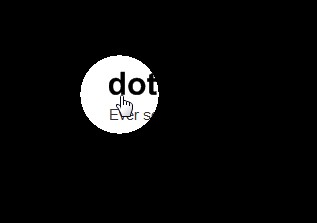
2009-09-18_181856

With TunnelVision you have the option of configuring how large area is visible, what shape the area is, and the color of the area which is blacked out (you may even add an image):
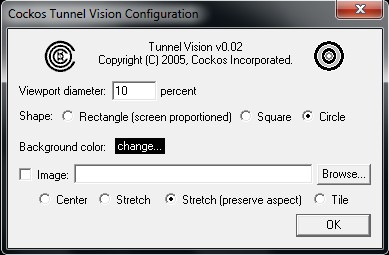
2009-09-18_180946

Here is my visible area changed to rectangle and made larger (40 percent):
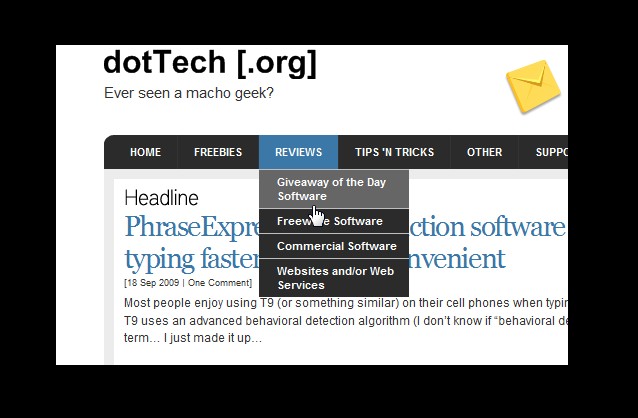
2009-09-18_181833

One thing you should be warned about: when you first run TunnelVision it will only show you a small area where your mouse cursor is (like my first screenshot above) so you will have to manually find your way to your system tray and change TunnelVision settings via the system tray icon.

Admittingly using TunnelVision may get annoying seeing as you yourself cannot see much of your computer screen. However if you think you have the need for blocking out parts of your screen... what is better than an open source application to do it with? You can download TunnelVision from the following link:

Version Reviewed: v0.02

Supported OS: Windows 95+

TunnelVision download page [direct download]


Other posts that may interest you:

8 Comments

  1. David Roper
    Posted September 18, 2009 at 8:21 PM | Permalink

    Yipee! I run this when I fly. Good program.

    1
  2. Dr Nitin
    Posted September 19, 2009 at 12:43 AM | Permalink

    Dear Ashraf,
    There is a similar programme called as MouseShade.
    works pretty well
    Especially useful when running a powerpoint show
    Dr Nitin

    2
  3. Ashraf
    Posted September 19, 2009 at 12:54 AM | Permalink

    @Dr Nitin: Hmm MouseShade may actually be better than TunnelVision because it allows for a bit more customization in options (i.e. change opacity). Then again TunnelVision allows for you to use an image in the covered area while MouseShade doesn’t.

    3
  4. JJSlider
    Posted September 19, 2009 at 6:25 AM | Permalink

    Do I smell another review coming up?

    4
  5. Bob
    Posted September 19, 2009 at 7:26 AM | Permalink

    I like the options of MouseShade better, but Avira gives a malware warning, as do 5/32 scanners in VirusTotal. Your opinion Ashraf?

    5
  6. Ashraf
    Posted September 19, 2009 at 1:14 PM | Permalink

    @Bob: I haven’t downloaded it yet so I can’t say. However I would avoid it if it is 5/32 detected on VirusTotal. They are probably just false positives but why risk it for a program that has an easy alternative?

    @JJSlider: I was thinking about it until Bob mentioned the malware detections LOL.

    @Any programmer: Since TunnelVision is open source maybe someone can modify it to have more features?

    6
  7. A. S.
    Posted September 21, 2009 at 2:13 PM | Permalink

    Although they are pretty pricey, you could always use a ‘laptop screen’ or ‘desktop screen’ privacy filter:

    http://www.reghardware.co.uk/2006/05/26/review

    http://www.privacyscreens.co.uk/

    7
  8. Ashraf
    Posted September 21, 2009 at 3:07 PM | Permalink

    @A. S.: Ya they are really nice. I plan on getting myself one soon as I get around to it…

    8

Post a Comment

Your email is never published nor shared. Required fields are marked *

*
*

You may use these HTML tags and attributes: <a href="" title=""> <abbr title=""> <acronym title=""> <b> <blockquote cite=""> <cite> <code> <del datetime=""> <em> <i> <q cite=""> <strike> <strong>

Check this box to be notified of follow-up comments via e-mail. You can also subscribe to comments via e-mail without commenting.



