How to: Block Flash ads in Internet Explorer (no add-on/plugin needed!)

It seems that I and 64 other dotTechies use a version of IE.  YAY us. Now the rest of you dotTechies can read this article but I can’t say it will be very useful.

Now while I agree in principle with Ashraf about Ads but at the same time I just can’t stand some!  The ones I don’t like are the Flash based ones that make sounds or expand when your mouse goes over them.  Now being a big fan of using what I’ve got on my system to do what I want, so I found a way to do it using just IE’s own settings.  It’s done using IE’s Zones, which are ways to give trusted site more access then normal sites or not trusted sites less.  What I’ll show you how to do is make it so that not trusted sites can’t run Flash and then I’ll give you a list of sites I found to be serving Flash ads.

First open up Internet Options; either from IE its self or from the Control Panel (I only show from IE).
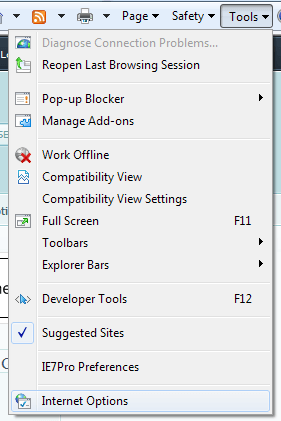
Menu

Once that opens go to the Security Tab.
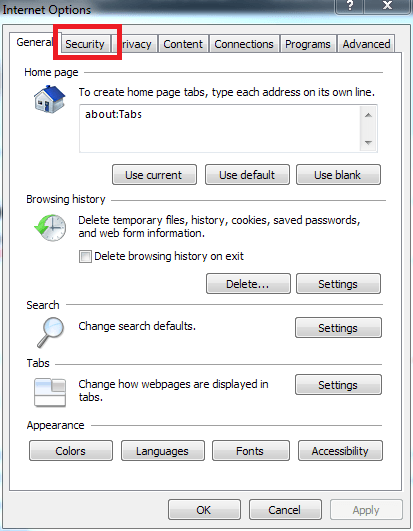
Options 1

Then select the Restricted sites Zone and click the Custom level button.
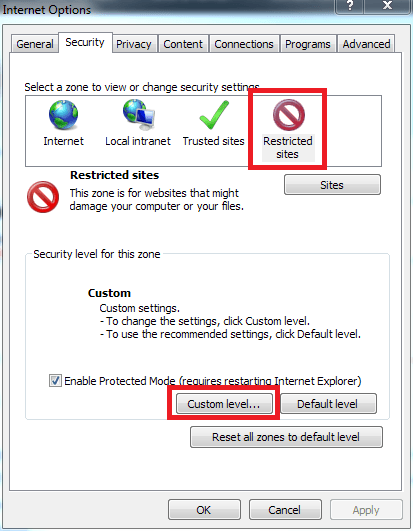
Options 2

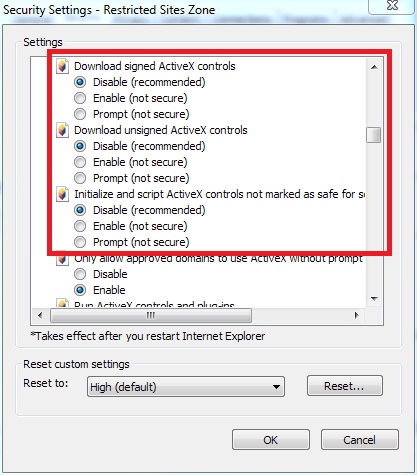
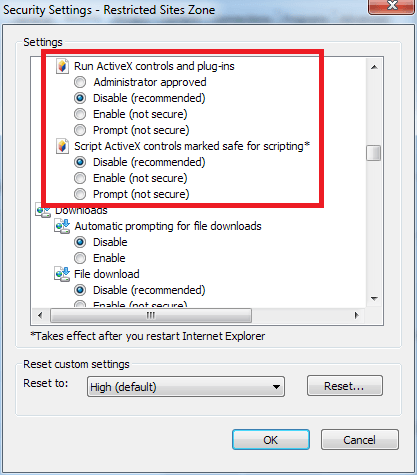
In the settings, make sure that the following settings are set to disable:

  • Allow Previously unused ActiveX controls to run without promotion
  • Allow Scriptlets
  • Automatic prompting for ActiveX controls
  • Binary and script behaviors
  • Download signed ActiveX controls
  • Download unsigned ActiveX controls
  • Initialize and script ActiveX controls not marked as safe for scripting
  • Run ActiveX controls and plug-ins
  • Script ActiveX control marked as safe for scripting
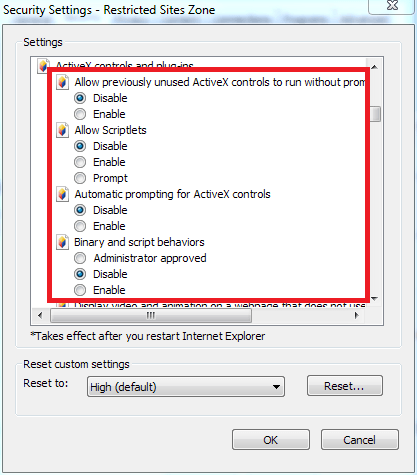
Set 1

Set 2

Set 3

Now whatever sites we add to the Restricted Zone can’t run Flash. To add sites to the Zone Click on the Sites button on the Restricted sites options
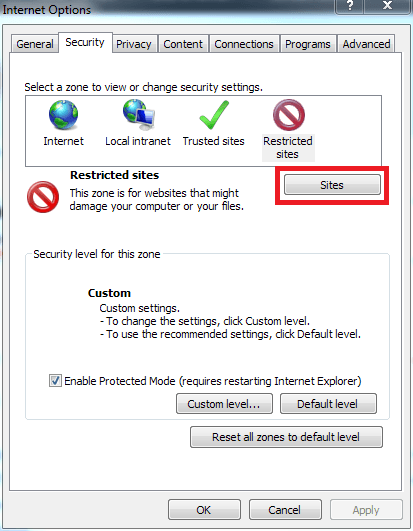
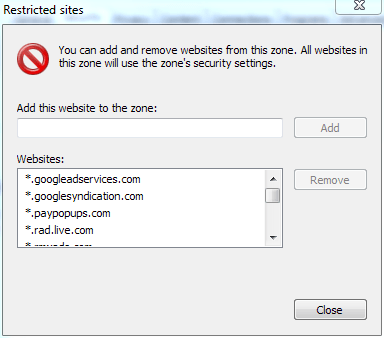
Options 3

Sites

The sites I found and blocked are (A ‘*.’ before one of them means that any sub servers are also blocked):

  • *.googleadservice.com
  • *.googlesyndication.com
  • *.paypopups.com
  • *.rad.live.com
  • *.rmxads.com
  • *.tumri.net
  • ad.doubleclick.net
  • ads.adbright.com
  • ads.adbrite.com
  • ads.yimg.com
  • g.doubleclick.net
  • m1.2mdn.net

You can add your own to the list but remember that you’re really blocking all Flash on that server, not just Flash ads. So be careful not to block a site that also gives you Flash you want.


About the Author, Samuel:

I'm a programer who know too much about Microsoft for his own good. I post a lot as "Bill Gates II" here and on other sites. Most of my posts will be "How to" type, though I'll throw in a programing one every now and then.

23 Responses to “ How to: Block Flash ads in Internet Explorer (no add-on/plugin needed!) ”

  1. 1
    November 17 2009 at 10:47 PM
    Ashraf

    I don’t even use Internet Explorer but I must say: brilliant! (I think I stole Ozzie’s catch phrase there.)

  2. 2
    November 17 2009 at 10:55 PM
    Samuel

    Thanks Ashraf. I supose that other browsers might have simular abilities but I don’t know.

  3. 3
    November 17 2009 at 11:07 PM
    Ashraf

    @Samuel: The better browsers have addons to do this =P.

  4. 4
    November 17 2009 at 11:10 PM
    Samuel

    @Ashraf: True, but IE doesnt even need an add-on :D

  5. 5
    November 18 2009 at 12:27 AM
    Ashraf

    @Samuel: Semantics!

  6. 6
    November 18 2009 at 12:32 AM
    Wheezer

    Thanks for writing that Samuel.

    I’m currently trying Firefox but still have IE on my computer. I’m not sure I’m gonna use Firefox full time yet. It’s good to know there is an option if I end up deciding to stick with IE.

  7. 7
    November 18 2009 at 1:51 AM
    Roger-u

    i use this: http://www.flashswitch.com/ With a click on a system tray icon you can enable/disable Flash at will (you do then have to refresh the webpage)

  8. 8
    November 18 2009 at 2:14 AM
    Ozzie

    @ Samuel: Brilliant!

    @ Ashraf: Brilliant minds think alike (or something to that effect)!

  9. 9
    November 18 2009 at 6:35 AM
    pro.in.vbdnf

    Does this also apply to other software with IE-based displays, such as Windows Live Mail? Its RSS reader uses IE to display content, and feeds often have ads.

  10. 10
    November 18 2009 at 8:32 AM
    Alan

    I detest I.E. for its security vulnerabilities.
    I detest Active X for its security vulnerabilities.
    I detest M.$. for foisting these abominations upon me.

    My solution :-
    I removed all trace of Adobe rubbish;
    I used Firefox to obtain from Adobe the 5 MByte NON-Active’X version of Flash;
    I will NEVER allow I.E. to get the corresponding Active’X version.

    Results :-
    I previously warned other users on my P.C. not to use I.E.,
    Now they can only use Firefox if they want FLASH.

    Supplementary :-
    I have now set my Firewall to block ALL Internet access for I.E. in recognition of the latest security patches dealing with the STUPIDITY of M.$ allowing installation of rogue fonts – the latest patches have the smell of panic and inadequate testing.
    Think I will wait for the next Patch Tuesday before deciding if I will let I.E. back on the Internet.

    Alan

  11. 11
    November 18 2009 at 8:39 AM
    Samuel

    @Ashraf: Yup!

    @Wheezer: Thanks!

    @Roger-u: That’s an interesting add-on, but from what I can tell, I turns off all flash on the page you are viewing. This trick only turns off Flash from the sites giving ads (or sites you don’t want to see Flash from)

    @Ozzie: Thanks!

    @pro.in.vbdnf: I can’t say for sure, but it probably does. It does block Flash ads in IE’s RSS reader.

    @Alan: That’s you call, and I did say this article was for me and 64 other dotTechies.

  12. 12
    November 18 2009 at 10:22 AM
    Dae Powell

    Well, I use AOL’s IE-based browser. Snicker if you will, but most of my online friends use AOL.

    I would be interested in using this method on AOL. Any help here?

    Thanks.
    Happy Dae

  13. 13
    November 18 2009 at 10:26 AM
    Samuel

    @Dae Powell: Besides to stop using AOL? Well, you should still have Internet Options in your Control Panel. From there you can access all the same settings, so if you make the changes there it should work.

  14. 14
    November 18 2009 at 10:42 AM
    Kev93

    @Alan: You do that too? I setup my company’s network and ‘banned’ anything with the IE user-agent.
    Except for MS update of course.

  15. 15
    November 18 2009 at 10:49 AM
    Samuel

    @Kev93:
    You do realize that blocking based on the User-Agent is not that great of idea, being as it’s very easy make a browser send a different one?

  16. 16
    November 18 2009 at 11:09 AM
    Jeanjean

    My parameters are already correct (if I remember well, it was on the councils of my IP).
    Thank you in any case Samuel.

  17. 17
    November 18 2009 at 3:11 PM
    J. L.

    Anyone uses Windows 7 and turned off the Windows Feature IE? You don’t even need it to browse the Windows Update site anymore, now its part of your control panel.

  18. 18
    November 18 2009 at 8:39 PM
    Kev93

    @Samuel: Not for these users. most of them don’t know what a file is (literally). They couldn’t ‘hack’ themselves out of a paper bag.

  19. 19
    November 18 2009 at 9:08 PM
    Samuel

    @Kev93: Maybe, but there are add-ons that make it real easy, so easy a cave man could do it (sorry couldn’t resist).

  20. 20
    November 20 2009 at 6:25 PM
    Neville

    Samuel,

    Bill Gates II is funny because the Bill Gates we all know and love is Bill Gates Jr, which is equivalent to Bill Gates II. If Bill Gates (of Microsoft) grandfather had been who he was named after he would have been the “II”nd instead of Junior.

  21. 21
    November 22 2009 at 12:55 AM
    Samuel

    @Neville: I congratulate you on getting my challenge right! Now I must change my description. Don’t know what you get bonus points is though :S

  22. 22
    November 22 2009 at 6:09 AM
    Stephen

    Would it be simpler just to add these sites to your HOSTS file, or is this bypassed by Flash?

  23. 23
    November 22 2009 at 8:02 AM
    Samuel

    @Stephen: Easier? Maybe. The main advantages this has are that:
    A) Less likely to mess up your computer if you do something wrong.
    B) Most users are more comfortable in IE Settings then the HOST file.

Leave a Reply :