
 Email article
As great of a browser as it is, Firefox is probably the most notorious memory leaking software known to man to date. With no time to spare, a user can easily be losing dozens – often hundreds – of megabytes of memory to Firefox. To help address this memory issue, I have talked about CleanMem in the past, one of the most effective and useful memory cleaners/optimizers/whatever-the-heck-you-want-to-call-it. Memory Fox is a program that does similar things as CleanMem, except Memory Fox is a Firefox add-on that is focused specifically on Firefox memory usage.
How Memory Fox works is simple. Whenever you switch from tab to tab or create/close a tab, Memory Fox flushes the memory used by Firefox, similar to how CleanMem flushes memory used by all programs every X minutes. Memory Fox also flushes the memory used by Firefox if Firefox is idle. However, while CleanMem is only “on” every X minutes (when it needs to do its job), Memory Fox is constantly running while you have Firefox running. The good thing is, though, Memory Fox itself does not use very much RAM/CPU (~1.5 MB RAM and 0-1% CPU) so its own process (called afom.exe) won’t impede on your computer resources.
According to the developer of Memory Fox, Memory Fox “focuses on two (Working Set and Private Working Set) types of memory usage and with flushing for memory recovery. When resource requirements (Stack and Heap) have been reached, according to the user’s preset option settings, the memory will be flushed and recovered from Fragmented Orphaned Ram memories.” That is just a mouthful and geeky way of saying Memory Fox will help mitigate Firefox’s famous memory leaking problem.
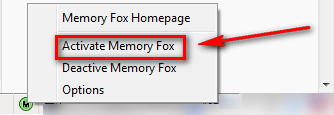
After you install Memory Fox, you need to manually enable Memory Fox…
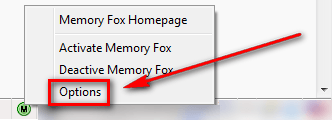
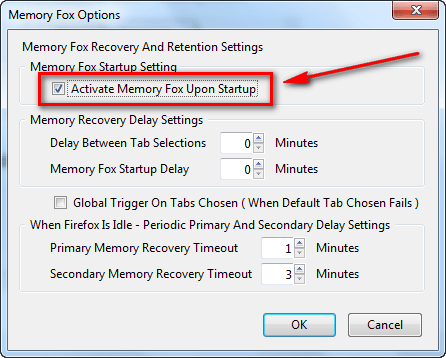
…and manually set it to automatically start on Firefox boot:
Overall, while Memory Fox won’t *fix* Firefox’s memory woes – you can’t ever fix the memory problems of a program with a third party program – it does a great job at keeping it in check. You can get Memory Fox from the following links:
Supported OS: Windows XP/Vista
It also works just fine for me on Windows 7.
Version reviewed: v1.01
***NOTE: Because Memory Fox is a new add-on, it is temporarily marked as an “experimental add-on” at Firefox add-on’s website and you must check the “Let me install this experimental add-on” box to install it. As far as I am concerned, Memory Fox is fairly stable so there is no worries there.***
[via Ghacks Technology News]




