
The only free file (audio, video, image) converting program you will ever need.

May 2, 2011 89 Email article | Print article

Ask yourself these five questions:

  1. Do I want to be able to easily convert a video file to literally any video format?
  2. Do I want to be able to easily convert an audio file to literally any audio format?
  3. Do I want to be able to easily rip the audio from a video file?
  4. Do I want to be able to easily convert an image file to many different image formats?
  5. Do I want to be able to easily rip (video and audio) DVD/CDs?
  6. Do I want to have the ability to do all this with one file at a time and in batch mode?

If the answer to any of the above 6 questions is “Yes”, then you should keep reading. If you answered “No” to all the questions, get lost (just kidding – please don’t get lost).

Ladies and gentleman, meet FormatFactory:

2009-02-13_150631

FormatFactory meet ladies and gentlemen. FormatFactory is a freeware program that will replace all your other converting programs. With FormatFactory you can convert videos -> videos, audios -> audios, images -> images. As an added bonus, you can also rip the audio from video files, and rip music/movie DVD/CDs.

In more detail FormatFactory supports:

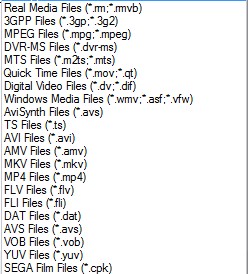
  • The conversion of the following video formats (input files)…
2009-02-13_151036

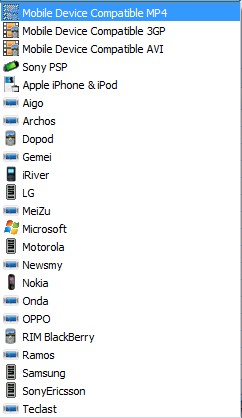
…into MP4, 3GP, AVI, WMV, MPG, VOB, FLV, SWF and MOV video formats (output files). Also, there are also predefined profiles included for mobile devices, such as an iPod or iPhone, that you can convert to (output files):
2009-02-13_152345

Okay so that is not literally *every* video format like I claimed. But I figured it is close enough that you will forgive me for stretching the truth a little bit. :)

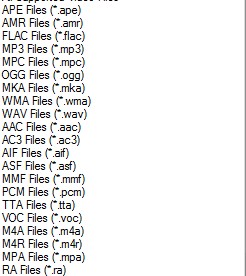
  • The conversion of the following audio formats (input files)…
2009-02-13_151442

…into MP3, WMA, FLAC, ACC, MMF, AMR, M4A, M4R, OGG, MP2 and WAV audio formats (output files). Again I sort of stretched the truth about being able to convert to *every* audio format, but hey, if I did not say that would you be reading this impressive list? :)

  • The ripping of audio from the above mentioned video formats (input files) into MP3, WMA, FLAC, ACC, MMF, AMR, M4A, M4R, OGG, MP2 and WAV audio formats (output files).
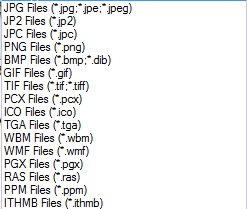
  • The conversion of the following image formats (input files)…
2009-02-13_151908

…into JPG, PNG, ICO, BMP, GIF, TIF, PCX, and TGA image formats (output files).

  • The ripping of video DVDs (input files) into MP4, AVI, WMV, 3GP, MPG, VOB, or FLV video formats (output files). Also you can convert to the mobile device profiles I mentioned above. (DRM bypass not supported.)
  • The ripping of Music CDs (input files) into MP3, WMA, FLAC, ACC, MMF, AMR, M4A, M4R, OGG, MP2 and WAV audio formats (output files).
  • The ripping of a DVD/CD (input) into an ISO or CSO (output).
  • Conversion of an ISO to a CSO and vice versa.
  • The ability to combine any two of the video formats (input files) I mentioned above into one single AVI or WMV video (output files).
  • To top it all off, you can do all the converting in batch mode (except maybe ripping a DVD for obvious reasons).

Update: All the above features are for FormatFactory v1.70. Since I the time I wrote this post originally, FormatFactory has been updated frequently and it has a lot more features now. For example, the video joiner supports FLV, MP4, MKV, 3GP, SWF, and mobile devices in addition to WMV and AVI now.

All along the way, you can the ability to control the quality and settings of your output file. For example, you can change the resolution of your output video files; you can change the bitrate of your audio files; you can make the output file high quality but big file size, low quality and small file size, or anything in between.

And for non-English speakers, FormatFactory supports 42 languages:

2009-02-13_153326

The *only* con I found with FormatFactory is that it cannot take SWF flash videos as an input (it will take FLV), but you can output as them. Hopefully the developer will add this feature in later versions.

If you are still interested, you can download FormatFactory from the following link:

Officially FormatFactory works on all 32-bit Windows; however 64-bit Windows dotTechies have reported it works on 64-bit just fine.

Update: Take note FormatFactory comes bundled with some crapware. Be sure to uncheck boxes/click ‘Decline’ during installation for this crapware to avoid installation.

Click here to download FormatFactory

Update: This review was conducted on FormatFactory when it was v1.70. FormatFactory has been updated multiple times since then; new features have been added and improvements have been made. Just an FYI.


89 Comments »

  1. flommedrengen May 2, 2011 at 3:03 AM (comment permalink) -

    @koko: Yes, it can add watermarks. Under “Output setting” – “Watermark (AviSynth)”

    76
  2. flommedrengen May 2, 2011 at 3:08 AM (comment permalink) -

    @RobCr: I would suggest you use the Freebies forum: http://dottech.org/forums/freebies

    77
  3. J4626 May 3, 2011 at 8:09 AM (comment permalink) -

    Great tool,

    I was able to use the batch mode to fix a bunch of videos that MediaShout wouldn’t open. It would be nice if you could drag & drop a file into to the app instead of always having to find it.

    I also used it to rip a DVD and it was able to pick up the sub-titles when Handbrake wouldn’t. There it would be nice if it recognized chapters.

    Thanks for the referral dottech!!!!

    78
  4. locutus of borg May 3, 2011 at 8:59 PM (comment permalink) -

    Hi Ashraf

    It’s possible downloading Format Factory without adware or other crap, the portable version of Format Factory of Liberkey’s portable platform is totally functional and hasn´t all this “additional adware”

    http://www.liberkey.com/en/catalog-flat-list-view.html

    79
  5. Rob (Down Under) May 3, 2011 at 10:35 PM (comment permalink) -

    @locutus of borg:
    Thanks for the ‘heads up’
    I tried to find my answer in the Forum, but they do not appear to have an English one ?
    Does one have to install Liberkey ?
    I love portable (aka no Install) applications.
    I don’t like having to have added complexity, viz a suite to manage them.
    I just like to create a folder for the app in my C Directory, and place the app into the folder.

    PS I found the English Forums.
    It appears that one has to Install the suite.
    Has no one heard of ‘KISS’

    80
  6. locutus of borg May 8, 2011 at 9:39 PM (comment permalink) -

    @Rob (Down Under): Hi Rob
    Only it’s necessary: downloading liberkey: http://www.liberkey.com/en/download.html ~ 5 mb, execute and choosing a location where liberkey will “extract” its files at. Note: Liberkey never is installed, only extracted, you can choose any location including usb flash, cards, etc.
    Later, run “E:\LiberKey\Liberkey.exe” and activate associations temporaly (right click on task icon, Liberkey tools > Activate file associations).
    Finally, download Format Factory from page: http://www.liberkey.com/en/catalog/browse.html (Audio -> Converters)

    Bye

    PS. Liberkey (from within its interface) give you a few options to download sets of many portable applications at once, called suites: basic, standard and ultimate. THIS IS NOT A REQUIREMENT, IT’S JUST AN EASY FOR THE USER.

    81
  7. Chris June 1, 2011 at 2:15 PM (comment permalink) -

    @ET:

    Any thoughts on how to correct this synchronization problem / better DVD rippers out there? It’s pretty annoying to me.

    82
  8. Rob (Down Under) June 2, 2011 at 1:02 AM (comment permalink) -

    @locutus of borg:
    Thanks for the info.
    I don’t think I saw your email (your post) when you posted it.

    83
  9. Ram Narayan Ray April 17, 2012 at 9:38 AM (comment permalink) -

    im ram narayanray janakpur nepal naw saudi arab

    84
  10. Eddie W May 23, 2012 at 4:20 PM (comment permalink) -

    Don’t download this. It installs crapware without asking first, and changes your browser startpage.
    Não use este software. Ele infecta seu sistema com programas indesejados e muda a página inicial do navegador.
    No baje este software. El cambia la homepage del browser y infecta tu pc.

    85
  11. I NEED HELP May 23, 2012 at 11:31 PM (comment permalink) -

    SO… Ive dl Format Factory because i have a couple of TV shows that are in avi and iv tried putting the shows on my portable hard drive to play it on my DVD play but it wouldn’t find the shows.. do i need to format the shows into a different format to play on my DVD player on my portable hard drive..???? Ive tried formatting the shows as a mp4 and playing it on my DVD but it didn’t work and iv tried formatting them to vob and putting it on my hard drive but still nothing am i doing something wrong ?? all i want is to watch the shows on my TV instead of watching it on my laptop.

    i don’t know if someone has asked this question already i just couldn’t be fucked reading every single comment ..

    86
  12. rohit September 5, 2012 at 9:41 AM (comment permalink) -

    how to convert dvd disc to 3gp. I try this with dvd to mp4, it done. but dvd to 3gp goes failed always failed.

    87
  13. LivieS January 16, 2013 at 7:42 AM (comment permalink) -

    Hey guys, I’m Livia from Reincubate. If you’re looking for a powerful and cost-efficient video converter, you might want to try the Reincubate Video Converter. It’s a new app, so it has not gotten alot of buzz, but do give it a go and tell us what you think about it.

    It can convert video and audio files to and from the most popular formats (mp3, ogg, mp4, avi, mov, flv, mkv, wav, wma to name just a few) in just a few easy steps. It will easily get your movies into the right format for any device such as iPad Mini, video consoles or iPhone in no time. Let us know if we can help with anything!

    88
  14. David Roper February 17, 2013 at 7:36 AM (comment permalink) -

    [@I NEED HELP]

    You need to convert AVI to VOB.

    89

Leave A Response »


