How to disable Gmail’s new compose-new-email pop-up window [How-To Guide]

November 1, 2012 68 Email article | Print article

Google recently introduced a new way to compose e-mails in Gmail. If you switched to the new way and don’t like it, don’t worry — there is a way to switch back. This guide shows you how.

How to switch back to old compose-new-email method in Gmail

Do the following to turn off Gmail’s new compose-new-email pop-up window and return back to the old method:

  • Visit http://gmail.com and log into your account.
  • Once logged it, click on the red “COMPOSE” button so the new compose-new-email pop-up window appears.
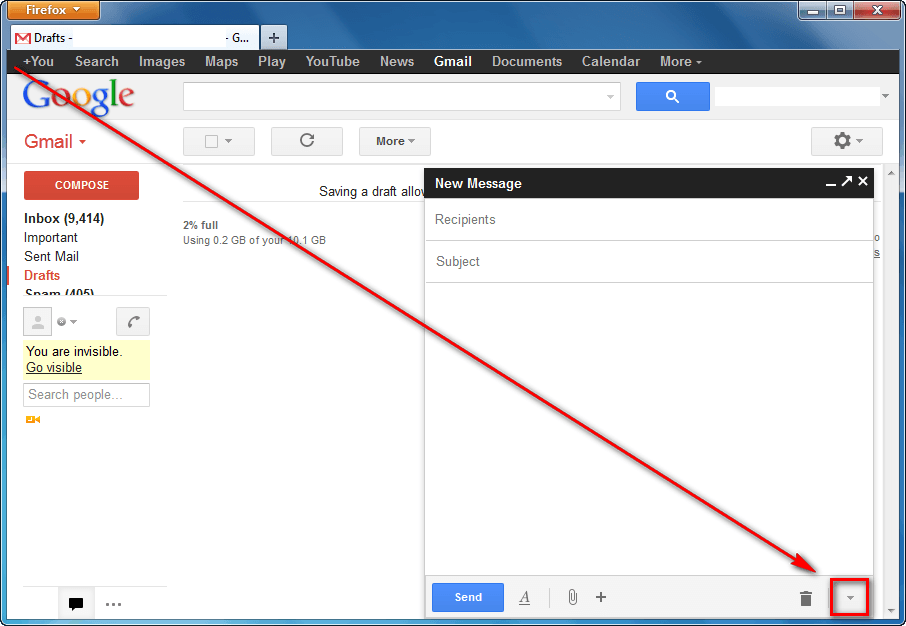
  • Once the pop-up window appears, click on the down arrow button:
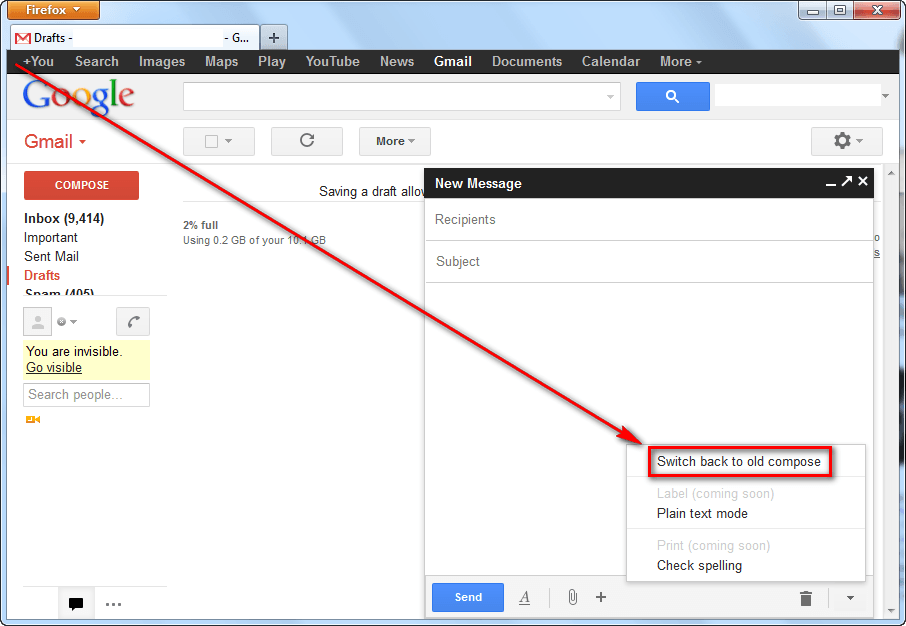
  • Next click on “Switch back to old compose” (UPDATE: Google plans on eventually disabling old compose method completely. Now you can only “Temporarily switch back to old compose” and later you won’t be able to switch back at all):

  • Done! Once you click on “Switch back to old compose”, the page will reload and you will have the old method back again.

If, after switching back, you realize that you actually did like the new compose method, you can easily re-enable it by:

  • Clicking on the red “COMPOSE” button; and
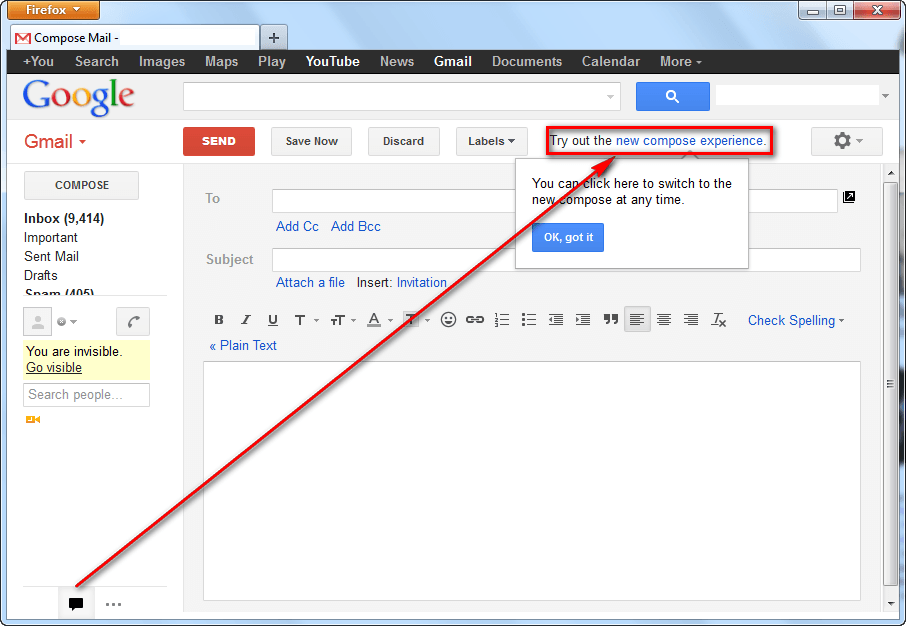
  • Clicking on “new compose experience” link near the top:
Conclusion

That was easy.

68 Comments »

  1. D April 10, 2013 at 6:57 PM (comment permalink) -

    [@D]

    before the new ‘compose’ I probably accidentally sent 1 msg in 10 years before it was ready.

    51
  2. Terry Whitaker April 12, 2013 at 7:35 AM (comment permalink) -
  3. Kevin April 13, 2013 at 5:21 AM (comment permalink) -

    Thanks. I really, really don’t like the new compose – too many clicks to do simple stuff – I hope they keep the option to choose the ‘old’ compose if you wish.

    53
  4. Richard Adams April 15, 2013 at 12:14 PM (comment permalink) -

    The new google compose destroyed a very important email I just sent out by failing to do any “wrapping” within a paragraph of text.

    Now I look like an idiot.

    Why did they have to muck with it? Couldn’t they do anything more useful with their time (like fixing Chrome)?

    54
  5. Judy April 15, 2013 at 1:09 PM (comment permalink) -

    What drives me nuts is that, should I decide to cc someone, or bcc them, I can’t, once I start composing the letter. Has anyone found a solution for this?

    55
  6. hot April 17, 2013 at 6:45 PM (comment permalink) -

    being blunt, the little box effing sucks and takes time out of my day to do something that should be simple. and in the bottom right corner, the hardest place for me to focus rather than in the middle of my screen so I can see the damn thing. but you can pop it out, yeah, great another step every damn time. I’ve got a boot for someones ass

    56
  7. Deborah April 17, 2013 at 11:12 PM (comment permalink) -

    I completely agree with all the complaints. If Google forces this new and “unimproved” method of composing emails, then I will switch from gmail to another email account.

    57
  8. Olly April 18, 2013 at 1:11 AM (comment permalink) -

    You can switch to the HTML view (for slow connections), but then you can’t drag/drop attachments. This is OUTRAGEOUS,

    58
  9. Piss Off April 18, 2013 at 6:00 PM (comment permalink) -

    It’s bloody awful. Please tell me Google is listening to all the negative feedback.

    59
  10. Richard A April 18, 2013 at 7:37 PM (comment permalink) -

    The company that cannot fix a browser that constantly crashes due to the Flash “issue” cannot, I fear, be relied upon to pay attention to user complaints about this new useless “improvement”. Will the google empire meet the same fate or previous conquerors? Yahoo … Netscape … Compuserve??

    60
  11. Abha April 18, 2013 at 10:18 PM (comment permalink) -

    The selection to remove the pop up window no longer exists–there is no “switch back to old compose” as a menu item. I hate the thing. Google is pulling a MSFT–because we are so big and so brilliant, we will FORCE you to use our idea no matter how stupid it is. Great–you just flipped me the bird.

    Hello–I do not care how wonderful you think it is; I want the choice. And soon my choice may be to switch email providers.

    61
  12. String April 19, 2013 at 3:46 PM (comment permalink) -

    I agree with everyone here who despises the new compose window. Gmail was the only reason I switched to a web browser based email client. But the new composition window is so awful that I will quit using Gmail altogether.

    Google has in the past added much useful innovation to our online experience but I’m so insulted by this new compose window that I think I’ll trash Chrome and the rest of my Google apps as well.

    62
  13. sunny April 19, 2013 at 9:42 PM (comment permalink) -

    Google won’t let me reply to an email, I just get a pop-up window that blacks out my screen to try to
    FORCE ME to go though the tutorial for the new messaging system. The new system just stinks!
    It is counter-intuitive, takes longer to change font or anything else, and some features are not accessible now when you reply to a message. Have they ever heard the expression “if it ain’t broke don’t fix it”?
    Now they are gonna force it down our throats!

    63
  14. tap April 20, 2013 at 10:18 PM (comment permalink) -

    thanks a lot dear….

    64
  15. Tracerswarner April 29, 2013 at 12:57 PM (comment permalink) -

    [@Judy]

    Put your cursor on the “to” section and click it. On the right, you will see CC and BCC pop up. Click those to add them!

    65
  16. Judy April 29, 2013 at 5:29 PM (comment permalink) -

    [@Tracerswarner]
    thanks–I’ll try it.

    66
  17. joanna May 5, 2013 at 9:07 PM (comment permalink) -

    [@Deborah]

    Totally agree! i use gmail for my businesses and my personal emails and have loved it until this ridiculous and unnecessary change.

    I HOPE they read this feedback and take it on board, so as to give us options instead of being forced to use a completely clunky system

    67
  18. Very unhappy customer May 12, 2013 at 7:31 PM (comment permalink) -

    The new version of compose email from Gmail is bloody ridiculus! Who wants to look at a small square on the right hand side of the screen..

    Just for what purpose have they done this? What are they trying to achieve? Totally baffled.

    68

Leave A Response »