Get your very own custom email address for free.

email_icon_by_bisiobisioAnyone know when e-mail was invented? I don't >.>'. Did Al Gore invent it? Who cares. The point is (actually it really isn't the point...I am just trying to be funny) that email is wide spread across the globe and is used by the poor, the rich, and everything in between. Why use snail mail when you can use e-mail (does that rhyme?). In the early days e-mail was typically provided to you by your ISP such as AOL (@aol.com - remember those?). Now e-mails are more popularly used via third party services such as Gmail or Hotmail. It is nice to have a custom and unique whateveryouwant@gmail.com or whateveryouwant@hotmail.com or [insert email here] because it allows us to not only communicate with other people across the world, but also build an online identity. However what if you could have your own custom email. Not just have your own custom email, but get it for free? A ha, I knew that would catch your attention.

Today I am here to tell you about how you can get your very own custom email address for free. Unfortunately, the only way to do this for free is to have a whateveryouwant@whateveryouwant.co.cc email address instead of a whateveryouwant@whateveryouwant.com email address. However that is still better then a generic whateveryouwant@gmail.com or whateveryouwant@hotmail.com. Am I right or am I right? Okay if you are ready to take the plunge:

In order to get your own custom e-mail address first visit CO.CC and register your desired domain:
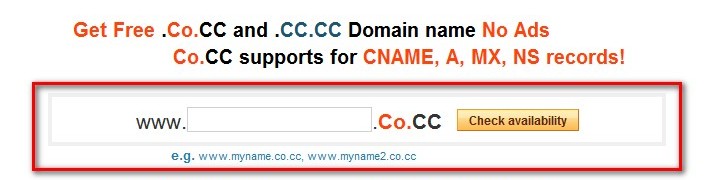
untitled6

Three things to note:

  1. Not all CO.CC domains will be free. Some may cost money while others will not. For example: dottech.co.cc was free while helloworld.co.cc cost me $4 a year. If you search for a domain and the result shows that you must pay for it, simply search for a different domain name.
  2. You can only have four free domains per account. I assume that if you create a new account you can register four more free domains, but I am not sure if that it is "legal" to create multiple accounts or not.
  3. Every CO.CC domain comes with a CC.CC domain. While the CO.CC is fully customizable to your needs, the CC.CC is specific to being a "web store" and you cannot change that.
  4. Whatever domain you register is what your email address will be.

    Update: You can now keep CO.CC domains for free forever if it is for personal use.

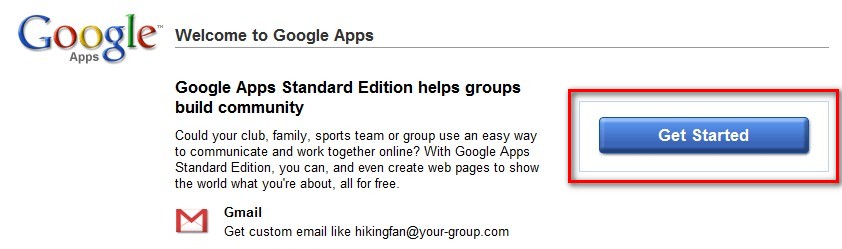
    After you have registered your domain from CO.CC, go to Google Apps and click on "Get Started":

    ***Note: You can use Google Apps for free with any domain (.COM, .NET, .ORG, etc.). The only problem is you won't find a free .COM or .NET or .ORG or any other domain to use with Google Apps. This is why you must stick to a .CO.CC domain if you don't want to pay anything. Don't worry - a .CO.CC domain is similar to a .COM, .NET, .ORG or any other domain.
    2009-03-12_205636

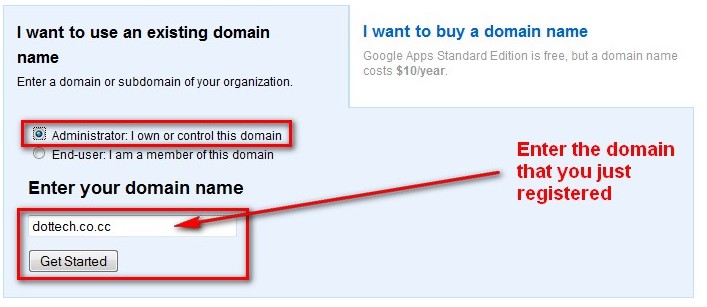
    In the page that loads after you hit "Get Started", select "Administrator: I own the domain", type in the domain that you just registered from CO.CC and hit "Get Started":

    untitled7

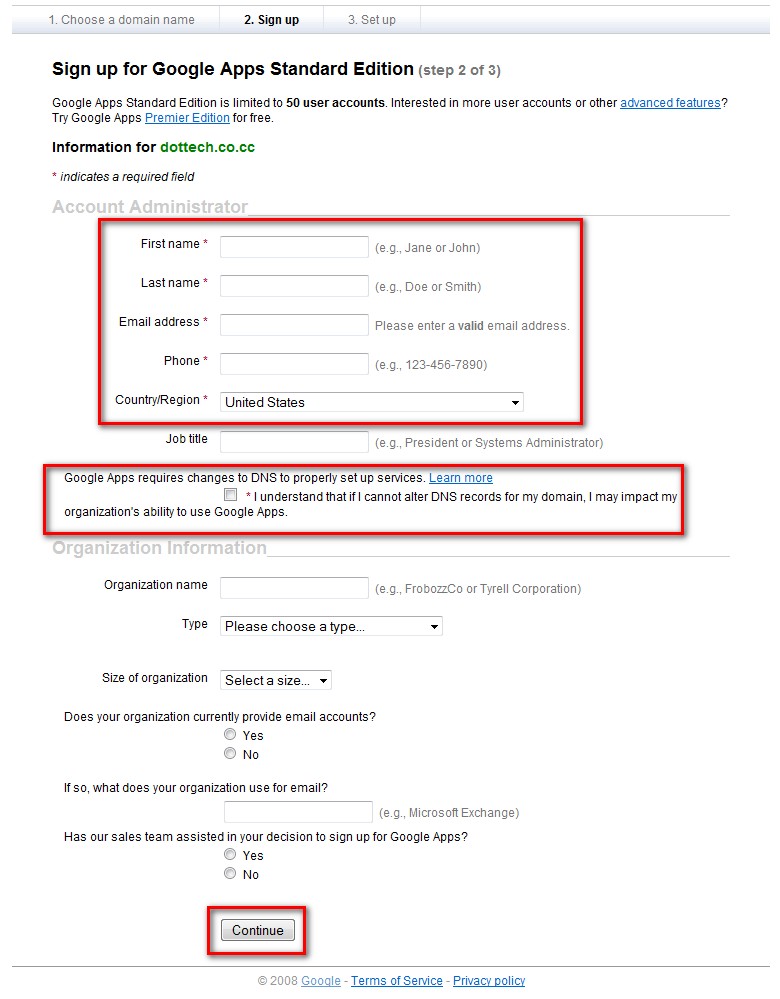
    At the next page you will be asked to fill in some information about yourself. Fill out all the "Required" fields (you can also fill out the extra fields if you want) and hit "Continue":

    2009-03-13_021429

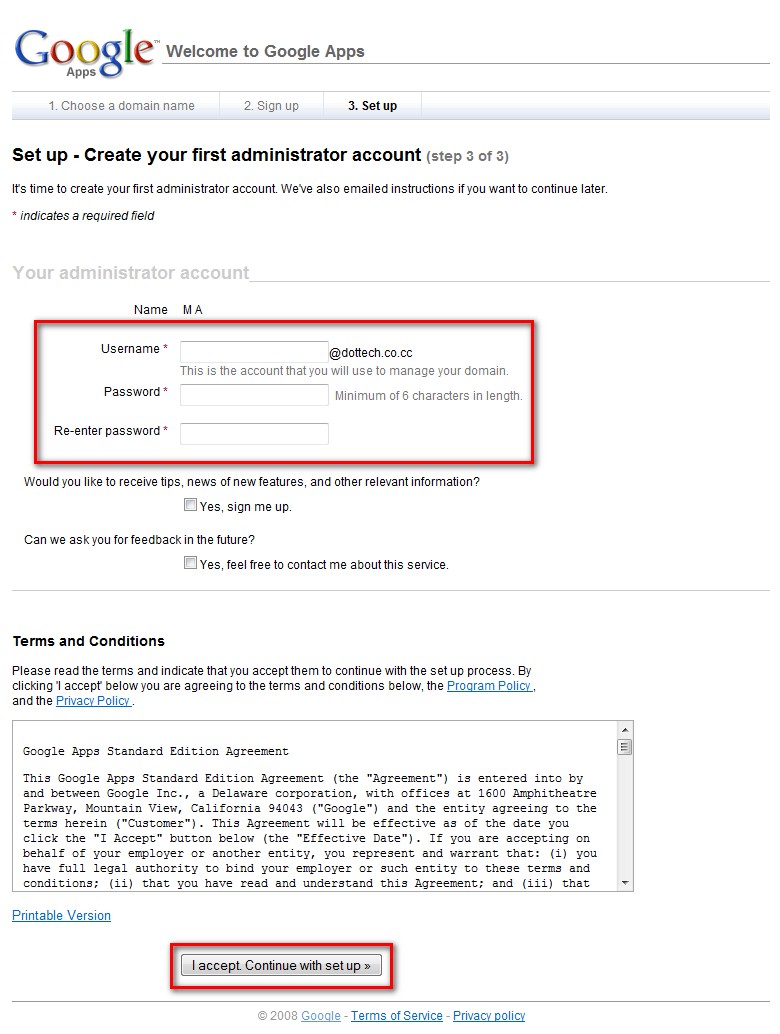
    At the next page you will have to setup your administrator email account. Fill out all the "Required" fields as you find appropiate and hit "I accept. Continue with setup":

    2009-03-13_021727

    After you have hit "I accept. Continue with setup" you are done creating your free Google Apps account with Google. However you still need to active the email service and verify that you own the domain that you signed up with. At the admin panel (the page you are brought to after you hit "I accept. Continue with setup") click on "Verify domain ownership":

    untitled8

    At the next page there will be a drop down menu. Click on the drop down menu and select "Change your CNAME record". You should then see four step directions show up on your screen. Look at number two. There should be a string of characters in bold something like google23dbs35567:

    untitled9

    Highlight that string and copy it. Open a new browser tab/window and go back to CO.CC. Click on "Domain Settings" (it is located at the top of your webpage) and login. Click on the name of the domain you used for Google Apps:
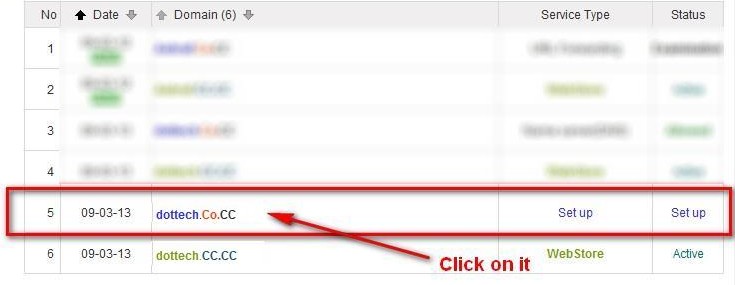
    untitled10

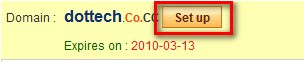
    At the next window click on "Setup":

    2009-03-13_024247

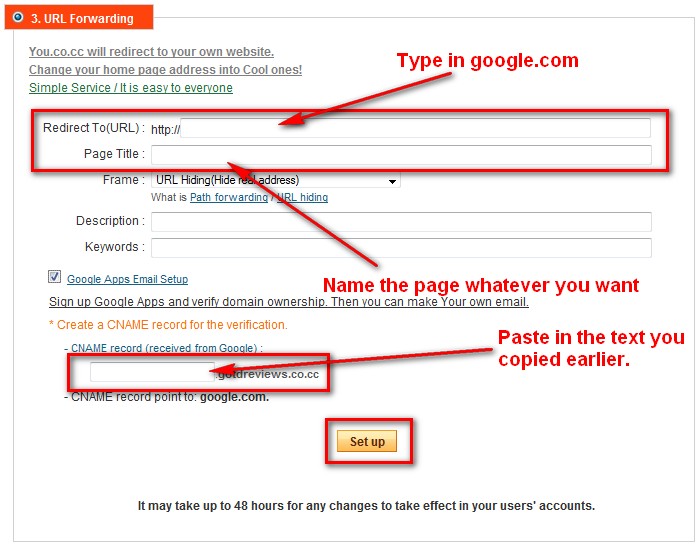
    At the next page you will be given three options: "Manage DNS", "Zone Records", and "URL Forwarding". Click on "URL Forwarding". Once you click on "URL Forwarding" fill in the "Redirect to (URL)" text field with "google.com" (without the quotes) and fill in the "Page Title" with "Google Redirect" (without the quotes). After that, there should be a checkbox next to a line that says "Google Apps Email Setup". Check that box. Paste in the text you copied earlier in the "CNAME Record" box that appears. Hit the "Set up" button:

    2009-03-13_025332

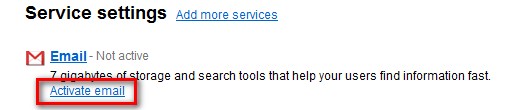
    Hit "OK" at the confirmation page that tells you your changes were made. Go back to the tab/window where you have the Google Apps page open (if you don't have the tab/window anymore, log back in and go to the "Verify domain ownership" page again). Now hit the "Verify" button. You will be brought back to the Google Apps admin panel. Click on "Activate email":

    2009-03-13_030435

    The next page that comes up gives you instructions on how to setup your domain to work with your email. Don't worry about them - we have already taken care of it. Just go to the bottom of the page and click on "I have completed these steps":

    2009-03-13_030640

    That is it. You are done. Congratulations you now have your own custom email address! All you have to do is wait until Google verifies your domain and sets up your email. They say it can take upto 48 hours but mine was setup within an hour or two. You will know that your domain was verified and your email was setup when you don't see the "Verify domain ownership" or "Activate email" links at the Admin panel anymore.

    Once your email is setup, you can access it by going to http://mail.google.com/a/yourdomainname.co.cc. For example, for me it would be http://mail.google.com/a/dottech.co.cc. Your email will work like any other Gmail account. If you would like to create more then one @yourdomainname.co.cc email address you will need to login to the Admin panel at http://google.com/a/yourdomainname.co.cc and click on "Create new users". You can have up to 50 users.

    Now go and enjoy your new email address and let me know if you have any problems :)

    >>jv16 PowerTools - The Ultimate System Cleaning and Error Fixing Utility Suite

    About the Author, Ashraf:

    Ashraf is the founder of dotTech. Ashraf spends insane hours on dotTech (usually writing articles but sometimes doing absolutely nothing except staring). Yes he is weird, but he is also very friendly.

    45 Responses to “ Get your very own custom email address for free. ”

    1. 1
      March 13 2009 at 4:57 AM
      ychin

      Thx!!! A domain with our own name is just so good… but can we use those e-mail addresses for MSN???

    2. 2
      March 13 2009 at 9:24 AM
      Ashraf

      Ychin,

      What do you mean? Would you rather use MSN then GMail? If so yes MSN has a similar service but I don’t know what it is called and I am getting late to work right now so I can’t tell you. But Google it and you can find out.

    3. 3
      March 13 2009 at 2:16 PM
      Carlos

      Quite interesting, Ashraf! But the snag is that “yourdomain” expires after one year, and what comes then? Thanks anyway… And keep up the good work.

    4. 4
      March 13 2009 at 2:42 PM
      muhammad

      THANKS

    5. 5
      March 13 2009 at 4:52 PM
      John W

      Very cool Ashraf.

      On their page the registrar has a link to a site offering free webhosting. Once again, I don’t know about what happens after the first year. Put the two together, and you have a domain name and hosting for free for at least a year.

    6. 6
      March 13 2009 at 8:11 PM
      Ashraf

      John,

      Your comment reminds me that maybe I should make a post about free web hosts. Hmmm maybe my next Tips ‘n Tricks article.

    7. 7
      March 13 2009 at 11:51 PM
      Ashraf

      Carlos and John,

      I did some more research after you guys brought up the issue and found out that after the first year you will have to pay ~$3 a year to keep your domain.

    8. 8
      March 14 2009 at 6:55 PM
      John W

      An article on free hosting is a great idea. I’m looking forward to reading it.

    9. 9
      March 14 2009 at 7:17 PM
    10. 10
      March 27 2009 at 9:48 AM
      mukhi

      now-a-days, i do not trust any email provider other than gmail, hotmail, yahoo. once i registered for one email address from a relatively unknown provider, they just stopped service without giving me a notice! as a result, i lost some docs saved in that mailbox.

    11. 11
      March 27 2009 at 3:26 PM
      Jean-Luc Picard

      But this is GMAIL >.<

    12. 12
      April 9 2009 at 8:06 PM
      Wes

      Much better off ponying up a few bucks a year for a “real” domain.

    13. 13
      July 29 2009 at 12:58 AM
      Amit Mishra

      Can you please describe how can we set CUSTOM mail URL with Screenshot.

      as i want to set mail.my-domain-name.com

      how can i set CNAME in my CO.CC account.

      Note – my website is not running after modification in CNAME
      website location is – amit mishra

    14. 14
      August 10 2009 at 6:14 PM
      alalata

      Thanks a lot, excellent post.

    15. 15
      September 1 2009 at 1:49 AM
      Skye-hook

      Ashraf, a few of your directions were different from what pages I was given as I tried to do what you said. Google has made it as confusing as possible, & I came away from it at the end wondering if I had actually done it all right or not. Hard to believe such an experienced place as Google could create such a jumbled, confusing bunch of pages. Maybe I should have used MSN, since I see you say we could.
      Thanks much for letting us know about the free domains!!! :)

      To all who wonder about keeping a free domain name with co.cc, $3 a year after the 1st year is way cheap, probably the best around for after the 1st year! One I checked out wanted $4.99 a MONTH after 1st year! Beware!

    16. 16
      October 7 2009 at 6:43 AM
      Shankar

      Who owns the rights on design? Is it user or sponsor? It is vital for the long run.

    17. 17
      November 16 2009 at 4:03 AM
      Glenn Richardson

      Great post Ashraf. It all worked for me!

      Just one thing…..Is there an easy way of setting up Outlook to read these eamils?

    18. 18
      December 15 2009 at 1:13 PM
      omotayo

      Special greeting to you, i so much love what you did for us, keep on doing good, there is a reward for everything, thanks so much, my regards to your loving ones. GOOD JOB !!!

    19. 19
      January 1 2010 at 11:44 PM
      Myra

      Thanks for sharing! I needed a custom email address and this was great help!

    20. 20
      January 2 2010 at 6:13 AM
      agomama

      42cc0f8b

    21. 21
      March 3 2010 at 5:34 AM
      prao

      I LOVE YOUR SITE – THIS WAS THE MOST USEFUL PEICE OF INFORMATION I HAVE RECEIVED ON THE INTERNET!!

      THANK YOU VERY MUCH!

    22. 22
      March 26 2010 at 3:07 PM
      Diann

      Well Google is NO longer dong what you said…. They were mena and hauty and I have been a clent for years and years… NO FREE custom emails anymore… they want MONEY!!!

    23. 23
      April 9 2010 at 4:17 AM
      Tari

      Hi, thanks alot your site gave me enough info.

    24. 24
      April 13 2010 at 7:52 AM
      NSM Admin

      Good job!!!

    25. 25
      April 15 2010 at 2:24 AM
      Keith

      i can not send message. if i tried to send message, i will be told that it is not yet time for me to send message. evan after 48 hours. i am still having this problem….

    26. 26
      April 15 2010 at 5:40 AM
      shaqualladeal

      @Keith: wat about it

    27. 27
      April 15 2010 at 8:45 AM
      shaqualla

      @ychin: why?

    28. 28
      April 17 2010 at 4:19 AM
      Keith

      @shaqualladeal: i need to make it work please can you do it for me. I have tried severally but it did not work. Please, i will be glad if can do it for me. Thanks.
      Keith

    29. 29
      May 1 2010 at 8:17 AM
      Smushmuffin Films

      @Diann: Actually they still do it for free, they just make the “free” page kind of hard to find. Here’s a link for you: http://www.google.com/apps/intl/en/group/

    30. 30
      May 9 2010 at 11:22 PM
      mike

      when I go to co.cc website and try to get domain it says
      “One year domain registration for $0″
      whereas you have said that:  ”Update: You can now keep CO.CC domains for free forever if it is for personal use.”
      pleasse explain

    31. 31
      May 18 2010 at 8:08 PM
      Michael

      this article is so great! thanks for posting this, it helps me alot… god bless you and more power!

    32. 32
      May 22 2010 at 8:33 PM
      guesy

      @ychin: register it at genuine site, http://freecocc.com

    33. 33
      June 13 2010 at 3:09 AM
      shafeeque

      Very Help Full

    34. 34
      June 19 2010 at 9:44 PM
      Nick

      Many thanks for this wonderful guide. Very easy to understand.

    35. 35
      June 25 2010 at 11:08 AM
      Osas

      @Diann: They still do it for free. I just did mine and i did it without any stress.
      @Skye-hook: I don’t think it’s difficult. U just have to read carefully the instructions and i’m sure you’ll get it..if you haven’t already :D.

    36. 36
      June 25 2010 at 11:14 AM
      Osas

      @Osas: @Diann: They still do it for free. I just did mine and i did it without any stress.
      @Skye-hook: I don’t think it’s difficult. U just have to read carefully the instructions and i’m sure you’ll get it..if you haven’t already :D.

    37. 37
      June 29 2010 at 10:12 AM
      francisco

      hola a todos

    38. 38
      June 29 2010 at 10:22 PM
      imran14826

      LOVE YOUR SITE – THIS WAS THE MOST USEFUL Place OF INFORMATION I HAVE RECEIVED ON THE INTERNET.
      Imran14826
      http://www.livetv.pk

    39. 39
      June 30 2010 at 8:40 AM
      andy

      thanxx man this is cool
       

    40. 40
      July 15 2010 at 12:06 PM
      Josephwebzone.weebly.com

      This information was sooo much help THANK YOU alot

    41. 41
      August 20 2010 at 9:20 PM
      Jake

      DUDE! THANKS!! I’ve been looking everywhere for this.

    42. 42
      August 24 2010 at 8:59 AM
      Osas

      Can someone tell me how to create a custom email in MSN? I know it can be done. Thanks

    43. 43
      August 28 2010 at 11:12 AM
      David

      Ashraf , Thank you vary much, your instructions was very helpful indeed

    44. 44
      August 30 2010 at 11:26 AM
      Anonymous

      Here’s the problem with co.cc, though. They only let you have that domain name for ONE YEAR. No more, no less. I am currently awaiting an email from them to confirm that statement, though. Hopefully they say that it IS free for life, and not for just one year.

    45. 45
      September 1 2010 at 1:39 PM
      ????

      . Hopefully they say that it IS free for life, and not for just one year.

    Leave a Reply :