
 Email article
I have never really been a fan of memory optimization programs. The reason for this is most of the memory optimization programs I have come across actually make your computer slower(as opposed to faster) because of the way they are designed to work and the lack of effectiveness. Up until now whenever asked to recommend a memory cleaner, I have always pointed people towards AnVir Task Manager. AnVir Task Manager has a really nice memory cleaning tool that works differently than the average memory cleaner. In layman’s terms, instead of the industry standard of “overloading” the memory to force Windows to clean up memory usage (this is the reason why you will notice many memory cleaning programs almost freeze your computer while cleaning up your memory) AnVir Task Manager sort of “resets” the memory usage of a program as if the program was just turned on. This approach to memory cleaning is about the best memory cleaning approach you will find because it is quick and effective for memory leaking software. Now that does not mean a AnVir Task Manager will solve your RAM woes (only buying more physical RAM will do that), but it is a nice supplement to have.
While I have been recommending AnVir Task Manager, many dotTechies have been telling me “Ashraf, Ashraf, be cool like us and get CleanMem – it actually works!” Today I thought my self “Enough is enough… I want to be cool too!” So I decided to give CleanMem a go; and I must say the buzz around CleanMem is well deserved because it actually works.
You see CleanMem works a lot like AnVir Task Manager in terms of cleaning memory. For the more technical people the developer has a more technical explanation of how CleanMem works (calls API, blah, blah) on his website so read that if you are interested. I will rather explain it for us simple people this way: instead of the typical lets-overload-the-memory-to-force-memory-cleanup approach, CleanMem sort of “resets” the memory usage of a program just like AnVir Task Manager. To make the cake taste even better, CleanMem does not stay on in the background like other programs. Instead when you install CleanMem it sets itself (via Windows Task Scheduler) to run every 30 minutes (you may change this… just go to Windows Task Scheduler). So every 30 minutes CleanMem runs automatically and instantly “resets” the memory usage of all running processes. It does it very quickly (it comes and goes in literally half a second) and without putting any load on your computer (uses ~1 MB RAM and little to no CPU) so you may even forget it is running. Please note that there is no interface to CleanMem. It does its thing and goes away so you never see it. While CleanMem is set to automatically run, you may manually launch CleanMem at any time but you will still never see an interface to it.
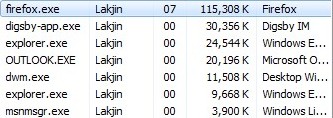
To convince the skeptics, I did a real-life test of CleanMem. Here is my memory usage of some running processes before I run CleanMem:
Here is after I run CleanMem:
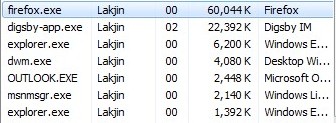
Amazing isnt it? Especially note the drop in RAM usage of the most notorious memory leaking program out there: Firefox. Keep in mind this memory cleaning was done instantly and without any load on my computer by CleanMem. As I already mentioned, CleanMem does this memory cleaning every 30 minutes automatically so even when the programs go back to leaking memory, they will be dealt with on a regular basis.
As I already mentioned, if you have a RAM shortage problem, the best way to solve that is to purchase more RAM. Memory cl eaners are just supplement programs – they are not replacements for the actual hardware. In terms of supplement memory cleaners, CleanMem is one of the best ones out there. I highly recommend it.
You may download CleanMem from the following link:
Supported OS: Windows 2000/XP/2003/Vista/ 2008/7
Version Reviewed: v1.4.2




