New, redesigned Google.com – check it out yourself

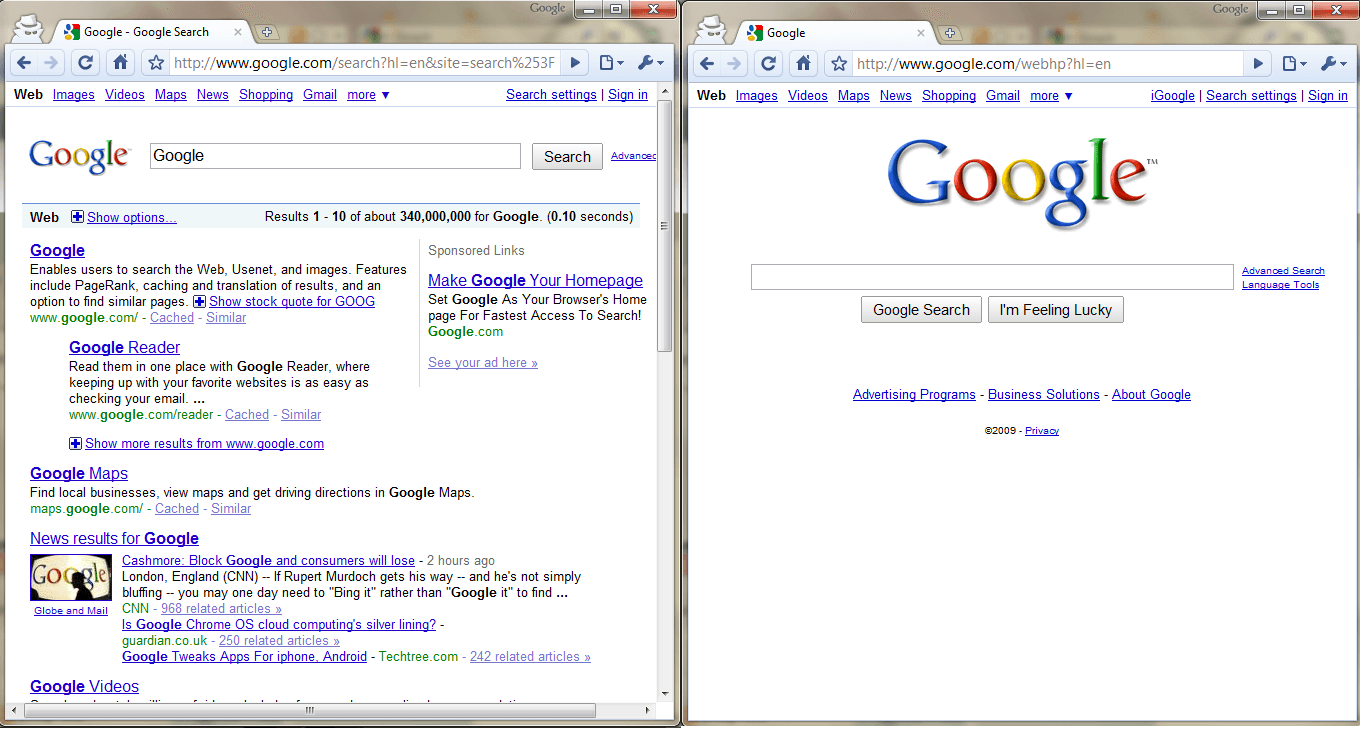
What's the difference between this...

2009-11-25_002557

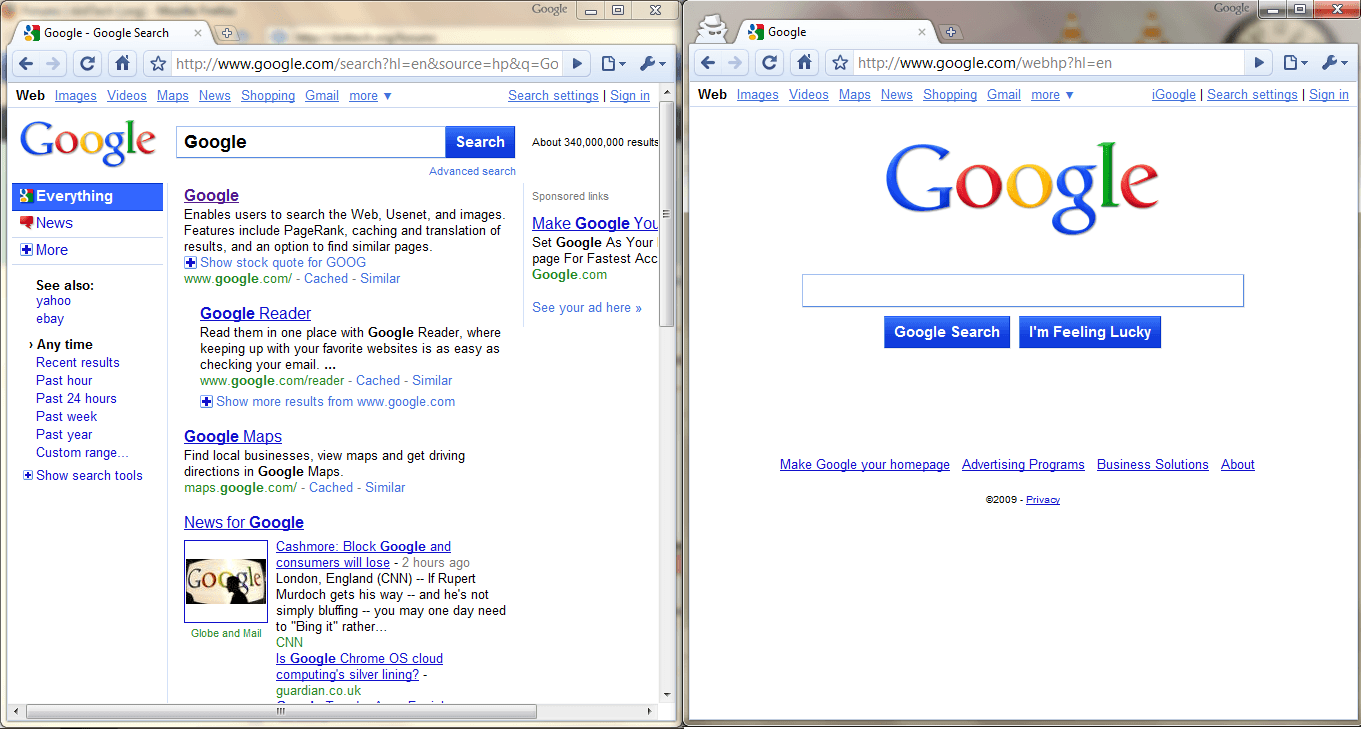
...and this:

2009-11-25_002557

If you said they look different then you are absolutely right! Google recently redesigned Google.com because, well, they can. (Only Google can afford to pay for a plastic surgery in a recession recovering economy.)

The thing is, though, this new, redesigned Google.com is only available to a few people right now. So, why should you care if you have the new Google.com page? Some may want it because it's easier to use; others many want it because it is more organized; yet others may not want it at all. The cool thing is if you don't like the redesigned Google.com, you can always easily go back to the older one.

Now you must be thinking "Well, how does one go about obtaining this brilliant new Google interface?" As mystifying as Google is, accessing the new redesigned Google.com actually is not that hard. To use the new redesigned Google.com, visit Google.com (not sure if visiting an international version of Google will work) and paste this into your URL bar (you need JavaScript enabled in your browser):

javascript:void(document.cookie="PREF=ID=20b6e4c2f44943bb:U=4bf292d46faad806:TM=1249677602:LM=1257919388:S=odm0Ys-53ZueXfZG;path=/; domain=.google.com");

2009-11-25_002557

This trick is confirmed to work in Firefox 3.5.x, Chrome 3.x, and Internet Explorer 8. It may or may not work with other browsers.

Once you have entered that short JavaScript code simply press the "Enter" key on your keyboard or hit "Go" or do whatever you do when you want to visit a URL. Violá! You're done! Enjoy your new Googleness! (Do take note you either need to refresh Google.com or do a Google.com search before you will actually see the new interface.)


What? Did I forget to mention something? Oh!! Right. I said that you can easily go back to the old version; I need to show you how. Reverting back to the old Google is simple: delete your cookie(s).

If you are a Firefox user you can do it in two ways:

  • Click "Tools" -> "Clear Recent History..." -> Select "Everything" for time range -> Make sure "Cookies" is checked -> Hit "Clear Now". This will clear out all your cookies - not just the ones associated with Google.
  • Click "Tools" -> "Options -> "Privacy" -> "Remove Individual Cookies" -> Find the cookies that say google.com and www.google.com -> Delete them.

If you are a Chrome user, follow Google's instructions:

  • Click the wrench menu.
  • Select "Options".
  • Click the "Under the Hood" tab and find the Privacy section.
  • In the Cookie settings section, click "Show cookies".
    • To delete all cookies from the list, click "Remove all".
    • To delete a specific cookie, select the website that issued the cookie, then click "Remove". <--- (Look for google.com and www.google.com cookies.)
  • Click "Close" when you're done.

If you are an Internet Explorer 8 user,:

  • Click "Safety" -> "Delete Browsing History" -> Check "Cookies" -> Hit "Delete". This will clear out all your cookies - not just the ones associated with Google.

If you use any other browser, go to (ahem) Google and search for the instructions on how to clear cookies for your specific browser.


About the Author, Locutus:

Locutus is a random person who writes tech articles. He spends time on dotTech and Cogizio.

18 Responses to “ New, redesigned Google.com – check it out yourself ”

  1. 1
    November 25 2009 at 11:09 PM
    Samuel

    Interesting, don’t use google that much so I’ll pass.

  2. 2
    November 26 2009 at 12:04 AM
    Liam K

    Wow, looks much better! I look forward to them releasing it officially.

  3. 3
    November 26 2009 at 2:00 AM
    Locutus

    @Liam K: I just can’t get it to do it for me in Firefox. I can do it in Chrome, however. I really like it too!

  4. 4
    November 26 2009 at 3:24 AM
    Kai

    Why does Bing come to my mind ;)

  5. 5
    November 26 2009 at 3:26 AM
    Stockel1949

    Like supposed by you it don’t work with the belgian “Google.be”.
    Thanks again for all your tips.

  6. 6
    November 26 2009 at 5:19 AM
    boras

    If your browser redirects to its localized version like google.co.in or google.co.uk, etc, you can open following link:
    http://www.google.com/ncr

  7. 7
    November 26 2009 at 9:51 AM
    PTLdom

    :) … they removed the Wonder Wheel feature/option :(:(:(

  8. 8
    November 26 2009 at 11:58 AM
    tarzan007

    gosh… it looks so ugly, I hope this is just some gimmick for Holidays :|

  9. 9
    November 26 2009 at 1:06 PM
    Tom

    I just tried it and got a Google Sorry… message:

    We’re sorry…
    … but your computer or network may be sending automated queries. To protect our users, we can’t process your request right now.”

  10. 10
    November 26 2009 at 1:31 PM
    Locutus

    @Tom: I got that; to fix it, refresh the page.

  11. 11
    November 26 2009 at 5:05 PM
    Kinetix

    It worked for me, but got rid of the Thanksgiving-looking Google logo. Meh, I’ll wait ’till it shows up officially.

  12. 12
    November 27 2009 at 4:42 AM
    anemailname

    Hope they didn’t have to pay for that! LOLOL

  13. 13
    November 27 2009 at 5:10 AM
    Googleverse

    Didnt worked for me :(

  14. 14
    November 29 2009 at 9:54 PM
    toast

    Did not work for me. Chrome 4.x

  15. 15
    December 1 2009 at 1:22 PM
    SilenceIsGolden

    Disclaimer: I don’t usually use Google, Ask.com works much better for my search habits and doesn’t give so many splogs in its search results.

    But, the above worked (in Firefox). Looks like Yahoo now, but I like the filter options on the left (e.g. date, date-range), really helpful.

    Especially helpful (for me) – and very surprising – are the filters to either increase or decrease the amount of commercial sites, because I don’t use those.

  16. 16
    December 5 2009 at 1:58 PM
    Johnson

    Locutus

    Thanks for the heads up. I use Chrome 3.x exclusively and Google search probably 90% of the time. The filter feature makes the new Google sound very attractive. Digging through search results that appear relevant only to discover that they’re 10 years old is frustrating. So I was looking forward to trying it.

    However, when the line above was copied and pasted and go’d, absolutely nothing, and I mean nothing, happened. So if you have slices of brilliance to share I’d be a grateful recipient once again.

  17. 17
    December 5 2009 at 5:04 PM
    Locutus

    @Johnson: You may want to delete your Google cookie and try again.

  18. 18
    December 6 2009 at 5:17 PM
    Johnson

    Locutus:

    You know, I really hated that answer. It was exactly what I would have told someone asking the same question under the same circumstances. I really do hate it it when I get that stupid. It didn’t work, but thanks for the slap in the head. I needed it.

Leave a Reply :