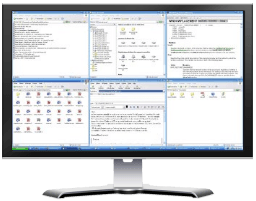
WinSplit Revolution: Tile, resize, and position windows for efficient use of your screen

December 18, 2011 17 Email article | Print article

ecranEver working on a project and wished you could place two windows side by side to make it easier for you to do whatever you were doing? I know I have. Well, you know as they – be careful what you wish for… you might just get it!

WinSplit Revolution allows users to easily tile, resize, and position windows so they all fit together like blocks. Not only does this allow full use of all available screen space, but it also assists in multitasking.

The great thing about WinSplit Revolution is it does not literally “split” your screen which would involve creating and displaying different desktops for each “screen”; rather WinSplit allows you to resize windows and organize them in a fashion which is useful to you. Therefore, WinSplit is very light on computer resources.

WinSplit works in two ways – via the floating, semitransparent button panel…

2009-10-23_015003

…and via hotkeys:

2009-10-23_015210

(Take note that some features of WinSplit Revolution, such as Mosaic – which automatically positions all windows open to maximize full usage of your screen – are only available via hotkeys.)

Whenever you want to resize and tile a window, either click on the appropriate button the panel or press the appropriate hotkey while the window is active and the window will be resized and tiled accordingly. WinSplit gives users the ability to customize the default resizing and tiling settings:

2009-10-23_015404

Keep in mind all these options I just mentioned are accessible via the WinSplit Revolution system tray icon.

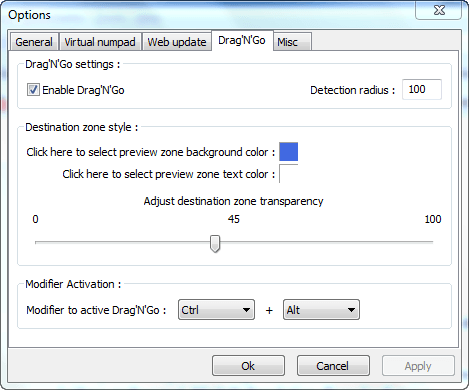
If you prefer being able to drag + resize/tile windows as opposed to using hotkeys or the panel, WinSplit Revolution allows for that too:
Here is a demo video showing exactly the kinds of things WinSplit Revolution can do:

Pretty handy, huh? To make it even better, WinSplit Revolution can be installed or be made portable (you select which one you want as one of the first steps after you run the EXE you download):

2009-10-22_221102

You can download WinSplit Revolution from the following links:

Version reviewed: v9.02

Supported OS: Windows 2000/XP/Vista/Win7 32 & 64 bits

WinSplit Revolution homepage [direct download]

17 Comments »

  1. jumbi October 23, 2009 at 3:37 AM (comment permalink) -

    I wanted such a utility many many times!
    Never spend the time needed so far to search for this and now the “trusted” solution appears here!

    Thanksssssssssss

    1
  2. Jeanjean October 23, 2009 at 4:04 AM (comment permalink) -

    I’ll try this one as soon as possible.
    Thanks again.

    2
  3. Tortuga October 23, 2009 at 5:34 AM (comment permalink) -

    Hi Ash :D

    Wow, this looks verrrry interesting!!!
    Another tool I did not know I needed, but could turn out to be quite useful indeed!!

    Each week you dig up something interesting.
    But you know, my tool box is quite full already!!! If you keep this up, I’ll never get enough time to study & understand them all …
    We don’t have 30hrs days like you :twisted:

    Peace

    3
  4. tejas October 23, 2009 at 4:10 PM (comment permalink) -

    I think I’m gonna love this app.
    Thanks!!

    4
  5. jivadas October 23, 2009 at 10:22 PM (comment permalink) -

    @tejas: I agree, Tejas. Personally, I have not yet had the chance to install it, since I first heard of it [thanks to you, Ashraf; aldo for the lead to ManicTime, a self-Management tool that tracks your time at work and/or play. It's free.]

    Your readers should report their experience. I will, when I try to install WinSplit—right—now!!!

    But tell me, Tejas: is that monicker from Spanish Texas? or from the Sanskrit , where it means “Interior Fire”?

    x0x
    jd

    5
  6. Quro@75 October 24, 2009 at 1:23 AM (comment permalink) -

    Can’t miss this. Thanks

    6
  7. Bruce Fraser October 24, 2009 at 4:52 AM (comment permalink) -

    Ashraf,
    You did well to give credit to “Gizmo” as your source. But not everyone is familiar with TechSupportAlert.com, so you should also give the link.

    7
  8. Austinkir October 24, 2009 at 8:46 AM (comment permalink) -

    Been using PowerResizer for days now — its basically like win7′s window resizer (drag windo to screen edges to resize). This tool does seem very powerful though, thanks.

    NICE new look btw.

    8
  9. Todd October 24, 2009 at 2:52 PM (comment permalink) -

    Hello,

    Been using WinSplit Revolution for a while now. I run dual wide screens (24″ & 32″) so it helps to make the best use of this real estate. I highly recommend it.

    Todd

    9
  10. kcs3295 October 25, 2009 at 2:16 PM (comment permalink) -

    This is one of the best websites I have ever found. Thankyou for your hard work.

    Ken

    10
  11. Rowdy March 29, 2010 at 12:31 PM (comment permalink) -

    I frequently use dual screens of winExplorer to move files and folders between internal and external HDrives for backup etc but have had to set and resize manually. This utility is an excelent timesaver!

    Thanks for this and all your helpful info and program recommendations. :^)

    11
  12. Skip James December 20, 2010 at 4:07 AM (comment permalink) -

    Thank you very much for the fantastic program. I work with thousands of files every day. Moving many files between several hard drives. Being able to have a window for each drive is wonderful. You have made my life a great deal easier.

    12
  13. ebony December 19, 2011 at 5:18 AM (comment permalink) -

    Ashraf
    Thank you for all you do. This is a great program and I can that I will have a need for it from time to time.

    Another time saver goodie.

    13
  14. John W December 19, 2011 at 6:10 AM (comment permalink) -

    I’ve used this program for some time but the most useful feature I find was not discussed. With duel monitors you can press and your current window is moved to the right or left monitor. Super helpful and productive!

    14
  15. stan December 19, 2011 at 6:33 AM (comment permalink) -

    I think this will be a useful program alright but what is the “Cleanup Tool”?

    Before I install WinSplit I would like to know if I should install the Cleanup Tool first or is its needed at all. I don’t see any information about using it on the WinSplit site.

    Has anyone found a need or used the Cleanup Tool?

    15
  16. Trevor March 28, 2013 at 6:50 AM (comment permalink) -

    Revolution is a strong name for a program. But here, on windows XP, it’s so fitting. Awesome program, thanks for sharing.

    16

Leave A Response »