
 Email article
Everyone knows dotTech’s favorite audio and video converter is FormatFactory. However a week or so ago Jeff, a dotTechie, brought iWisoft Video Converter to my attention, a freeware video and audio converter, as a possible software that can triumph FormatFactory (big thanks to you my friend). So here I am, looking to see if this program is worth our time or not.
Seeing as many dotTechies are regular GOTD’ers, I am sure many of us are familiar with Wondershare Video Converter Platinum. iWisoft Video Converter, as it turns out, seems to be very similar to Wondershare Video Converter Platinum:

Like Wondershare Video Converter Platinum, iWisoft Video Converter converts videos and audios, supports many input and output formats, can do basic video edits, supports batch processing, can rip audio from video, can merge multiple videos into one, converts very quickly, and has great output quality.
Specifically
- These are the input audio and video formats supported by iWisoft Video Converter:

- These are the output audio, video, and image formats (yes you can convert your videos into images) supported by iWisoft Video Converter:

- These are the electronic devices iWisoft Video Converter has specific output profiles for:

UPDATE FEB 16, 2013: iWisoft Video Converter hasn’t been updated since Nov 2010. While its video converting features are still useful and still work very well, it doesn’t have per-defined support for the latest electronic devices. You can still use iWisoft Video Converter to convert videos for the latest devices, like iPhone 5 and Galaxy S III; you just have to customize the output settings yourself as opposed to picking a pre-defined output profile.
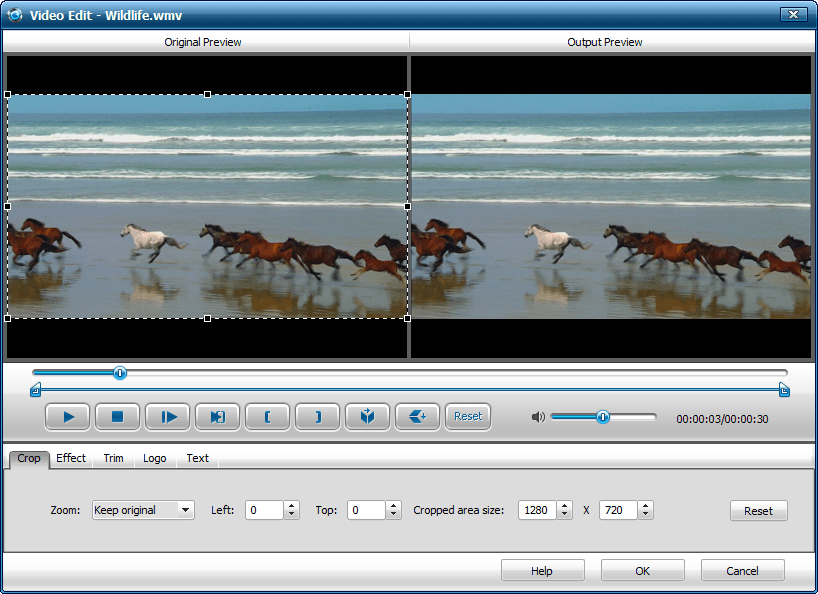
- iWisoft Video Converter can crop, trim, flip (horizontally/vertically), add some effects and change settings such as brightness, add an image watermark, and add text to videos:
Of course what good are all the features if the performance of iWisoft Video Converter stinks? Well rest assured, the performance is very commendable indeed. To test the performance of iWisoft Video Converter I used two videos:
- A 17.8 MB 10 minute 40 seconds WMV video.
- A 25 MB 30 seconds HD WMV video.
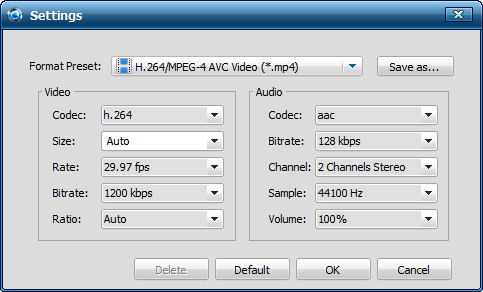
I converted both videos to an AVI video at default settings…

…and a MP4 video at default settings:
Also, I converted the same videos to the same output formats at the same output settings with FormatFactory so I could compare iWisoft Video Converter vs FormatFactory. Here are results:

1:1 Output Quality means the quality of output video is as good as, or very similar to, the input video to the naked human eye on an average size computer screen.
For the tests I did, the results are fairly mixed; in some areas FormatFactory topped iWisoft Video Converter while in other areas iWisoft Video Converter topped FormatFactory. Generally speaking, however, iWisoft Video Converter is less computer resource (CPU and RAM) intensive than FormatFactory while the output video filesize is smaller with videos converted with FormatFactory than iWisoft Video Converter. The one most notable difference between the two was the fact that iWisoft Video Converter’s HD WMV -> MP4 was of much better quality than FormatFactory’s. So, FormatFactory and iWisoft Video Converter both are terrific video converters – they both do everything very well; however if I were to draw a line somewhere, I would say iWisoft Video Converter performs better with high quality (H.264)/HD videos than FormatFactory while FormatFactory excels with SD (standard quality) videos.
Keep in mind the results above are at the default values for output videos settings of iWisoft Video Converter. The results I list above will vary greatly depending on input videos and output video settings; if a user wants greater quality of output video, he or she can raise the video bitrate (both programs allow for this), but that will also raise the time it takes to convert the video and the output video filesize. Also, an HD input video -> HD output video will always result in better quality than HD input video -> non-HD input video.
Now if the performance results confused you don’t worry – they are confusing. Let me sum up with one last sentence: iWisoft Video Converter is a great video and audio converting tool. I personally will be sticking to FormatFactory for most of my file converting needs (I need the image converting capabilities of FormatFactory which iWisoft Video Converter cannot do) but I highly recommend iWisoft Video Converter to anyone that wants an excellent freeware video and audio converter, or wants an alternative to FormatFactory.
You may grab iWisoft Video Converter from the following links:
Version reviewed: v1.2
Supported OS: Windows 2000/XP/Vista/Win7




