
 Email article
Today’s Software
- OCR to Word: extract text from scanned documents with surprising accuracy
- Aero Glass Mp3 Player: a slick, well-integrated audio player for Windows 7
- CloseTheDoor: scan your ports to make sure none of them are left open
Subscribe to our Windows section to never miss an article: RSS Feed | E-mail
About Windows Software of the Day
Windows has hundreds of thousands of programs. Because of this great volume and lack of a central store, software discovery (aka finding new and useful programs) is extremely difficult. With our Windows Software of the Day initiative, dotTech aims to change that. Everyday we post three programs, allowing our readers to discover new software, daily. Enjoy! [Subscribe to our Windows section to never miss an article: RSS Feed | E-mail]
Developers: Click here to get your apps featured here!
dotTechies: Want to see an app on here? Send us a tip!
Software for May 2, 2012
OCR to Word
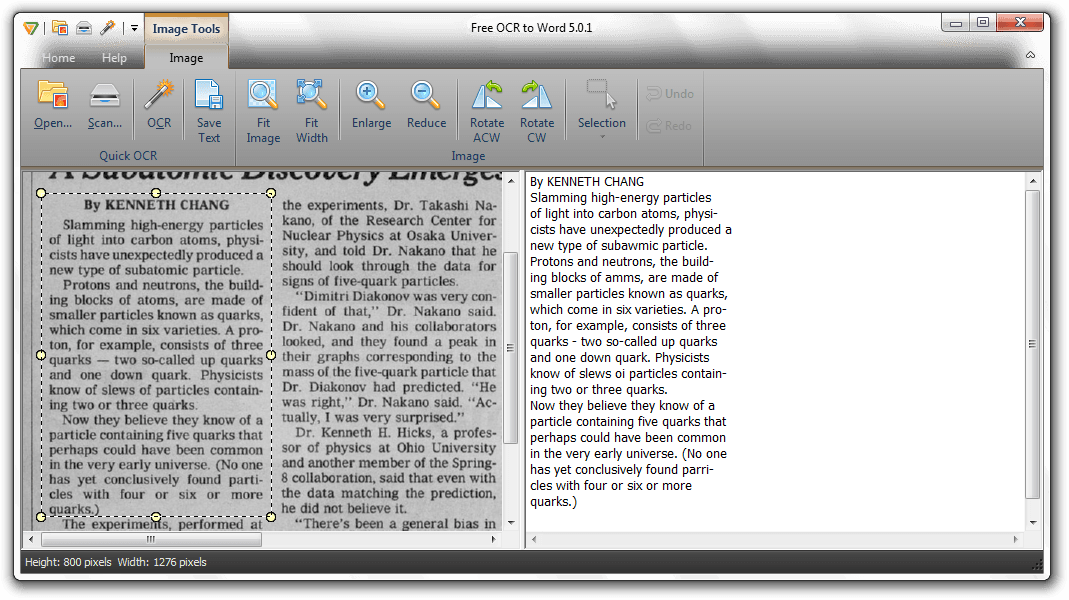 Many of you might remember gImageReader, an optical character recognition program we covered in August last year. For those of you who don’t, optical character recognition — also known as OCR — is technology that allows you to automatically scan text from an image. Although it’s not the most accurate technology, it’s getting better every year, and soon will be hopefully near perfect.
Unlike gImageReader, OCR to Word sports a nicely-designed, ribbon-style interface, scanner support, and other features. If you scan directly from your scanner, for instance, you can save the extracted text as a word document. (I was not able to get this to work using pre-scanned JPEGs.)
Regarding accuracy, OCR to Word was fairly accurate. As you can see in the screenshot above, it got words wrong occasionally, but it’s not hard to figure out, and with a little time and a spell checker, it’d be easy to correct these mistakes. All in all OCR to Word is a nice, easy-to-use program that lets you extract text from images with surprising accuracy.
Price: Free!
Version discovered: v5.0.1
Supported OS: Windows XP/Vista/7
Download size: 6.2MB
VirusTotal malware scan results: 0/42
Portable version available? No
Aero Glass Mp3 Player
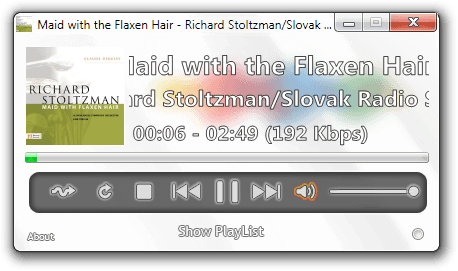
Want a media player that is extremely integrated into the modern Windows experience? You’re in luck–Aero Glass Mp3 Player is excellently integrated with Windows.
To select a song or playlist, you either drag it onto the window or use the Open With menu, shows album artwork and lets you play/pause/stop/fast forward/rewind in Aero previews, and fills in the icon from left to right as the song progresses.
Its integration is quite impressive; indeed, if this wasn’t off of DeviantArt, I’d almost expect it to be selling for some small amount of money.
Price: Free!
Version discovered: v1.5
Supported OS: Windows 7, maybe Vista – requires .NET 4.0
Download size: 3.7MB
VirusTotal malware scan results: 1/42
Portable version available? Yes!
Aero Glass Mp3 Player homepage
CloseTheDoor
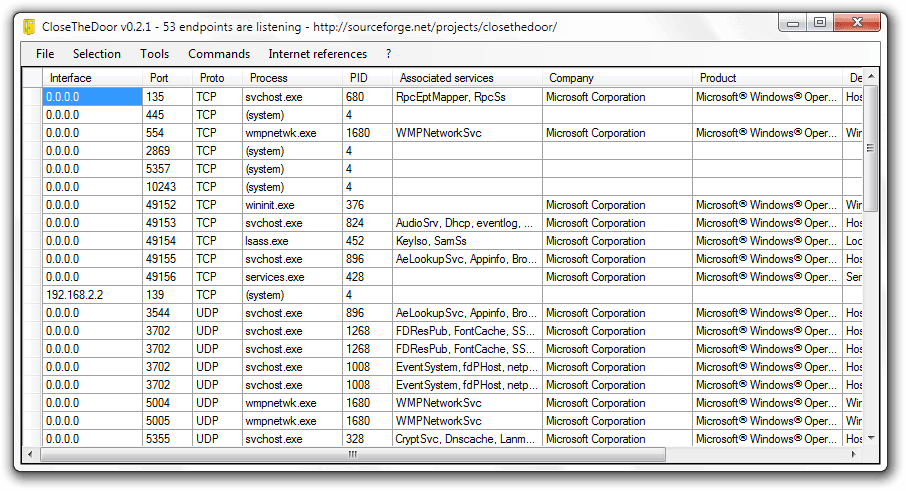 This is a tool for the more technically minded readers in the crowd. If you’ve got a computer that you think is bugged and need to see if it’s listening for commands, CloseTheDoor can tell you exactly what’s open, what’s opening it, and can provide handy links to either Google the processes or to outright terminate them.
If you want to terminate or Google multiple processes at once, CTD can handle that, too. It also provides quick links to various built-in Windows utilities like Regedit, Services, and a few others. If you have a few extra kilobytes in your USB drive, consider filling them with CloseTheDoor: for all you know, it’ll come in handy one day.
Price: Free!
Version discovered: v0.2.1
Supported OS: Windows XP/Vista/7 with .NET 3.5
Download size: 126KB
VirusTotal malware scan results: 0/42
Portable version available? Yes!
dotTechies: We have tested all the software listed above. However, Windows Software of the Day articles are not intended as “reviews” but rather as “heads-up” to help you discover new programs. Always use your best judgement when downloading programs, such as trying trial/free versions before purchasing shareware programs, if applicable.




