
 Email article
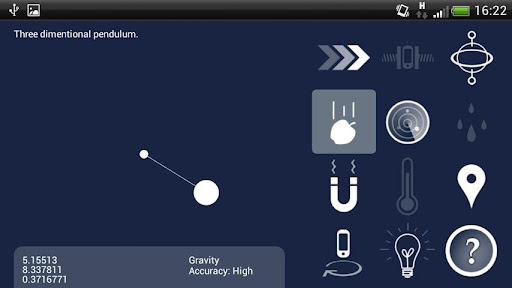 Your phone is a lot like a mini-Star Trek tricorder. It can scan the ambient acceleration, magnetic pull, location, and more, and it’s entirely hidden from you the majority of the time. If you’d like to see what your device is scanning, however, try Sensible Sensors: it’s a nice looking app that gives you instant access to all that data.
Sensible Sensors is easy. On the left is a representation of the data, and on the right, the data selector. The data available varies per phone–many don’t have barometers, for instance-but you can probably use at least magnetic pull, acceleration, and light sensitivity on all devices. The representations are pretty cool: in many, there’s a ball reacting to the sensed force, and in others, there’s maps, light bulbs, and more.
If you’re looking for a fun way to see the world from your phone’s point of view, Sensible Sensors is a nice way to do that. Otherwise, it’s roughly similar to AndroSensors, another sensor data viewing app. It’s mostly a time passer, but can also be used to test device capabilities, and whether your apps are working properly.
Price: Free!
 Version discovered: v1.0
Requires: Android 2.3.3+
Download size: 254KB
Sensible Sensors on Play Store




