WinUtilities Advertisement
300x100 advertisement

Free Paragon Hard Disk Manager 8.5 SE

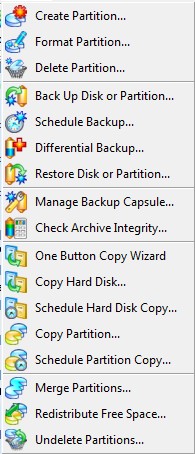
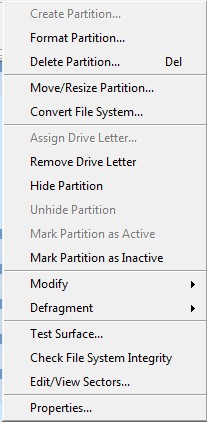
Paragon Hard Disk Manager is an excellent hard drive manager tool. With Paragon you can create full backups of your hard drives, copy your hard drive, create partitions, delete partitions, move partitions, merge partitions, defrag etc. - the list goes on:

2009-04-03_001025

2009-04-03_004925

In addition to the features shown above, you can create a boot/recovery disk which you can use in case you are ever unable to boot into Windows.

Paragon Hard Disk Manager 8.5 SE supports the following file systems/formats:

2009-04-03_015535

Overall my favorite feature of Paragon Hard Disk Manager is the ability to view/create ext2/3 partitions in Windows!

This is what Paragon Hark Disk Manager 8.5 SE program window looks like:
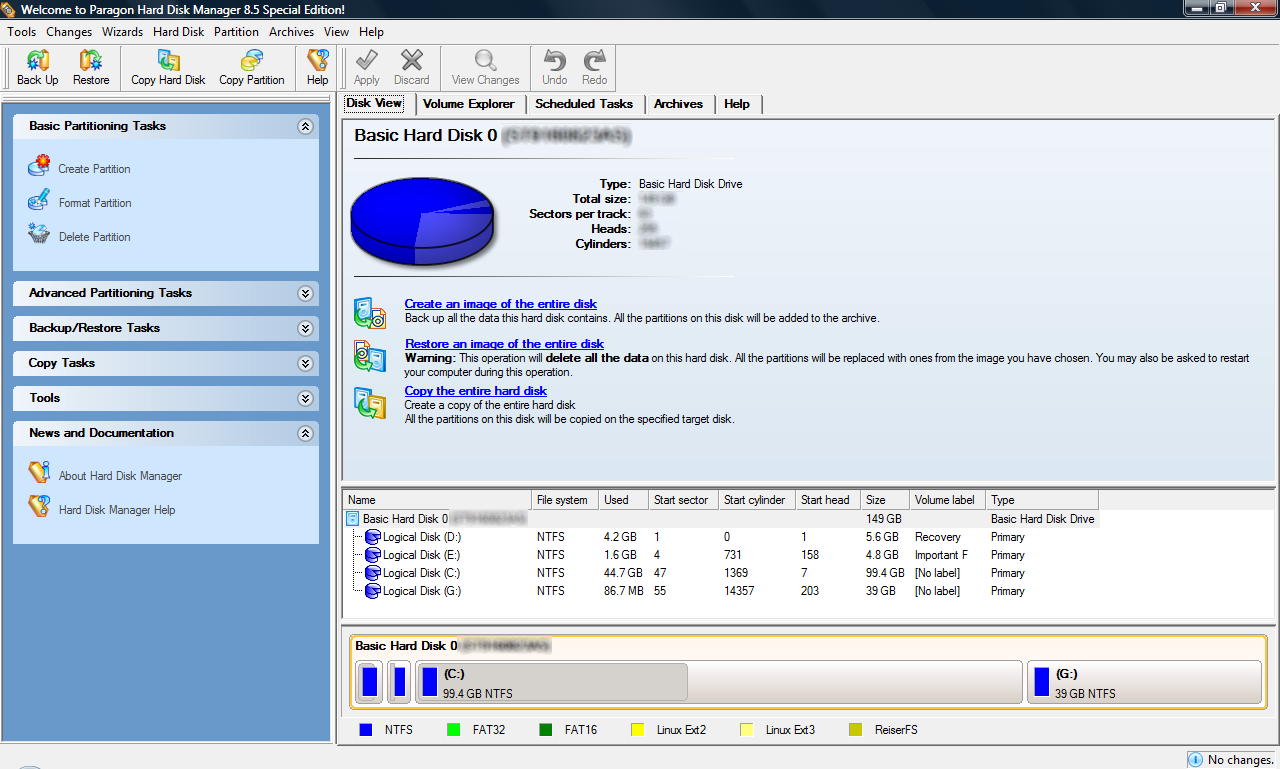
Paragon Hard Disk Manager 8.5 SE works with Windows 98/ME, NT, 2000, XP, and Vista. 32-bit and 64-bit is supported for all Windows except Vista: Vista support is limited to 32-bit only as far as I know but Vista x64 users should double check on that.

Bottom line: Paragon is recommended.

How to get Paragon Hard Disk Manager 8.5 SE?

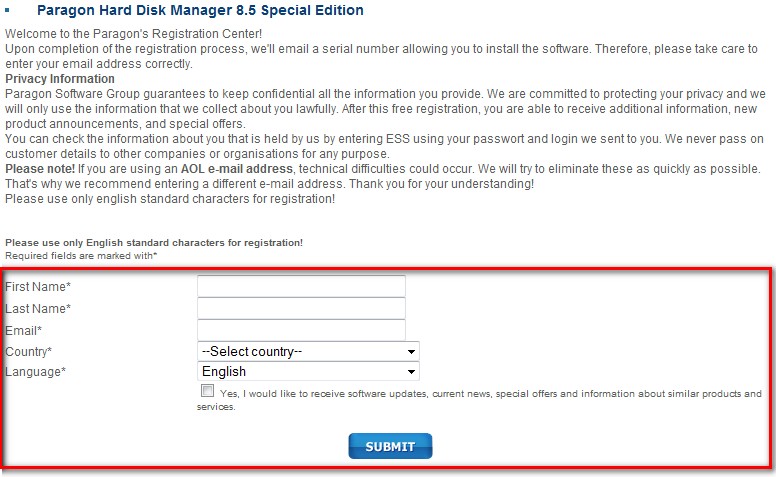
2009-04-03_020201

  • Download Paragon Hard Disk Manager 8.5 SE:

2009-04-03_021705

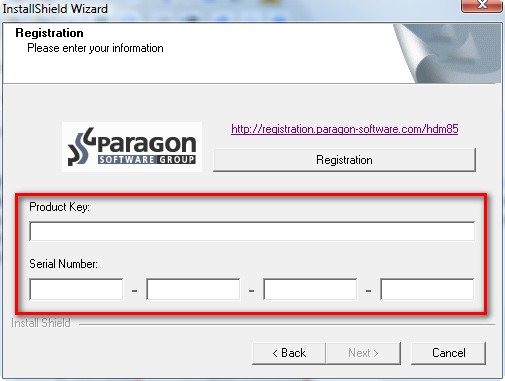
  • Install Paragon Hard Disk Manager 8.5 SE. During installation you will be prompted with a screen where you must enter product key and serial number:
2009-04-03_021442

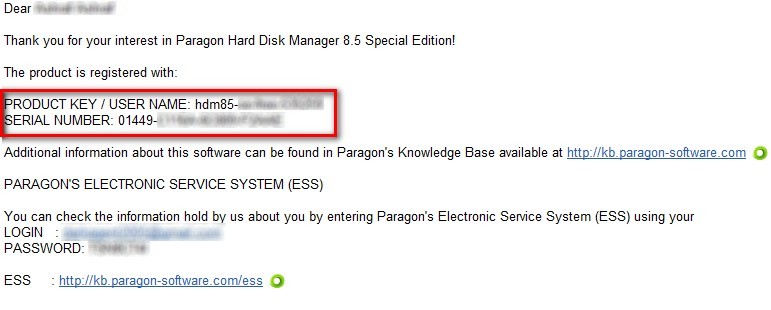
Go check the inbox of the email you used to register with Paragon earlier. You should have an email from "eservice@paragon-software.com" with subject of "The letter from Paragon Software". Within the email there should be a "PRODUCT KEY / USER NAME" and "SERIAL NUMBER":

2009-04-03_020708

Copy and paste each into their respective areas at the installation window.

  • Finish installing Paragon Hard Disk Manager 8.5 SE.
  • Enjoy.

If you have any problems or concerns, please post below.

About the Author, Ashraf:

Ashraf is the founder of dotTech. Ashraf spends insane hours on dotTech (usually writing articles but sometimes doing absolutely nothing except staring). Yes he is weird, but he is also very friendly.

30 Responses to “ Free Paragon Hard Disk Manager 8.5 SE ”

  1. 1
    January 28 2009 at 7:26 PM
    Chris

    Hey Ashraf ~ how does Paragon stack up to Partition magic? I’m talking ease of use, point and click interface, etc.

    Thanx ~
    Chris
    Medina, Ohio
    Land of Eternal Enchantment ~ and snow

  2. 2
    January 28 2009 at 7:31 PM
    Ashraf

    Never used Partition Magic so I couldn’t say.

    However, I went to Norton’s website and it says Partition Magic is for XP/2000 Windows. Paragon works with XP/Vista.

    Plus Partition Magic is not free as far as I know.

  3. 3
    March 16 2009 at 3:41 AM
    MCHAL

    Hi there:

    Thanks for the freebie.

    It does do a great and fast job of making partition images, but, unfortunately, it takes eons to restore images – I tried this through its DOS-like CD/DVD OS from plain DOS! Free products out there does this same task in two or three minutes! Why is that?

    Regards.

  4. 4
    April 3 2009 at 5:27 AM
    teejay

    This promotion doesn’t work. Inspite of registering several times, I never got their email..

  5. 5
    April 3 2009 at 5:34 AM
    teejay

    Sorry, it works, just remember to select your country as USA, anything else doesn’t work. I think I was trying to be honest but these are no the days of honesty.

  6. 6
    April 3 2009 at 10:42 AM
    J-Dev

    How long does this Freebie last? As in, will the Product Key and Serial Number expire after some time, or will it continue for the life of the product?

  7. 7
    April 3 2009 at 2:02 PM
    Peter

    Hi there, I´m living in denmark and did get severals of theirs SE products for free include this one and did always write I come from Denmark, no problem to get the serial, but once it did take longer time to get it, but under one day(24 hr). Good luck

  8. 8
    April 3 2009 at 3:38 PM
    Ashraf

    It lasts forever.

  9. 9
    April 3 2009 at 4:04 PM
    Dan

    Hey Ashraf – Do you know what the difference between Hard Disk Manager 2009 Professional and Hard Disk Manager 8.5 SE is? The setup’s are of very different sizes. How old is Hard Disk Manager 8.5 SE? I have also read posts before suggesting that Acronis True Image is better than Hard Disk Manager. Have you/anyone here tried Acronis True Image?

  10. 10
    April 3 2009 at 4:07 PM
    Dan

    Also just to add up to my comment, Can we use their technical support with this download if something somewhere goes wrong?

  11. 11
    April 3 2009 at 4:10 PM
    Ashraf

    Dan,

    For your questions about differences between versions and the age of 8.5 SE, please see http://www.paragon-software.com/home/hdm-personal/release.html.

    As for Acronis True Image: I have most definitely heard of it but never used it myself. Reading up on it I can say Acronis is probably going to be better at creating backups since it is a specialized program in that aspect.

  12. 12
    April 23 2009 at 2:35 AM
    visalittleboy

    Thanks for sharing!

  13. 13
    July 18 2009 at 7:06 PM
    Michael

    The download doesn’t work. I got the registration key email, but I’ve tried several times and several different ways to download, but it never starts.

  14. 14
    August 22 2009 at 10:52 AM
    Victor

    @Chris:

    Hey, Chris,

    I stumbled on your remarks entirely by accident while checking on something else, and was struck by your description of the NE OH.

    I live near Warren and, moreover, have worked in Medina and, will agree with the “snow” qualifier of your description, but the “Land of Eternal Enchantment”?…. Hmmm….

    Are you possibly thinking of Puerto Rico, the “Isle of Enchantment”?

    No offence intended, however– just having fun!

    You have to agree that it is not every day a small-town resident in OH runs into another one, not 40 miles away, while visiting a British free software site!

    Best wishes.

    Victor

  15. 15
    September 9 2009 at 9:02 PM
    wason

    Thanks for the freebie.

  16. 16
    September 17 2009 at 12:36 PM
    jim

    hi i tryed to download it and when i click download its says this is not a valid website help!

  17. 17
    September 17 2009 at 12:37 PM
    Ashraf

    @jim: Yes I know. I don’t know what is going on. I e-mailed v3.co.uk about it already.

  18. 18
    September 17 2009 at 12:46 PM
    jim

    k thanks

  19. 19
    September 17 2009 at 4:54 PM
    jim

    is this compatible with windows vista??

  20. 20
    September 23 2009 at 6:59 AM
    marebearinjapan

    I was able to get the registration code, etc. for Paragon Hard Disk Manager 8.5 SE BUT….the download link on Paragon’s website which I went to through the link in the article has problems….clicking on download now takes one to a broken link so one cannot download the program, it seems….

  21. 21
    October 3 2009 at 12:50 PM
    Grass Hopper

    I can’t get to the download either. Any chance of a different link that works?

    BTW, I just discovered this site, via GOTD and I am thrilled with what I have read/seen here. THANKS for all your efforts. :)

  22. 22
    October 4 2009 at 8:24 AM
    Grass Hopper

    You know, I had a thought (which can be a dangerous thing!), but can one of the users on the site provide the file for HDM 8.5SE? Since we can clearly get registration information from Paragon, it would be legal to use the software …

    just a thought …

  23. 23
    October 12 2009 at 4:52 AM
    YOSSI

    The download link http://www.vnudownloads.co.uk/hdm85_se-20080117-1930-ea.exe doesn’t work again? file doesn’t exist

  24. 24
    November 7 2009 at 11:55 PM
    captcha

    @Grass Hopper: For those who would like to install this very good app (compatible with Vista 32-bit): the guys at VNU have changed the name of the setup file, so the correct download link is: http://www.vnudownloads.co.uk/hdm85_specialedition-20080117-1930-ea.exe

    Ps. Dear Ashraf, could you please test whether it works on Windows 7 x86 or not?

  25. 25
    November 10 2009 at 1:55 AM
    dummy

    Dear Ashraf,

    Thank you for your useful articles. I have a question: is the bootable CD built with HDM 8.5 SE able to create a disk image?

    Thank you for your reply in advance.

    Best,
    D

  26. 26
    November 24 2009 at 11:51 PM
    Crodol

    I know… I am little late… and the link does not work anymore. Any ideas on where to get this software please???

  27. 27
    November 26 2009 at 10:07 PM
    dummy

    @Crodol: See comment #24

  28. 28
    January 3 2010 at 3:02 AM
    hmmm

    Dear Ashraf, could you please test whether PHDM 8.5 SE works on Windows 7 x86 and update your article with the experience?

    TIA, BR

  29. 29
    January 24 2010 at 11:05 PM
    steve

    When trying to register ,the “next”(submit) button is non-functional-so I can’t submit my registration.Can any one tell me how to move to the next step? thanks,Steve

  30. 30
    March 10 2010 at 1:53 AM
    madrat

    @captcha: to download follow the link shown in comment 24. it works just fine. thanks

Leave a Reply :