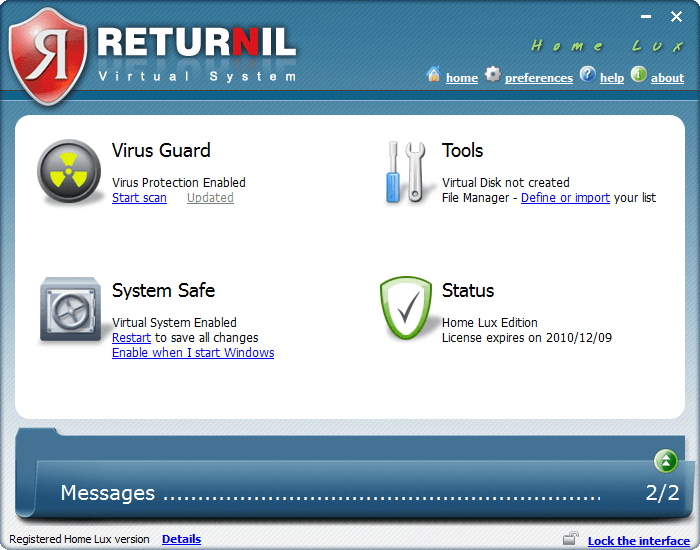
dotTech Exclusive: Free 1 year license of Returnil Virtual System 2010 Home Lux!

December 9, 2009 93 Email article | Print article

2009-12-09_213558As promised earlier this week, we have a real treat for everyone this weekend: Everyone can get a 1 year license of Returnil Virtual System 2010 Home Lux for free! Before I delve into how to get the 1 year license, let me give a quick overview of what RVS 2010 is for those that don’t know.

Returnil Virtual System 2010 is a unique security software that protects your computer in an unorthodox manner. RVS 2010 uses a powerful combination of anti-virus, anti-malware, and a virtual system to protect your computer from all types of viruses and unwanted system changes. The traditional security software like Avira, Kaspersky, Norton, AVG, NOD32, etc. actively, and on demand, detect and remove infected files. RVS 2010, on the other hand, has a two pronged attack to the malware problem:

  • Virtual System – RVS creates a “virtual copy” of your main system partition (the partition which you have Windows installed) and whatever changes are made to your computer are dumped when you restart your computer (there are opinions to tweak how it does that, but generally speaking, that is how it works).
  • Anti-Virus/Anti-Malware – RVS also includes the traditional anti-virus/anti-malware live protection and on-demand scanning features.

Because of this two pronged approach which incorporates traditional and innovative protection capabilities, if used properly, a user can keep his/her computer 100% clean with RVS 2010. If you desire more detailed information on RVS, please read dotTech’s full review on Returnil Virtual System 2010 Home Lux. As indicated in the full review, RVS 2010 is one of dotTech’s favorite programs.

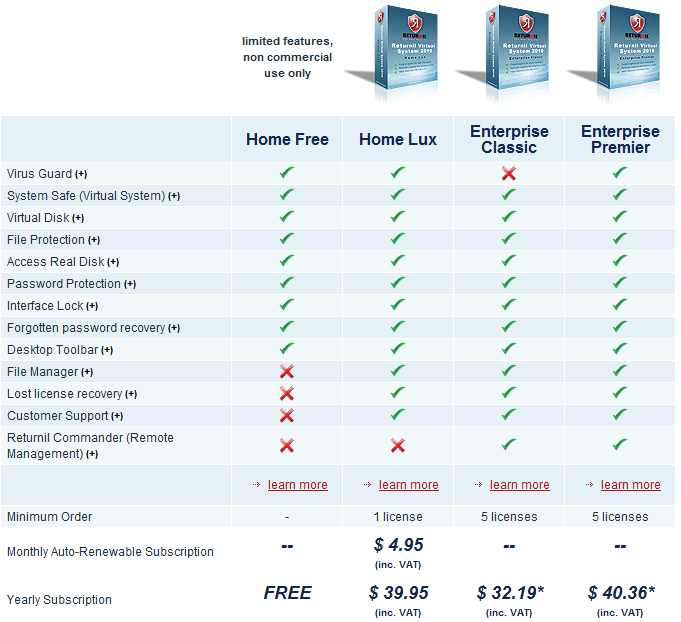
Now, RVS 2010 comes in four different flavors:
2009-12-09_205807

The free license you get via dotTech is of Home Lux – a $39.95 value.

That all being said, how to get the free 1 year license of Returnil Virtual System 2010 Home Lux? Just follow these simple directions:

Supported OS: Windows XP/2003 Server/Vista/2008 Server/Win7 (32-bit and 64-bit)

  • Enter your e-mail address in the following form and hit “Submit”:
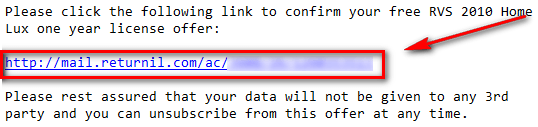
  • Check the inbox of the e-mail you entered. You should have an e-mail from “returnil-noreply [noreply@returnil.com]” with the subject of “dotTech.org RVS giveaway registration”. In the e-mail there is a URL you have to visit to confirm your e-mail address:
2009-12-09_211209

Visit the URL by clicking on the link or copy + pasting it in your browser.

  • After you have confirmed your e-mail address, check the inbox again of the e-mail you entered. You should have another e-mail from “returnil-noreply [noreply@returnil.com]” with the subject of “Your dotTech.org RVS registration was successful!” In the e-mail you will find your license code:

2009-12-09_211539

Copy the license code.

  • Download RVS 2010 and install it. You may need to reboot your computer after installation has finished.
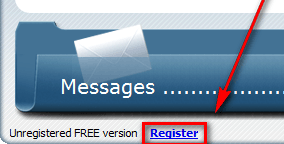
  • Run RVS 2010. Click on “Register” (located at the bottom left of the program window):
2009-12-09_0317252

  • At the window that pops up, go to the bottom half under “Request New Registration”. Click on “Commercial”. Type in anything you want in “Name” and enter the e-mail you submitted earlier in “E-mail”; paste in the license code you got via e-mail in the “Number” box:
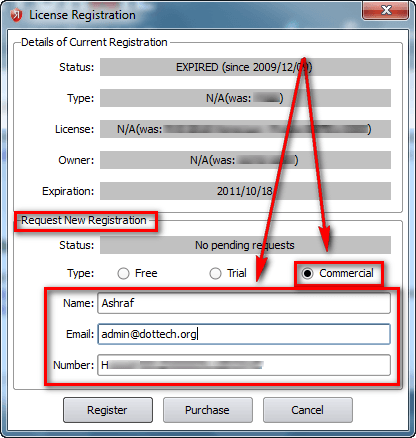
2009-12-09_0319282

Click “Register” when you have entered everything. You should now see “Request Pending” written at the bottom left of main program window:
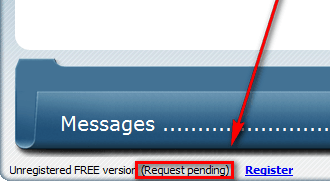
2009-12-09_0319502

  • Wait a few minutes while your registration is processed. When the registration has been processed, you will be told via a popup dialog box at the bottom right of your computer screen:

2009-12-09_032700

It took 5-10 minutes to process my registration so be patient.

  • Enjoy!

The license will last you one year. After the year is over, you can revert to RVS 2010 Home Free (non-commercial use only) or purchase another year’s license of RVS 2010 Home Lux for $39.95. You can even sweeten the deal by getting 25% off.

————————–

Frequently Asked Questions

Q: How long are the licenses we are getting?

A: They are 1 year licenses (12 months).

Q: How long will this promotion last?

A: This promotion will end at 12 AM (Pacific Standard Time) on Monday December 14, 2009. At that time, new licenses will no longer be given out.

Q: If I already have a subscription of RVS 2010 Home Lux, can I still use your license?

A: Yes! However, the license you get via dotTech will “replace” your license so only use it if you have less than 12 months left on your subscription.

Q: Is there a shelf life to the license?

A: Sort of. You can only get the license for free until this promotion lasts. However, after you get the license, you can activate it anytime from now and 12 months from now. The catch is the clock starts to tick once you get the license so if you, for example, activate it 6 months from now you will only have 6 months left on it.

Q: Can I share the license with my friends and family?

A: This freebie is for everyone, including your friends and family. If you would like your friends, family, and others to be able to take advantage of this great offer, please send them to this page so they can get a license for themselves!

93 Comments »

  1. Unlucky December 13, 2009 at 12:04 PM (comment permalink) -

    Ive been trying to uninstall this( actually i have uninstalled what i was able and removed reg keys etc. And yes, tried to use uninstaller applications and registry&junk cleaners, and yes, ive looked in interwebz alot.. ), because id like to give newer version a try, but there is something really deep and hidden somewhere?

    Installer says:
    http://i48.tinypic.com/295sr5j.jpg

    76
  2. Bill Allen December 13, 2009 at 12:08 PM (comment permalink) -

    Many thanks yet again ‘Ashraf’ always good to visit your pages as one can always take something away whether it be software or more more importantly, knowledge.
    Best regards!

    77
  3. John December 13, 2009 at 3:26 PM (comment permalink) -

    @Unlucky – That it the exact error as mine, too, as explained earlier.
    ___

    @Samuel – My computer knowledge has suffered severely after the introduction of Windows XP, as I have stopped self-assembling my own PC and that of friends (plus, with age, I tend to forget things). What did MBR meant again? LOL.

    In any case, the BOOT.ini does not seem to have been altered – one down.

    The e-Mail I had received from Returnil, together with the licence code, states:

    Please do not hesitate to contact us if you experience any problems.
    _ Kind Regards,
    __ The Returnil Team
    ___ We are on Facebook: http://www.returnil.com/fb

    As I am not in the mood for another registration… could you or Ashraf, please forward my problem (caused by THEIR installer) as posted here? I would very much appreciat it.

    PS – A legal responsibility cannot be avoided. I won’t leave it there. This matter must be resolved. Perhaps a specific pre-install patch could be created, for Returnil owns the source code, and only have to address (and follow) that part of programming which detects the “previous” incomplete installation..

    Thank you very much for your attention. Sorry to have bothered you again.

    78
  4. Samuel December 13, 2009 at 4:59 PM (comment permalink) -

    @John: MBR: Master Boot Recored, it tells the BOIS where to look for the boot partition. Don’t know much besides that, sorry.

    I looked over at Returnil’s web site and got this from their FAQ:
    “…
    What do I do if Returnil Virtual System fails to install or uninstall properly? This could be caused by a number of reasons that most likely relate to other programs you may be using at the same time as RVS. The most common:

    Antivirus, HIPS, and/or Anti-Executable interferes with the installation. To remedy the issue, deactivate your antivirus real-time protection until the installation of RVS is complete and then reactivate your AV.

    Antivirus, HIPS, and/or Anti-Executable interferes with the uninstall of RVS. To remedy the issue, deactivate your antivirus real-time protection until the installation of RVS is complete and then reactivate your AV. NOTE: if you have already attempted to uninstall RVS and experienced an issue where this did not complete, download the same installer used originally, temporarily deactivate other security programs and then install over the damaged version, and then restart your computer. This will fix the damaged install and allow you to uninstall RVS properly.

    Firewall hinders install or uninstall. To remedy this issue, open your firewall rules and/or allow the RVS installer to run without hindrance
    …”
    Seems like you have for the most part done all that alread so you could try contacting them by going to here. The problem with Asraf or I contacting them for you is that they may need some system log that we can’t provide. Hope you can get your system up and running with Returnil soon!

    79
  5. madalpal December 14, 2009 at 2:05 AM (comment permalink) -

    Good day all. Thanks as always Ashraf for your help, support, ideas, insight, freebies, explanations………..

    However, for the Returnil issue, I did everything according to “script,” registered fine & all, ran scan, disabled everything. as I too wanted to be a “#3 user” like Ashraf suggested: ON DEMAND only. Fortunately I did a complete backup before I downloaded & installed.

    Because once I restarted my computer, I couldn’t get to the internet, it just stopped responding….. then, like every other program became unresponsive or just froze—once this starts to happen I always leave the task manger open— as it may be the only way to avoid a hard shut down. So, only by restoring my system to the point before I installed Returnil, was I able to even report this problem! But as its late now, & no support is available, I just wanted to let y’all know that something needs to be addressed by Returnil for those of us who are having different kinds of problems that may or may not be connected. So I’ll wait before attemtping another install.

    I wonder if others had problems, but like me, before I did the sytem restore, couldn’t get to the internet to get help.

    @ John—did you do a backup too?? If you did, you may be able to get up & running again using that. If not, did you try a system restore? If you are able to you might try that. I hope this may help.

    P.S. I know it will get straightened up, so thanks in advance.

    BTW, I’m grateful for many things from Ashraf & dotTech.org., like the one year free license for the A-Squared Anti-Malware that was offered recently!
    Thanks again.

    Al

    80
  6. RVS_MikeW December 14, 2009 at 8:56 AM (comment permalink) -

    @Hugh Kent Touched This:

    Hi Hugh,
    You should have no issues whatsoever with SBSD and SpywareBlaster. For AVAST and AVG you should ensure their active protection features are deactivated during RVS install/uninstall.

    The only real issue may be with Threatfire. We have had reports of potential incompatibilities that are still being investigated so you should be cautious when trying the two together.

    81
  7. RVS_MikeW December 14, 2009 at 9:01 AM (comment permalink) -

    @Lutfi01:

    Hi Lutfi01,
    Yes, it is ok to use RVS 2010 with other antivirus solutions. You should be careful however to deactivate them temporarily during RVS install and/or uninstall as they may block proper completion of these processes. Otherwise they should live and play well together.

    Mike

    82
  8. RVS_MikeW December 14, 2009 at 9:10 AM (comment permalink) -

    @o(o.o)o:

    Hi,
    Some users have experienced issues with install and uninstall due to interference from other programs. This interference comes from two main situations:

    1. Other security application causes an incomplete uninstall of a previous version or blocks a component of RVS 2010. In this case it is best to deactivate the other security programs and then perform the install/uninstall of RVS.

    2. Third party uninstallers and registry cleaners. These programs can cause damage and their use is more likely than not to cause an improper uninstall due to bugs in the way they work with RVS. To avoid any issues, please DO NOT use a 3rd party uninstaller when uninstalling RVS. Use add/remove programs to uninstall RVS!

    We hope you will give RVS 2010 another try with the next release as it will include a more robust uninstall routine that can repair a previous improper uninstall.

    Mike

    83
  9. RVS_MikeW December 14, 2009 at 9:13 AM (comment permalink) -

    @jSwann0:

    Hi jSwann0,
    Please send us a detailed report with the exact text of the critical stop error to support (dash) tech (at) returnil (dot) com. Please also include the following information:

    * C:\Windows\rvs3.log
    * C:\Windows\rvs3-inst.log
    * MSINFO32 or MSINFO64 report**

    **Click START > RUN > Type MSINFO32 or MSINFO64 as appropriate. On the System Information screen click FILE > Export and then save the file where you can find it to attach to your reply.

    Mike

    84
  10. RVS_MikeW December 14, 2009 at 9:15 AM (comment permalink) -

    @Unlucky:

    Hi,
    Please send the same information as requested in reply to jSwann0 and our team will investigate ASAP.

    Mike

    85
  11. RVS_MikeW December 14, 2009 at 9:18 AM (comment permalink) -

    @John:

    Hello John,
    Please send us the same information requested from jSwann0 in post #84 and we will investigate ASAP.

    Mike

    86
  12. RVS_MikeW December 14, 2009 at 9:22 AM (comment permalink) -

    @madalpal:

    Hi,
    Please send us the same information requested in post #84 so we can investigate further. RVS should have no effect whatsoever on your internet connection so please also make sure your system is clean. I would recommend performing a full, in-depth system scan with MBAM and SuperAntispyware (both free) as well as your current AV solution to be sure.

    Thanks
    Mike

    87
  13. sumomanu December 28, 2009 at 12:31 PM (comment permalink) -

    I have exactly the same problems

    88
  14. Charlee December 28, 2009 at 7:58 PM (comment permalink) -

    Wow, I thought I was the only one suffering this issue. Glad to know I’m not the only one, I mean, I’m not glad that we are suffering from it in the first place. It is the only thing that is killing me about this program, but even so…I LOVE IT! since I test a lot of programs, this is a great “shield” for my system. Just hope in the next release, the unistall process would be painless, but I am glad I came here to learn about the Antivirus/Spyware deactivation steps. Thanks!!

    89
  15. RVS_MikeW December 29, 2009 at 8:52 AM (comment permalink) -

    @Charlee:

    Hi Charlee and everyone else with install/uninstall issue reports,

    We will be releasing a new build today (Release Candidate build: 3.1.7380.5020-RC) that should address all currently reported issues and also includes a new feature upgrade for Full System Scanning with Virus Guard. The release is stable and is recommended for those reporting issues.

    We look forward to your feedback and the software can be downloaded from the following page at our website:

    http://www.returnilvirtualsystem.com/returnil-virtual-system-2010-beta

    With kind regards
    Mike

    90
  16. sumomanu January 4, 2010 at 3:20 AM (comment permalink) -

    I couldn’t install this beta version.Is just not installing. Installing is freezing and computer became unstable : I can not open Mozilla, Paint, etc. And I can not turn it off…
    I had the same problems like John installing a non beta version before. Still looking for the solution

    91
  17. old poet January 10, 2010 at 5:52 PM (comment permalink) -

    I also had a fit trying to install the 2010 version. I had used Revo free to do the uninstall. After much back and forth with Returnil and Revo I re-installled Returnil 2008 and used its uninstaller. Then I could install 2010, which I just did and registered it successfully. Its first scan found a piece of Malware other systems had missed. So now that Returnil is installed I can play. Also in the process Revo tech support suggested I try out Revo paid edition, which I did. I am impressed with it and will pay and keep it on my machine. John and others I hope this post is helpful, albeit a bit late.

    92
  18. RVS_MikeW January 11, 2010 at 10:55 AM (comment permalink) -

    @sumomanu:

    Hi sumomanu,
    If we have not already requested the following through an open support ticket, please contact us at support (dash) tech (at) returnil (dot) com with the following log files so we can investigate this further:

    * C:\Windows\rvs3.log
    * C:\Windows\rvs3-inst.log
    * MSINFO32 report**

    **Click START > RUN > Type MSINFO32 or MSINFO64 as appropriate. On the System Information screen click FILE > Export and then save the file where you can find it to attach to your reply.

    Also include a verbose install log by installing using the command line as detailed below:

    1. Download the new 3.1 installer and save it on the desktop of your admin account
    2. Open a command line prompt with Administrative permissions:

    XP:
    Sign into your administrator account (if not there already) and then click Start > All Programs > Accessories > Command Prompt

    Vista/Win 7
    Sign into your account and then click Start > All Programs > Accessories > right click the Command Prompt icon and select “Run AS Administrator”

    3. Navigate to the directory you downloaded the 3.1 RVS installer file. I suggest using your desktop and then modifying the following command to “your user account name” as shown here:

    *Note: When you open the Command Prompt, you should see something like the following:

    C:\Users\Your user account name> _

    At the Command Prompt (flashing “_”) type:
    > CD C:\Users\Your user account name\Desktop

    And then click enter which should look like:

    C:\Users\Your user account name\Desktop> _

    4. Enter the following command line EXACTLY where the name of the RVS file with extension should be used:

    In this example, the file name shown is the one presently provided from the 3.1 Major Geeks download link for v3.1 Release:

    RVS_SETUP_3.1.7414-REL.exe //LANG=en /I $$ /L* C:\Windows\rvs3-msi.log RVSLOG=debug

    The spaces are important so please verify before hitting the enter key.

    The result will be the creation of a log file called “rvs3-msi.log” in your C:\Windows directory.

    5. Attach the new log file to your reply.

    Thank you in advance
    Mike

    93

Leave A Response »