Block ads on your Android phone with AdFree Android (root required)

August 13, 2010 22 Email article | Print article

Although I don’t block ads on my PC (for the most part… I only block ads on web services I pay a subscription fee for), I find ads on my cell phone to be extremely annoying; the screen is small as it is… ads just throw salt into the wound. Of course, I know ads are used to support free apps – I am not denying this fact. However, if I want to support a developer I will purchase his/her paid app rather than have ads on my tini-tiny screen, which I only click on by accident (ugh!). So, I use an app that allows me to block ads on my Android phone and figure other Android users may be interested in using it also.

AdFree Android is a free app that blocks ads on Android phones by “nullifying requests to known hostnames serving ads”. AdFree Android blocks ads in apps and the Internet browser. (Note: If you use something like Opera Turbo in Opera Mini, AdFree Android will not be able to block ads because Opera Mini serves cached pages to you.) AdFree Android uses MVPS HOSTS file as the ad filter to determine which hostnames to block.

Installing and using AdFree Android is very easy. After installing AdFree Android, you simply need to

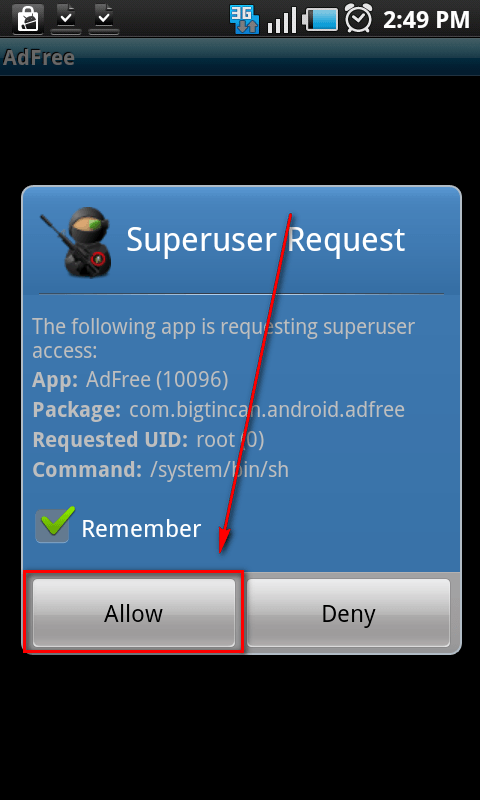
  • Give AdFree Android superuser permissions (yes, root is required):
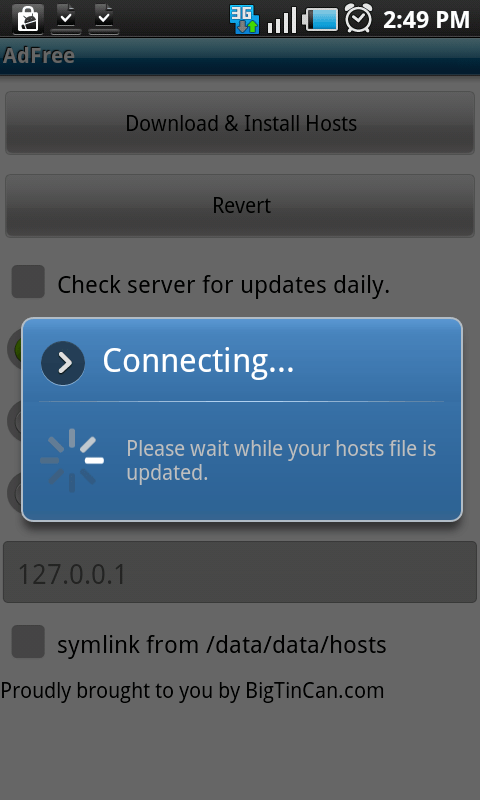
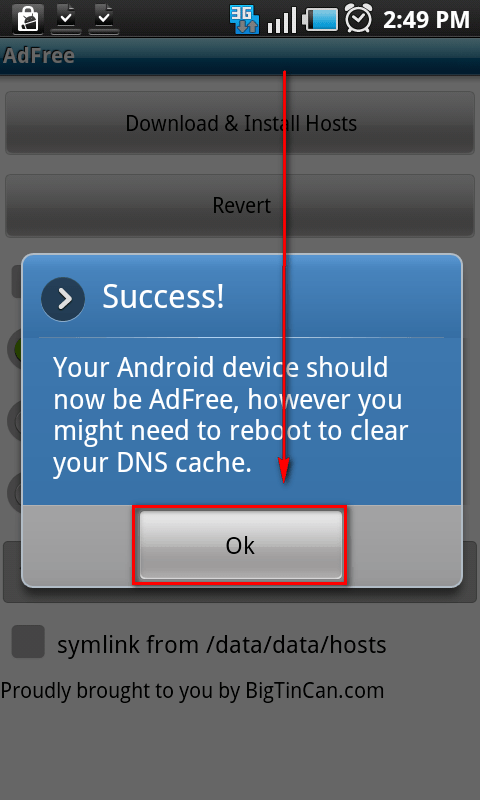
  • Download and install the the HOSTS file/ad filter:

  • Done!

Since AdFree Android downloads and places the HOSTS file in your phone’s /system/etc folder, AdFree Android is a one-time thing – it does not stay on in the background. The only time you have to interact with AdFree Android again – after the initial setup – is when you want to update the HOSTS file. In that regard, you have the option to setting AdFree Android to automatically update the HOSTS file on a daily basis:
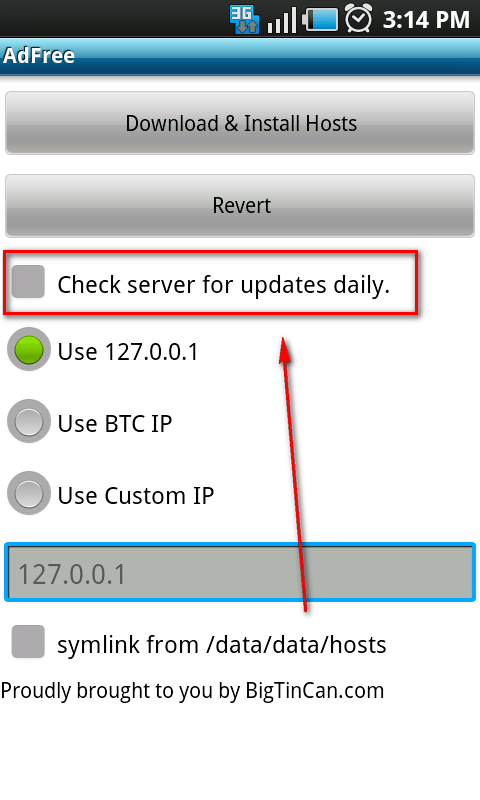
The downside to this add-HOSTS-file-to-system-folder approach to blocking ads is users are not given the ability to exclude specific apps and websites from ad blocking (i.e. free apps that you want to support by clicking on their ads). But, hey, no program is perfect right?

To grab AdFree Android, search the Android Marketplace for “AdFree Android”, use your bar code scanner on the QR code (found below), or load up this page on your Android phone and click on the following link:

Version reviewed: v.0.4.10

Price: Free

AdFree Android

22 Comments »

  1. Ashraf August 13, 2010 at 3:24 PM (comment permalink) -
    Mr. Boss

    Wow what the heck. After writing this article I find out Lifehacker just published an article on the same thing earlier today… That is what I get for dillydallying.

    1
  2. Locutus August 13, 2010 at 3:45 PM (comment permalink) -

    Wow.  I was going to say, “hey did you get this idea from Lifehacker?”.
    But now I’ll ask:  what Android phone do you have?

    2
  3. Ashraf August 14, 2010 at 6:17 AM (comment permalink) -
    Mr. Boss

    @Locutus: You tell me what device I have: http://dottech.org/images/snap20100814_053342.png =D.

    (Note: Nexus One 2.2+ is Nexus One on Android 2.2 [Froyo].)

    3
  4. Neville August 15, 2010 at 2:33 PM (comment permalink) -

    Gotta be an htc Evo4. Cool, I got one too, just terrified to try to root it though. Got any suggestions Ashraf?

    4
  5. Ashraf August 15, 2010 at 3:12 PM (comment permalink) -
    Mr. Boss

    @Neville: Try http://forum.xda-developers.com/showthread.php?p=6878393#post6878393.

    (I don’t have the EVO 4G. Kudos if you can match my benchmark with the EVO though. =P)

    5
  6. Neville August 16, 2010 at 6:07 PM (comment permalink) -

    I was guessing you were on a 4g network and the comparison was data speed. Thank You,  for the link I will be very careful, don’t want a brick  :)

    6
  7. Neville August 16, 2010 at 6:29 PM (comment permalink) -

    Ashraf, I was wrong. Went back and looked again, impressive on 3G! Oh, of course I don’t live where I can get 4G speeds anyway. Thanks again.

    Really, what phone do you have???

    7
  8. Ashraf August 16, 2010 at 7:01 PM (comment permalink) -
    Mr. Boss

    @Neville: The benchmark I posted actually has nothing to do with your network; it is for benchmarking your phone. So it doesn’t matter if I was on 3G or 4G.

    I will keep you guessing as to what phone I have =P

    8
  9. blazer September 30, 2010 at 3:51 PM (comment permalink) -

    SGS with lag-fix? ;)

    9
  10. Henk November 21, 2010 at 11:56 AM (comment permalink) -

    It does not work on wildfire with openfire rom… I think its because /system/etc/ has 3mb free space… how can i make this work / free spac3e?

    10
  11. Alex December 20, 2010 at 2:12 PM (comment permalink) -

    @Ashraf: HD2 running android. :)

    11
  12. M December 24, 2010 at 2:37 PM (comment permalink) -

    Is the app still available in the market? I can’t find it… all there is right now is loads of other apps claiming to be adfree. so it’s just finding the keyword.

    12
  13. Ashraf December 24, 2010 at 2:43 PM (comment permalink) -
    Mr. Boss

    @M: Yeah it is. Try loading this page on your phone and clicking on the market link at the bottom.

    @blazer: Yeah it was :-)

    @Alex: No but I would b impressed if tge HD2 could benchmark so well.

    13
  14. M December 25, 2010 at 1:51 PM (comment permalink) -

    @Ashraf it’s saying “There are no matches in Android Market for the search: pname:com.bigtincan.android.adfree”

    14
  15. M December 25, 2010 at 1:55 PM (comment permalink) -

    By the way, can’t this method be done manually somehow, like it could be done on Windows (that I know of) by directly editing the hosts file?

    15
  16. Ashraf December 29, 2010 at 3:21 PM (comment permalink) -
    Mr. Boss

    @M: Must be a market bug on your phone. I can upload the APK for you as soon as I root my Nexus S.

    @M: There is a way, but using this app is a lot easier.

    16
  17. Litening January 18, 2011 at 3:22 PM (comment permalink) -

    @M,

    It’s rather easy:
    1) Download the hosts text file from the link in the article: http://mvps.org/winhelp2002/hosts.txt
    2) Rename the file from “hosts.txt” to “hosts”.
    3) copy the hosts file to the root of your SD card
    4) reboot your phone in recovery
    5) connect phone to pcvia USB cable
    6) run “adb shell”
    6 a) mount /system
    6 b) mount /sdcard
    6 c) cp /sdcard/hosts /system/etc/
    6 d) reboot
    Your hosts file should now be replaced and no more nasty ads.

    It is also possible to do it without using a PC, but your phone will have to be S-off.

    N.B. I don’t take credit for these instructions, but just recall having read them somewhere.

    17
  18. Kids Telescope Reviews June 24, 2011 at 8:31 PM (comment permalink) -

    I have been exploring for a little for any high-quality articles or blog posts on this kind of area . Exploring in Yahoo I at last stumbled upon this web site. Reading this info So i am happy to convey that I have a very good uncanny feeling I discovered just what I needed. I most certainly will make sure to don’t forget this website and give it a glance on a constant basis.

    18
  19. Android Applications July 24, 2011 at 11:15 PM (comment permalink) -

    With the help of Ad Free Download you remove ads showing on your mobile. You can download Ad Free Downloader from Market.Android.com .Thanks for sharing.

    19
  20. Iphone rep October 28, 2011 at 1:57 AM (comment permalink) -

    Er din iPad 2 i stykker? iRepair tilbyder reparation af alle fejl på iPad 2. Du kan her se alle vores priser på alle vores iPad 2 reparationer. Har du et problem med din iPad 2 som ikke står på listen er du velkommen til at kontakte os for mere information om netop din fejl på din iPad. Vi er lager førende med stort set alle reservedele til iPad 2 og kan udføre din iPad 2 reparation samme dag den indleveres. Der kan dog i nogle tilfælde være en mindre kø på 1

    20
  21. joe January 4, 2012 at 2:48 PM (comment permalink) -

    @Litening: Thanks for the information. I am, however stuck on step #4 – rebooting my phone in recovery – Can you tell me how to do this? Thanks if you can help me.

    21
  22. Allegro January 17, 2012 at 11:40 PM (comment permalink) -

    I am sure this post has touched all the internet viewers, its really really nice paragraph on building up new webpage.

    22

Leave A Response »