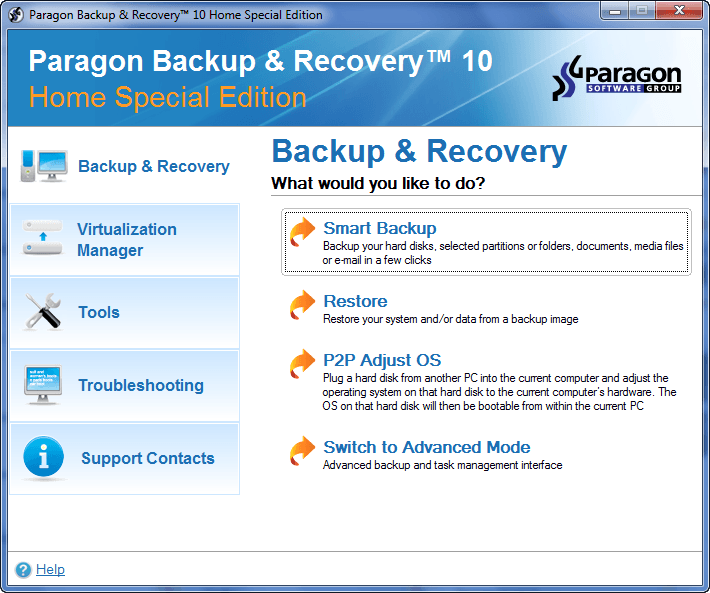
dotTech Exclusive: Free Paragon Backup & Recovery 10 Home (Special Edition)! [48-hours only]

September 9, 2010 65 Email article | Print article

Update: This giveaway has now ended. Please subscribe to dotTech (e-mail | Twitter | RSS) so you can know about future giveaways before they expire!

Considering the fact that dotTech has featured and reviewed Paragon Software products on dotTech multiple times in the past, I am sure many dotTechies are familiar with the brand. One of Paragon Software’s core competencies is data security; their Paragon Backup & Recovery product line is one of their flagship lines.

Paragon Backup & Recovery can be found in three different editions: Paragon Backup & Recovery Free, Paragon Backup & Recovery Home ($29.95), and Paragon Backup & Recovery Suite ($49.95). The following chart, created by Paragon Software, lists out the differences between all three editions, and also compares them to a discontinued product, Paragon Drive Backup Professional:
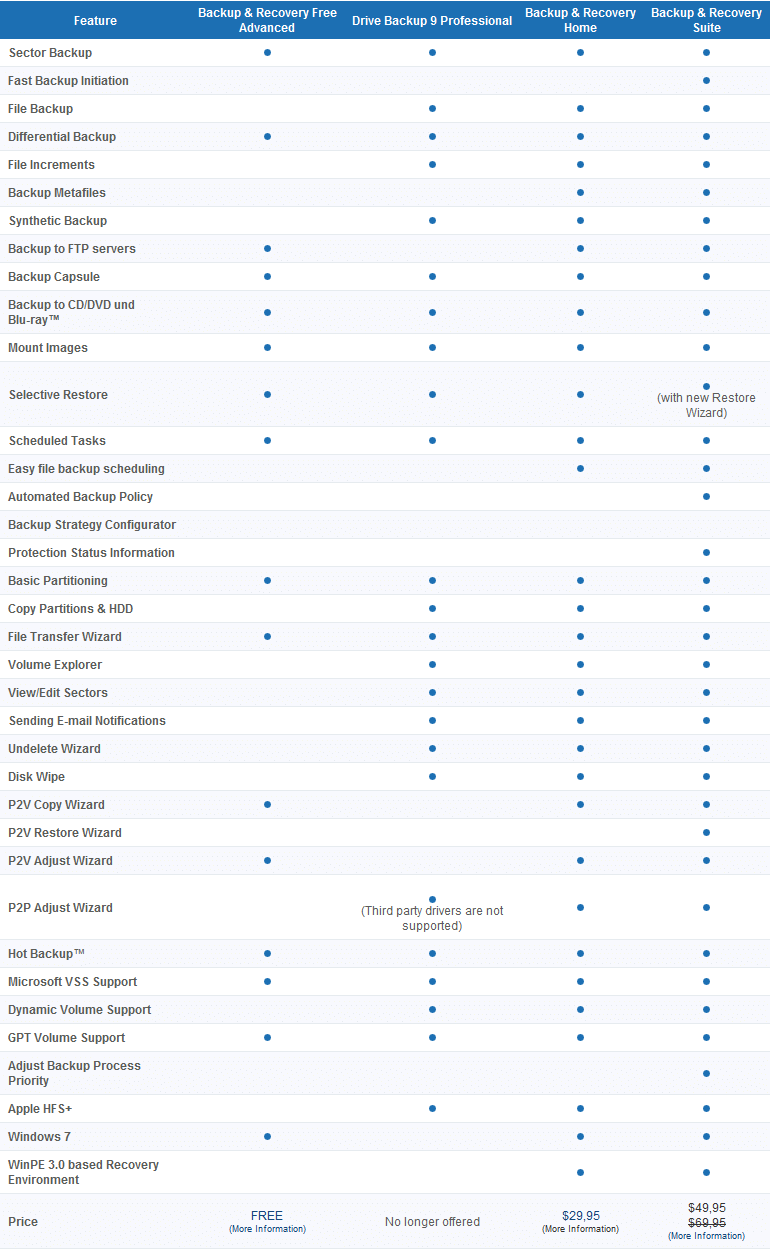
(Click on the above image to enlarge it.)

The Home edition of the Paragon Backup & Recovery product line is fairly new; it as released very recently. And now dotTech and Paragon Software are teaming up to bring everyone Paragon Backup & Recovery 10 Home (Special Edition) for free!

Here are are the highlights and features of Paragon Backup & Recovery 10 Home, as per the developer:
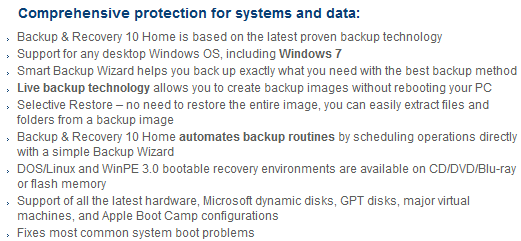
(Click on the above image to enlarge it.)
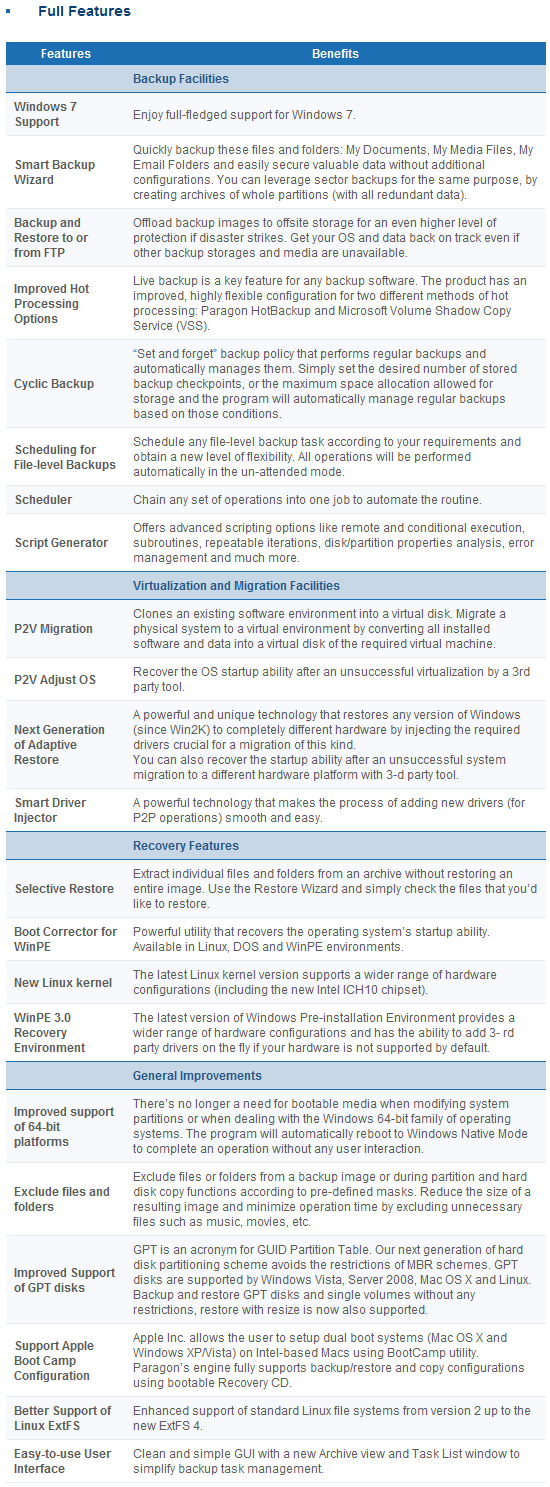
(Click on the above image to enlarge it.)

The only difference between Paragon Backup & Recovery 10 Home Special Edition and Paragon Backup & Recovery 10 Home (the edition you would get if you purchased directly from Paragon Software’s website) is Special Edition does not come with the ability to create WinPE recovery media. Special Edition still has all the other features mentioned above and can still create fully functional Linux based recovery media.

Now dotTech has not explicitly reviewed Paragon Backup & Recovery 10 Home, so I can’t tell you what is good/bad about the program. However, dotTech has reviewed multiple different Paragon Software products in the past – including Paragon Backup & Recovery’s predecessor Paragon Drive Backup Professional – and the general trend is Paragon Software products are excellent. Therefore, I am sure Paragon Backup & Recovery 10 Home is an excellent product also. (But of course please provide your feedback/mini-reviews on the product in the comments below!)

That said, to get Paragon Backup & Recovery 10 Home (Special Edition), follow these directions:

Version being given out for free: v10, build 10444 (14.07.10) Home Special Edition

Free updates: No

Supported OS: Windows 7 (32/64-bit)/Windows Vista (32/64-bit)/Windows XP Professional (32/64-bit)/Windows XP Home/Windows 2000 Professional SP4

Download size: 187 MB

Special note: This giveaway is available for the next 48 hours; it starts on Thursday September 9, 2010 00:00 PST and ends Saturday September 11, 2010 00:00 PST. After the 48-hours window, this giveaway will end. However, if you keep the installation file safe, you can install/reinstall the program whenever you want.

  • Visit the Paragon Backup & Recovery 10 Home (Special Edition) registration page and register:

Note: This promotion is available to everyone – everyone may get it for free. However, this is a dotTech.org promotion. Please do not directly link to, copy, paste, or reprint the link to the registration page anywhere else including private or public forums, blogs, file hosting services, etc. If you want to spread information about this offer, you may link to this article by providing a permalink (alternative permalink) to your audience. If you respect our wishes, we will be able to continue to bring you great freebies. If you don’t, we have no incentive to continue our promotions and they may stop.

Take note you have the option to receive e-mails from Paragon Software that have exclusive discounts (30%+) on their products; if you enjoy Paragon Software products – like I do – you may want to consider subscribing to that e-mail list to receive the discounts (it is optional).

If you registered properly, you will get a confirmation message:
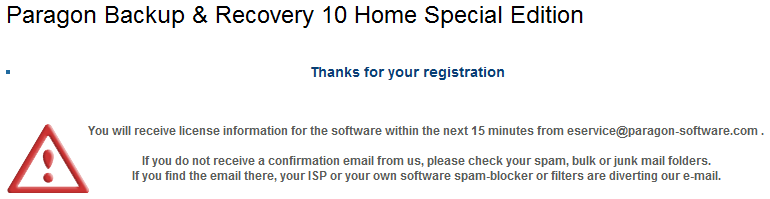
  • Check the inbox of the e-mail address you registered with. There should be an e-mail from eservice@paragon-software.com with the subject of Your Product Registration for Paragon Backup & Recovery 10 Home Special Edition (English). In the e-mail you will find the registration information for the product:
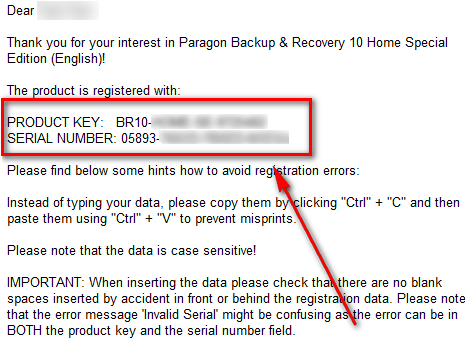
Keep this registration information safe because you will need it to register Paragon Backup & Recovery 10 Home (Special Edition) during installation.

  • Download Paragon Backup & Recovery 10 Home (Special Edition). [The installer for 32-bit and 64-bit is the same.]

Note: This promotion is available to everyone – everyone may get it for free. However, this is a dotTech.org promotion. Please do not directly link to, copy, paste, or reprint the link to the download anywhere else including private or public forums, blogs, file hosting services, etc. And please don’t upload the installation file on anywhere, such as third party file hosting services. If you want to spread information about this offer, you may link to this article by providing a permalink (alternative permalink) to your audience. If you respect our wishes, we will be able to continue to bring you great freebies. If you don’t, we have no incentive to continue our promotions and they may stop.

  • After you have downloaded Paragon Backup & Recovery 10 Home, run br10_home_se.exe (it is the file you downloaded). You will need to extract the installation files into a folder:
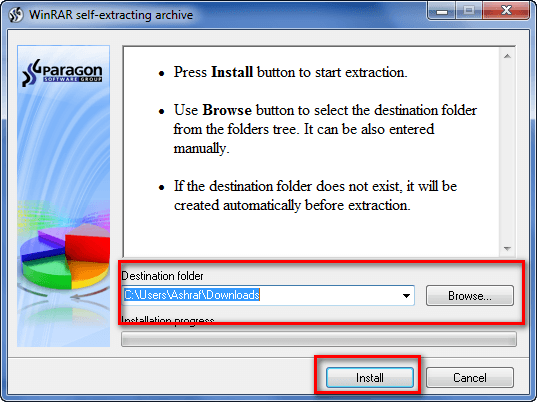
I highly suggest you extract the files into a new folder because br10_home_se.exe extracts the installation files for Paragon Backup & Recovery 10 Home (Special Edition) – it does not install the program for you. Extracting the files into a new folder makes it easier to delete the files after you have installed the program (you will be able to delete these installation files).

  • Go to the folder where you extracted the installation files. Find launcher.exe and run it. Click on Paragon Backup & Recovery Home Special Edition -> Paragon Backup & Recovery Home Special Edition:
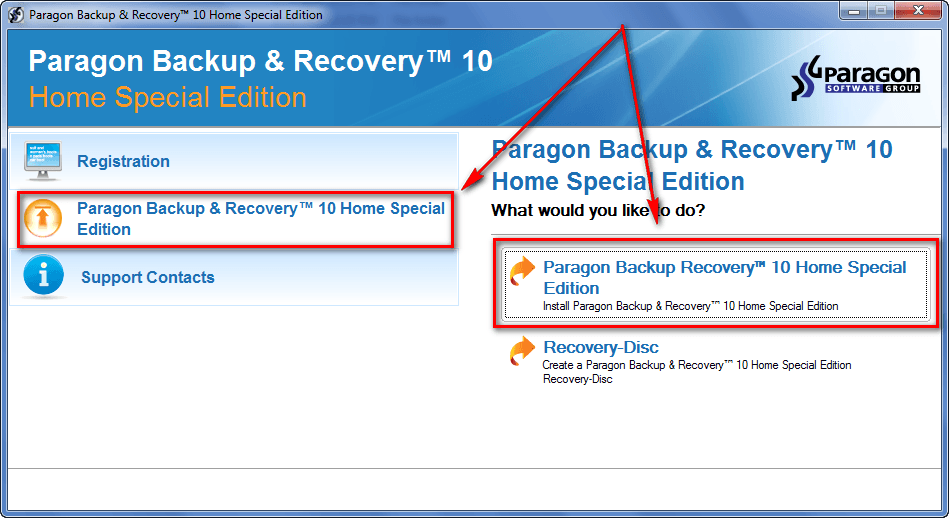
This will launch the Paragon Backup & Recovery 10 Home Special Edition installer.

  • Follow on-screen instructions to install Paragon Backup & Recovery 10 Home Special Edition. During installation you will be promoted to register the program:
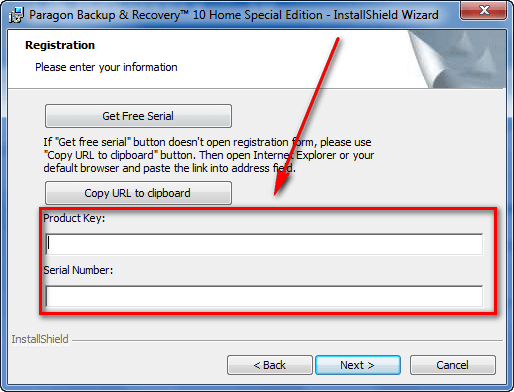
Use the registration information you received via e-mail to register the program.

  • Finish installing. After installation has finished, you will be asked to restart your computer:
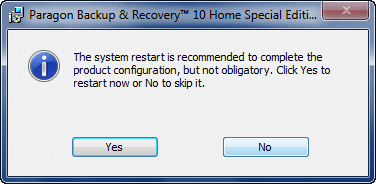
You are not required to restart your computer, but it is highly encouraged to perform one restart before running any operations.

  • (After you have finished installing Paragon Backup & Recovery 10 Home Special Edition, you can delete the installation files you extracted earlier.)
  • Evaluate the program and come back here to provide some feedback to Paragon Software in the comments below. Feel free to write a mini-review, or just list some good/bad points about the program.
  • Enjoy!

If you have trouble getting Paragon Backup & Recovery 10 Home Special Edition for free, post below and I will try to help.

65 Comments »

  1. RobCr September 11, 2010 at 4:31 AM (comment permalink) -

    @Erik:
    I posted a link, but that triggers moderation, and possible delay.
    If you do a Google for this (without the quotes), it is the 2nd hit (child of the first hit).
    Paragon Backup & Recovery Compact – Free Download
    That shows a comparison chart, against a version similar to the Home Special.

    51
  2. RobCr September 11, 2010 at 4:33 AM (comment permalink) -

    I posted a link, but that triggers moderation, and possible delay.
    If you do a Google for this (without the quotes), it is the 2nd hit (child of the first hit).
    Paragon Backup & Recovery Compact – Free Download
    That shows a comparison chart, against a version similar to the Home Special.

    52
  3. PeterB September 11, 2010 at 4:54 AM (comment permalink) -

    Hi Ashraf :)
    Thank you so much for this great offer.
    Downloaded it and installed just fine on XP pro sp3.
    There is a PDF manual for the program. You can get it here: http://www.paragon-software.com/docs/BR10Home_en160810m.pdf

    I know that it does not include the WinPE recovery disk, but the “linux” edition is included. I think that you will only miss the WinPE edition if you were going to make some P2P Adjust. That is missing in the “Linux” recoveryCD, and if you try to run it from it from the installed program, it gives you an error, saying that it cannot be done with an active OS.  So maybe it is still possible if you have a multiboot system. I have not tested that, since i only have 1 OS.

    53
  4. tekknokat September 11, 2010 at 5:16 AM (comment permalink) -

    Thank you for the software Ashraf, haven’t had a chance to try making the bootable CD and an image yet.  I was successful in getting the software to install though, I appreciate the opportunity to try out a new backup opportunity.  Acronis is also giving me problems in simply backing up .avi files in non image backups, any large files over 1GB seem to be a problem for Acronis, what a waste of money.  When I get time I will ask the forum there for help, and they have other help as well, I just never heard of Paragon before, never considered it as an option when shopping for software, when PCMagazine, CNet, and Wired, or similar such tech periodicals wrote such glowing reviews about Acronis 2010 after New Years, I bought the hype about “brand recognition.” 

    I don’t have a Seagate or WD hard drive, I hear Acronis TI comes with some of those drives with new purchase, I just got it direct from the website during their summer sale in early June.  I saw your story on free backup software, and I just decided after losing a bunch of good photos and letters in 2009, I wouldn’t trust my data to anything free, spending money I would get what I pay for.  April 2009 I bought a LaCie external hard drive for my old computer, and the same week I bought it and was uploading my files to Carbonite online with LaCie’s year of free online backup with purchase of the 1TB external triple interface USB/firewire400/eSATA drive, my hard drive crashed with Windows XP Pro SP3 on it, and I haven’t been able to recover it, and just holding onto it in hopes someday I can find a shop to lift the files for me.  My new PC doesn’t have anything on it I would cry over if I lost it, but I want to backup just the same to make those habits routine.  I just think of all those photos that can never be taken again, and letters, office documents, journals, with hours of time spent I will never take the time to assemble those facts, names, places, and timelines again.  

    What do people use to backup their DV movies and legal bootleg movie files in any of their given formats?  Can those be backed up seperately from disc image files using the file backup option rather than the disc imaging options?  I don’t see why not.

    54
  5. RobCr September 11, 2010 at 5:51 AM (comment permalink) -

    OOPs,
    Sorry for the multiple posts, my first one had a link, so I tried another without, and it just happened to be posted to a new page.
    I falsely assumed that the delay on my post (the one with a link), was holding back my non-link one.
    Perhaps when anyone is posting the 50th post, it should throw the ‘poster’ to the new page. That did not happen to me, so I assumed it went into the twilight zone.
    - – - – - – -

    tekknokat,
    I am not a big fan of file backing up software.
    Instead, I have all my files in organized folders starting with
    C:B_
    C:B_DVD
    C:B_Finance
    etc.
    So it is easy for me to burn them to a DVD.
    If you had used the free Seagate DiscWizard, to create images of your whole drive, then -
    - The size of individual files would not have been a problem.
    - I normally use the bootable CD to create and Restore images. However, If you also install the program into Windows, you can explore previous images, to extract individual files.
    - When your Drive died, you would have had your OS, and your files intact.
    And I can even show you how to resurrect the lot to another PC.
    I have preached (relentlessly, to anyone who will listen) about my file organizing (C:B_ etc), and the Seagate discWizard in this thread, and also elsewhere in Ashraf’s web site.

    Rob

    PS I was preaching in a VB6 forum to a chap, who ignored me.
    A few weeks later his laptop was stolen, and he lost everything.
    He had no images then, and is still not imaging his new PC.
    “You can lead a horse to water, but . . . . . . ”


    55
  6. Sav September 11, 2010 at 6:52 AM (comment permalink) -

    Two questions:
    1. Can i install on three machines with the same registration?
    2. Do i need to create three separate recovery disks? I use a different OS on each.
    Many thanks.

    56
  7. RobCr September 11, 2010 at 8:17 AM (comment permalink) -

    HOW  TO  VERIFY  IMAGE ?
    I have connected a spare IDE internal drive, internally, and done a full Seagate DiscWizard image. I was too frightened to rely on my external drive for the moment, after the Paragon 2010 Linux CD, gave me a ‘whopping’ (Mohamed Ali).
    I then decided to dig out 2009 Paragon Hard Disc Manager Pro, recoverable bootable CD  (WHICH IS WinPE NOT LINUX)
    I have tested that, and my external drive, by letting it create a full image (all partitions) to the external drive.
    The WinPE is definitely more professional than the Linux one.
    And now to my question -
    Does anyone know where the option is to Verify the image, I just created ?
     
    PS My parting thoughts on the 2010 Recoverable Linux CD
    I have experimented with a few Linux LiveCD’s
    Practically all of them had problems with my 2004 PC’s (both of the PCs).
    The only one that was reliable (and a delight to use), was Puppy Linux.
    So perhaps much of the blame for my ‘whopping’, was Paragon’s  LINUX  CD ?
     
    PPS Sav,
    I believe Recoverable CDs are not ‘tied’ to the PC that created them.
    So you do not have to create a fresh one for every PC.
    And I believe Ashraf mentioned that once you have the Serial number, you can install on all of your PCs, ‘until the cows come home’.

    57
  8. Sav September 11, 2010 at 9:29 AM (comment permalink) -

    @RobCr: Thanks RobCr. Indeed i did install on all PCs with just the one registration.
    Did my first backup very smoothly. It took  about 30 minutes for 45gbs.

    58
  9. RobCr September 11, 2010 at 12:36 PM (comment permalink) -

    @Sav: Glad that worked out.
    What was your before size (the amount used) ?
    And the after size (the size of the image) ?
    I have done quite a few images over time, and never even came close to the compression that post #46 got (30GB to 4GB)
    Off the top of my head, the best I ever achieved from 30GB would be say 20GB
    I know the laws of physics in parallel universes are different, so perhaps gully foyle is near a ‘worm hole’ (or a ‘black hole’).

    59
  10. Sav September 11, 2010 at 2:36 PM (comment permalink) -

    RobCr, the original size was about 45GB, it’s a new laptop, and the backup image came at just under 39GB.
    I didn’t play with any of the settings so the compression was at ”normal”.

    60
  11. Home User September 11, 2010 at 7:31 PM (comment permalink) -

    Confusing about boot disks! WinPE, Linux, BartPE, etc…. Is there anywhere you can go on the internet to read about the difference? Wonder what Acronis uses?
    The Acronis installation disc is even bootable to run your backup or restore. I made a copy of the whole CD and use it instead of creating a recovery disk. Both ways work great. I have been using Acronis since version 8 and it has never let me down. I originally start out with Norton Ghost on Windows 98 but after running into some problems with it I switched to Acronis. I am running a 160GB Seagate for drive c and 640GB Western Digital Black for drive d thru h. I have a copy of the Acronis that you use with Seagate drives and also one you use with Western Digital drives but have never tried them since I already had a retail copy. Usually get for about $10 right before the newest version comes out.
    I guess I will backup with Acronis before I start trying out Paragon Backup and Recovery to see how they compare. I always make partition images. I never backup just files and folders.

    61
  12. janet September 12, 2010 at 10:13 AM (comment permalink) -

    ASHRAF:

    Like Erik and Kate, I would like to know what the difference is between Paragon Backup & Recovery 10 Home SE and Paragon Backup & Recovery 10 Compact? [RobCr's link did not answer this question.....] 

    I go crazy trying to figure out the difference between all those Paragon offerings/versions….:-)….!

    62
  13. gully foyle September 16, 2010 at 7:17 PM (comment permalink) -

    Final report:  Paragon Backup & Recovery 10 Home (Special Edition)
    Paragon Backup & Recovery 10 Free Advanced was uninstalled (Revo Uninstaller reported no leftovers).  Ashraf’s offer, Paragon Backup & Recovery 10 Home (Special Edition), installed with no problems.  I especially like how the wizard displays every partition.  If you were surprised by my last numbers, these won’t ease your doubt.  I finally finished additional installations and reorganizations, then ran CCleaner, MyDefrag, and NTREGOPT, then ran Paragon B&R10 HomeSE to image the 32GB files on the 75GB Windows 7 x64 operating system partition as a 5.9GB (High Compression) image in 00:07:59 to a different drive.  Then I started the Recovery CD wizard, which announced that the CD could be booted into either WinPE or Linux, and then burned the disk almost instantaneously.  The built-in software Archive checker and the Disk checker verified both, but I haven’t add occasion to test by booting the Recovery CD, restoring the backup, and booting the restored image.  But my previous B&R10 Free Advanced backup image did pass that test.  Again, thanks, Ashraf.

    63
  14. Home User September 19, 2010 at 9:05 AM (comment permalink) -

    Final report: Compared with Acronis True Image 11 Home. Ran both on default settings.
    Ran Paragon B&R10 HomeSE to image 25.9 GB of files on 160GB hard disk on WinXP SP3 at normal compression to a 640GB internal hard disk. Backup files size was 17.0 GB. Backup time was 14 minutes. Restore time was 16 minutes and 6 seconds.
    Ran Acronis True Image 11 Home to image 25.9 GB of files on 160GB hard disk on WinXP SP3 at normal compression to a 640GB internal hard disk. Backup files size was 14.91 GB. Backup time was 15 minutes and 5 seconds. Restore time was 6 minutes and 25 seconds. Not sure why it restored so much faster.
    I didn’t select either to verify backup or restore. Both backed up and restored ok with the boot CD for each program. I guess I should have set to verify backups because I normally do when I backup. Just didn’t for this test.
    gully foyle said “Then I started the Recovery CD wizard, which announced that the CD could be booted into either WinPE or Linux, and then burned the disk almost instantaneously. I thought this didn’t come with WinPE. At least mine didn’t.
    Acronis is a lot more user friendly to me and just looks more professional looking to me. When I backed up with Paragon I unchecked the make files in 2 GB size. It still did. Tried twice to get one backup file with no luck.
    tekknokat, sorry you are having problems with Acronis backing up non image files. I never tried to do that. I just make images every couple of weeks and rotate them usually keeping about 3 just in case. Copy to external drive. I am going to try and backup some non image files on my computer and see what happens. I have several large files over 1 GB and some are avi.
    I personally am going to stick with Acronis. I really, really like it and until it doesn’t work for me I will probably keep using it. Just like Norton Ghost, used until it didn’t work for me and then started using Acronis. To me it is the best image software out there for my XP Pro SP3 machine. I like to try different software just to see what is available. Paragon is good software and I thank them and Ashraf for the free giveaway.

    64
  15. Minhas November 19, 2010 at 8:33 AM (comment permalink) -

    Confusing about boot disks!

    65

Leave A Response »