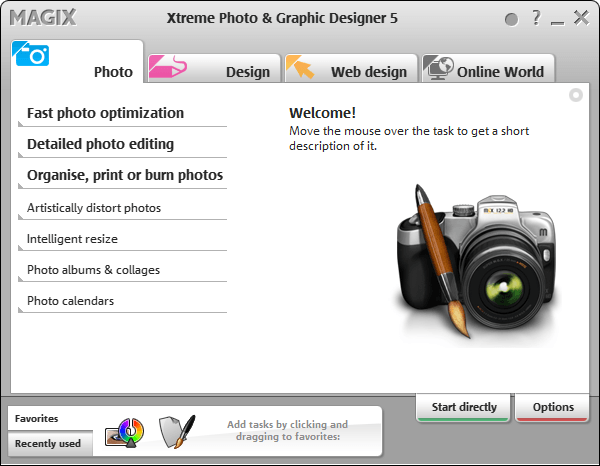
Free MAGIX Xtreme Photo & Graphic Designer 5 (Silver Edition)! [Limited time offer]

December 10, 2011 42 Email article | Print article

Note: This freebie was originally posted about in November 2011. That particular promotion of MAGIX Xtreme Photo & Graphic Designer 5 has ended but a new promotion for it is now live. So for those that missed it in November — this is your second chance. Sorry for any double notifications (e-mail/RSS/Twitter/Facebook/Google+)!

Software Description

The following is the description of MAGIX Xtreme Photo & Graphic Designer 5 as per the developer:

Image Editing

Enhance your pictures, enrich them with professional filters and effects, or design unique photo & graphics creations. Everything works on a non-destructive vector basis for professional results (original photos remain unchanged).

The integrated real-time image editing enables ultra-fast, loss-free editing of pictures – even for very large image files.

Creative Effects

Artistic image design: Painting, pencil drawing, canvas, crayon, pastel, wrinkled, television, fisheye, newspaper, waveform, shutters, and much more.

Photo caricatures: Use the “liquid paint” function to give cranky colleagues big ears, have a friend sport big muscles, or your boss look out from a frame with droopy eyes.

Turn your photos into graphics: The “Bitmap Tracer” vectorizes image files into lines and shapes that you can edit freely.

And much more

Illustrate, draw & paint

Discover the world’s fastest vector graphic engine and create graphic elements in real time. Enjoy next-generation graphic design throughout the entire process thanks to diverse drawing tools for freehand drawing (brush), shapes, graduated colors, fills, transitions, contour and relief effects, and easy drag & drop handling

  • Drawing tools & line gallery
  • Shadows & transparency
  • Color gradient & distortion

Text, layout & desktop publishing

Do you need nice titles on your photos for your album? Or would you like to design multi-page brochures to present your company? Take advantage of the unique design freedom and arrange elements any way you want.

Includes formatting, text flow around shapes and images, multilingual spell check, support for all installed fonts incl. live preview and find and replace function.

dotTech Advice

I am not very artistic person; for me to give advice on a photography/image editing program would be like an English professor teaching rocket science; yes, not pretty.

While I personally can’t evaluate this program, it has gotten some good reviews. However, when reading reviews, be sure to look up the reviews for v5 — the latest version of this program is v7 and many reviews are on that. v7 obviously has improvements over v5 so don’t be confuse the two.

Any right-brained dotTechies feel free to provide advice on this soft.

Freebie Details

MAGIX Xtreme Photo & Graphic Designer 5 (Silver Edition) is being given away in a promotion run by What Digital Camera. There is no information on if it is time limited offer nor is there information on if you can install/reinstall at a later date. My guess, however, is this is a time limited offer, hence why I marked this as a limited time offer in the title; I just don’t know how long this will be available. So grab this while you can, if you want it.

To get MAGIX Xtreme Photo & Graphic Designer 5 (Silver Edition) for free, do the following:

Version being given out for free: v5.0.406.1309

Free updates: No

Free technical support: Probably not

Supported OS: Not specified; it runs just fine on Windows 7 for me

Download size: 3.7 MB installation manager and 365 MB program

  • Download MAGIX Xtreme Photo & Graphic Designer 5. Take note you are downloading the MAGIX installation manager, not the actual MAGIX Xtreme Photo & Graphic Designer 5.
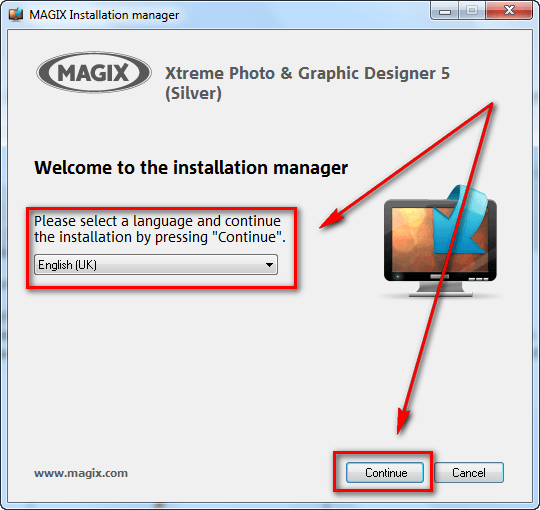
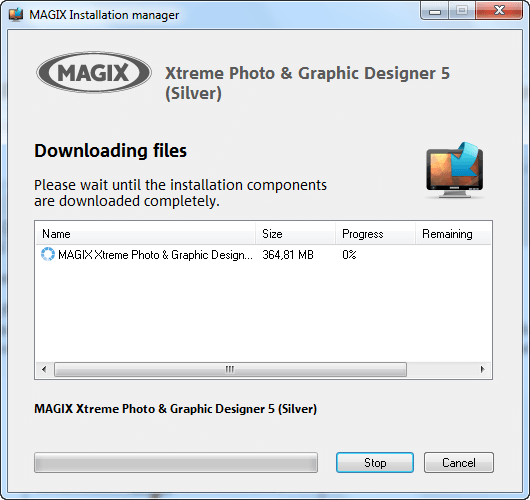
  • Once the download finishes, run the download manager. You will be asked to select a language, after which the download for the actual MAGIX Xtreme Photo & Graphic Designer 5 will begin:
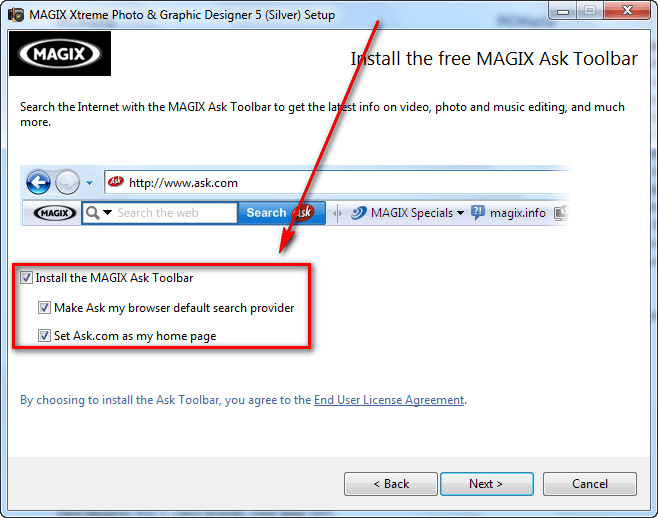
  • After the download finishes, install MAGIX Xtreme Photo & Graphic Designer 5. Take note it comes bundled with MAGIX Ask Toolbar, so be sure to unselect the toolbar during installation if you don’t want it (you probably don’t want it):
  • After installation MAGIX Xtreme Photo & Graphic Designer 5 should start automatically. If it doesn’t, run MAGIX Xtreme Photo & Graphic Designer 5 (Starter) from your start menu. When MAGIX Xtreme Photo & Graphic Designer 5 runs, you will be prompted to register the program. Click on the Register program button:
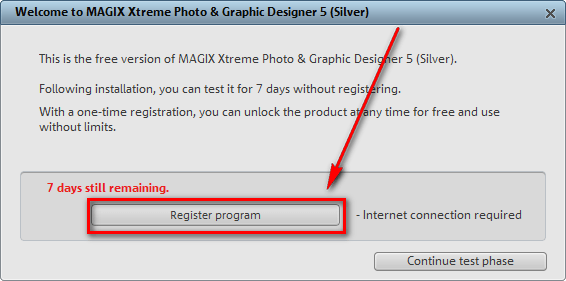
  • Once you click on the button, the registration page will open in your default browser:

If you have an account with MAGIX you can login with it. If you don’t, you will have to register a new account. If registering a new account, you will have to confirm it via e-mail before you can use it.

Follow on screen instructions until you are shown a confirmation message like the following:

  • Check the inbox of the e-mail address you registered with. Look for an e-mail from MAGIX register@magix.net with the subject of Your product registration at www.magix.com. In the e-mail you will find the registration code you need to use to register MAGIX Xtreme Photo & Graphic Designer 5:
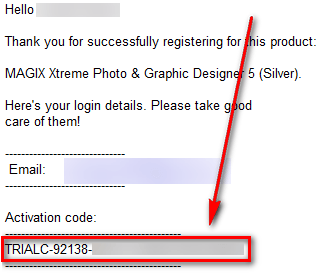
Copy the activation code.

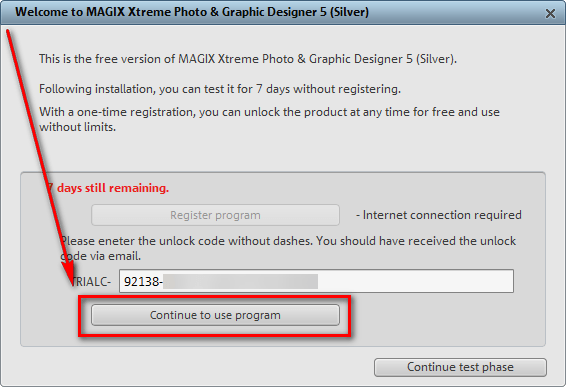
  • Go back to MAGIX Xtreme Photo & Graphic Designer 5, paste the code in the registration box (it will automatically take out the TRIALC part if you copied that), and click the Continue to use program button:
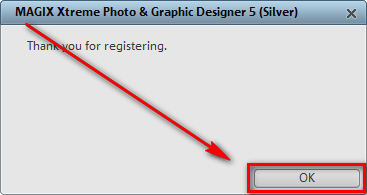
  • If you see the following success message, you are the proud new owner MAGIX Xtreme Photo & Graphic Designer 5:
If you have trouble getting MAGIX Xtreme Photo & Graphic Designer 5 (Silver Edition) post below and other dotTechies or I will try to help.

Enjoy!

42 Comments »

  1. leland November 10, 2011 at 12:56 PM (comment permalink) -

    If the key is missing go to the spam folder. When I first signed up with them last year that is where my key ended up. Once you mark it as “not spam” it should not go there again. Also keep your login info as they give stuff away at least once a year. Last year they gave away a video editor. It might not be the best but it works.

    26
  2. leland November 10, 2011 at 12:59 PM (comment permalink) -

    I downloaded it about a week ago so and it was working.

    I just started downloading it now again and it is working away in the background as I type this; no issues so far…

    27
  3. leland November 10, 2011 at 3:29 PM (comment permalink) -

    The download completed without issue. So it is still up and available.

    28
  4. leland November 10, 2011 at 3:31 PM (comment permalink) -

    To those having issues with AdBlock and NoScript. I did download it on a computer using NoScript. However for ad blocking I was Ad Muncher instead of AdBlock.

    29
  5. JonathanP November 11, 2011 at 10:40 AM (comment permalink) -

    @jayesstee

    Thanks for the tip. After I told NoScript to allow magix.com, the download worked.

    30
  6. SteveB November 12, 2011 at 5:42 PM (comment permalink) -

    Installed in Windows 7 64-bit but receive the “Trial Expired” message when I enter the emailed code. Anybody figured this one out yet?

    31
  7. mukhi November 14, 2011 at 4:28 AM (comment permalink) -

    i had a terrible experience with magix SW. i have once bought one magix ripper SW (free after MIR), never worked. it was hell of heavy as well.

    32
  8. Nevzat November 14, 2011 at 7:01 AM (comment permalink) -

    Ashraf, I wish you give the registration page url so that we don’t have to install the application. I just want to store it in case I ever need.

    33
  9. Robert December 10, 2011 at 5:59 PM (comment permalink) -

    looking forward to trying it…

    34
  10. Mary December 10, 2011 at 6:18 PM (comment permalink) -

    Wow, I was excited to see this program being given away! I already own Xara Xtreme Pro 5, and Xara 3D6, (which I purchased awhile ago) so seeing this program given away, I knew I had to download it.

    This is an excellent company [Xara Group Limited] and their products are high quality! I was a little surprised to see a big company give away one of their products!
    Here is their website:(US version)
    http://www.xara.com/us/

    If you scroll down to the bottom, you will see all their Magix products listed as well as their Xara products.
    No, I do not work for them! lol! Just a happy customer of theirs, and would recommend them to anyone!

    This loaded fine on Win 7/64. It did take a few minutes to download, but nothing too long that I got impatient!
    One thing I did notice though, that I will keep my eye on, is that the registration box still has the ‘TrialC’ before it, so I hope that it isn’t limited.

    I also noticed that as soon as my install was done, it showed an update was immediately available. I did not update it, and removed the update function in the program itself, just in case.

    I can’t wait to play around with this now! Thanks dottech and Xara!

    Mary

    35
  11. teo December 10, 2011 at 10:46 PM (comment permalink) -

    If it helps..
    When/after put the reg code for registering program, try to RESTART system and see if it works – is the program registered after that..
    IF it right, can someone post here the registration link for Magix’s site?!? Thnks

    36
  12. Pete December 11, 2011 at 2:47 AM (comment permalink) -

    Managed to download all, however registration supplied via email gives response trial expired.

    37
  13. Jay December 12, 2011 at 3:22 AM (comment permalink) -

    When I initially installed this program I got an an error message that says: “Dieses MSXML 6.0-Paket wird vom aktuellen Prozessortyp nicht unterstützt” = “MSXML 6.0 This package is not supported by the current processor type” If it doesn’t support a Core Duo a hell of a hot of us are in trouble! :0

    Anyway… I hit OK and the installation proceeded to finish; the program ran and took me to the website where I created an account. I received the unlock code and pasted it into the box and got a dialog message exactly like the one posted here saying “Thank You For Registering.”

    However, when I opened MAGIX Extreme Graphic Designer 5: I was informed that “The Trial Had Expired” exactly like many others here.

    Repaired the installation… same thing.

    Uninstalled – Rebooted – Reinstalled… same thing?

    Windows XP x64 – Intel Core Duo E8500

    38
  14. hatman December 12, 2011 at 3:57 AM (comment permalink) -

    Thanks Ashraf; Installed. Not time for testing though. File was over 300 mb. I can’t find anything in the program that says it is or is not registered.

    39
  15. njwood60 December 14, 2011 at 12:33 AM (comment permalink) -

    @KillNoise: Thanks for the heads-up on the fabs.exe service. I just realised it was running on my system and had the same problem with “access denied” when I tried to set the “start-up type” to ‘on-demand’. Instead of removing the whole registry key I just changed the value of ‘Start’ in the HKEY_LOCAL_MACHINE\SYSTEM\CurrentControlSet\Services\Fabs registry key from 2 to 3 (2 being auto start, 3 being on-demand start)

    It seems it’s only the photo-manager part of the software that uses the fabs.exe service and it had no problem starting the service after I had altered the registry key.

    40
  16. Watcher1924 March 17, 2012 at 11:20 AM (comment permalink) -

    For the people that might be interested, there is a new freebie which , according to Ashraf, is the same as this one. http://dottech.org/freebies/windows-freebies/28233/free-xara-xtreme-5-48-hours-only/
    I’m posting almost all of my comment from that page:

    I found this at Softpedia’s site:
    MAGIX Photo Designer (formerly MAGIX Xtreme Photo Designer) 7.0.1.1
    (http://www.softpedia.com/get/Multimedia/Graphic/Graphic-Editors/MAGIX-Xtreme-Photo-Designer.shtml)
    I have been quite confused but, if I got it right, it is one of the three program modules that consist today’s freebie (or another version of it, http://www.softpedia.com/get/Multimedia/Graphic/Graphic-Editors/MAGIX-Xtreme-Photo-and-Graphic-Designer.shtml). In the caption Photo Designer is mentioned as “free” but it’s basically ad-supported (though I think if we don’t mind the following we can use it):

    “Users are advised to pay attention while installing this ad-supported application:

    · Offers to change the homepage for web browsers installed in the system
    · Offers to change the default search engine for web browsers installed in the system
    · Offers to download or install software or components (MAGIX Ask Toolbar) that the program does not require to fully function”

    41
  17. skumaramigos May 18, 2012 at 10:34 PM (comment permalink) -

    dottech is always ahead in giveaway than rest like Tipradar

    42

Leave A Response »