How to switch from Outlook.com to Hotmail [How-To Guide]
August 7, 2012 575
Email article | Print article
Outlook.com is a new free web e-mail service by Microsoft intended to replace Hotmail. Using Outlook.com can be done by creating a new Outlook.com account or upgrading your existing Hotmail account to Outlook.com. If you have used Outlook.com and decided you want to go back to Hotmail, that can be done easily. This guide shows you how to do it.
Before We Begin
Before we being, take note going from Hotmail to Outlook.com does not change your e-mail address. This means if you created a new @outlook.com e-mail, that e-mail will stay with you when you go to Hotmail; if you converted your Hotmail account to Outlook.com, you will still retain the same Hotmail e-mail when you go back.
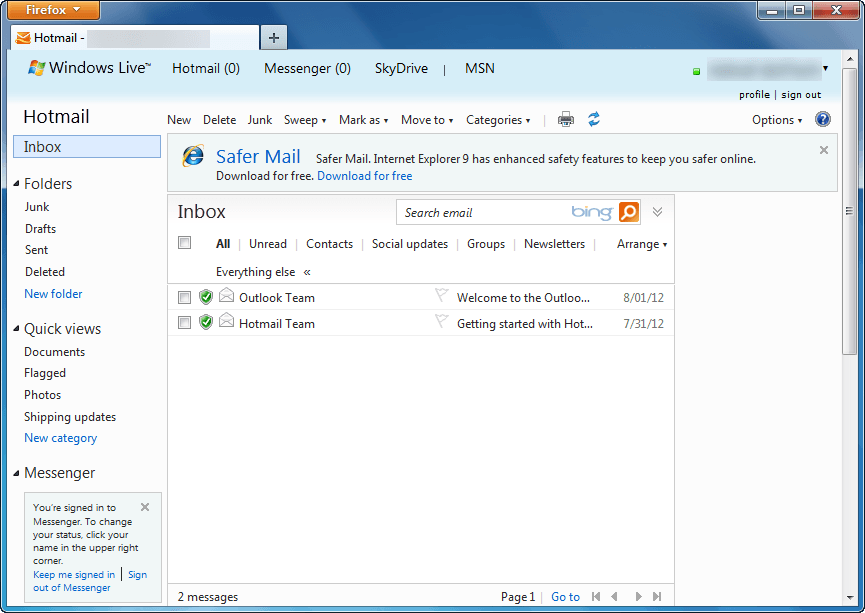
Also, downgrading from Outlook.com to Hotmail does not result in loss of data. All your e-mails, contacts, folders, etc. are converted with you. The only thing that changes when going from Outlook.com to Hotmail is the user interface; you get the old Hotmail inbox and features back.
Lastly, if you were forced to upgrade to Outlook.com from Hotmail, you cannot revert back to Hotmail. Going from Outlook.com to Hotmail is only for those people that voluntarily upgraded.
UPDATE: It looks like Microsoft is no longer allowing people to revert back to Hotmail from Outlook.com. Sorry people — you are stuck with Outlook.com, you cannot change back!
How To Go Back To Hotmail From Outlook.com (How To Turn Off Outlook.com)
The following are the steps you need to take to covert your Outlook.com account to Hotmail:
Note: To enlarge any images below, simply click on them.
- Login to Outlook.com.
- Once logged in, you will be taken to your Outlook.com inbox. From there click on the gear icon located near the top-right corner:
- Clicking on the gear icon will open a menu. From that menu click on Switch back to Hotmail:
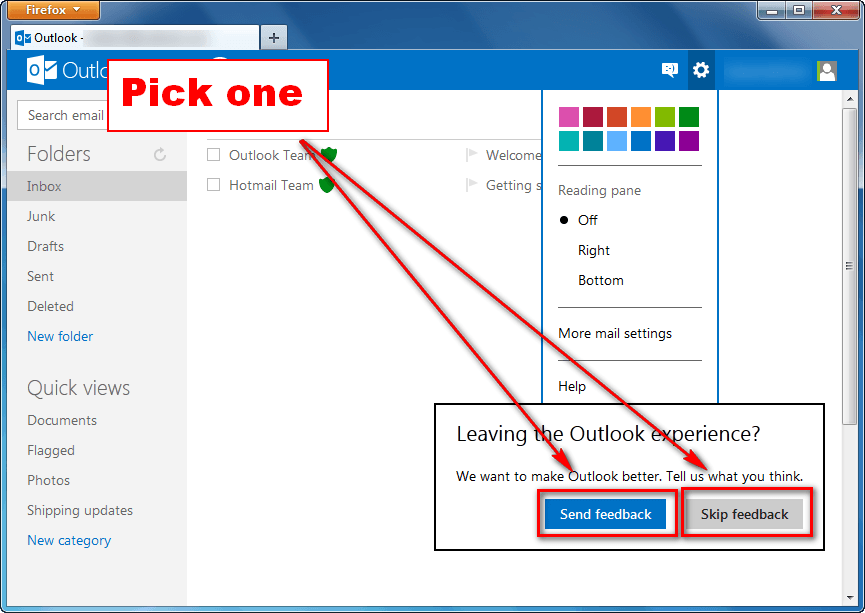
- Next you will be prompted with a message asking for feedback. If you want to provide feedback, click on Send feedback; otherwise, click on Skip feedback:
- Done.
If you opted to send feedback, you will be asked a series of questions after which you will be taken to Hotmail; if you opted to not send feedback, you will be taken directly to Hotmail:
Conclusion
Switching between Hotmail and Outlook.com is very easy and dotTech’s two guides How To Upgrade From Hotmail to Outlook.com and How To Switch from Outlook.com to Hotmail make the process even easier thanks to our step-by-step directions with screenshots. So go, venture into the world of Microsoft e-mail without fear of permanent change. Enjoy!






![Microsoft uses Siri to bash the iPad, again [Video]](http://cdn.dottech.org/media/2013/06/microsoftad-134x90.jpg)

![Google employee quits to work at Bing; his Google co-workers gave him this cake [Image]](http://cdn.dottech.org/media/2013/06/google_cake-134x90.jpg)
[@ALAN SHEEHAN.]
I tried with no success…microsoft is saying there is no way to change back….she was respectful and said she would pass on my complaint…..this does SUCK!!! Thanks for your help Alan, nice to know there are still people out there that care!!
You are welcome Ellen,i know its a crappy/ugly and
userunfriendly System,but its what everybody is stuck
with unless they find another provider.There are many
out here who do care about what others are going
through with this interference in what they used to
find comfortable/friendly&familiar with..what can one
say-C’est la Vie.Help is at hand from many people.
Best wishes-Alan.
Don’t understand what’s wrong with Microsoft these days. Outlook.com is HIDEOUS compared to Hotmail, Win8 is an ugly box of crap compared to W7…
They’re moving away from anything that looks pretty, and nearly moving away from anything sensible.
When I wrote this article, I had no idea it would attract so much attention. Thank you to all that have been commenting and providing assistance to others, including KF, Alan, and co
Have to agree with you Kendra. I don’t like Outlook, but it is their (msn) service. We, the NON-PAYING users, have only one right: To Switch or not. I haven’t, because, with all its many faults, Outlook still seems to me better than any alternatives I have tried. While the look is very different, and some aspects take a bit of figuring out, and at my age, are hard to remember, Outlook is not so different from Hotmail. And I remember getting annoyed every time Hotmail changed its look and I had to get used to it all over again – and that happened many times over the last 15 years. There are those of us who have managed to find our way around Outlook, and if any of you need help and have specific questions, we can give you the benefit of our experience. Remember, there are many (frustratingly) hidden dropdown windows – behind arrowheads, ellipses, icons and what have you. Once you find them, and can remember where they are, using the site is much less frustrating.
[@Glenda Kanashige]
GK
Thanks. It is as much personal preference as anything. I have to support Outlook.com, GMail, Yahoo, and a couple of others. One main reason MS is changing to a stripped down Hotmail is because of win 8 and that tie in makes it a certainty.
May I suggest Outlook.com support here http://answers.microsoft.com/en-us/windowslive/forum?tab=unanswered
Damn the CHANGE!!
My father is having a terrible time dealing with Outlook…
It took him long to get used to the Hotmail interface, now he has to start again….sigh
Jules,Nil Desprandum pal…if you cant solve any of his
problems,get him to post on doTech,there are more
than enough posters here to help to set his mind at
rest,regards-Alan.
outlook sucks x10 !! Did msn have a tard-moment or what?
We NEED to be able to change back, especially since we were FORCED into outlook!! :(
[@Jules] [@ALAN SHEEHAN.]
there should be an option of reverting back to hotmail and one should not be lumped with outlook if they dont want to.
my mails from outlook are not reaching the concerned person plus the to column the entire email id does not show just the name of the person you are sending mail to.
outlook sucks…
Unfortunately, Hotmail, like a lot of products, is being discontinued by the provider, so we have no choice.
As to one of your problems, if you click on the name in the To panel, the e-mail address opens up. Not as convenient as Hotmail, but………….
As far as I can tell, all my e-mails are reaching the recipients safely, but I can’t be 100% certain.
Tip
Click the “to” button once it gives you favorites, twice gives you all. Click on the “#” sign in “to” and you get the whole alphabet.
Tip 2
Use windows live mail to back up your data. You will wish you had.
[@Kendra farns]
Kemdra, you said it before and I asked then how do you backup your Hotmail (or your Outlook) data, using Windows Live or any other means. I guess my question became lost in the shuffle, so I’m bringing back and I would appreciate any help you or Alan could provide for that purpose. I’m a computer moron, so I would need detailed info.
Thanks in advance for your patience.
[@Kendra farns]
I WILL STOP THIS THREAD AND START ANOTHER ON JUST HOW TO MOVE FROM OUTLOOK ”
Hello- I am watching the thread and deleting a lot as I am filtering past my stage of what the —- and because 15yrs have past with no worries and now they are upon us—— I am a newbie to saving or backing up- Gmail has my favorites list GREAT! one down and all my folders at the left and 300 plus emails in my in box- to go TO ANOTHER——- How does it work?
I don’t want to email anyone except save my own info where I can get to it -thru another provider- How can I fwd all my (inbox) emails at once to my backup provider— Thanks for help- what bad timing to have such another problem to deal with—–
Kendra,please make sure you say where and what
the new thread is,don’t forget..there may be some
people out there who may come up against this
Scenario:-2 people talking “Have you any problems
with this new Outlook nonsense”? 2nd person-”Yes
& its driving me nuts”! 1st person-”I had some at 1st
but they were solved for me-check this out=doTech.
2nd person-”Thanks,i will”—–What does the 2nd
person find when he/she gets here-NIX!,everybody
has GONE,cheers-Alan.
Alan
Sorry but I am not starting a new thread.”h” is and if he/she puts a link to it I will be happy to post directions for backing using Windows live email client.
Really nice post of you Ashraf !
I have done its so simple to convert .Is it possible for the Yahoo.
Hello H here
- Scuze-
First off I really didn’t explain myself correctly .
I would like to keep outlook as long as I know my information can be backed up elsewhere (for using and to secure that info)
my emails;;; my folders on the left;;;; and contacts- yet I really would like to save- fwd like mass or all? -can you explain how please…… That’s the only reason I thought to start another thread on back-up info to use elsewhere that’s all cuz – hey I still don’t know how to do this -It has been asked over and over and I don’t get a clear instruction step to follow…. then I will stay w/outlook as a minor level usage as it can offer quality connect say like skydrive etc…. hope this is more clear of a request… time is a runnin
thanks ahead —- hlovedhotmail
Revised- correction-
save- fwd like mass or all?
(((((( Emails in my inbox))))))
thnx again hlhtmail
Hi,
I upgraded my hotmail account to outlook but, I very much like hotmail rather outlook.
Now, I don’t get option to convert/goback to hotmail.
It really SUCKS.
I appreciate if microsoft give me the option goback to hotmail. Otherwise, I have move my contact to gmail and I will close my hotmail account.
Srini
While it may make you feel better by voicing your opinion Microsoft has clearly said it is not going back
i dont have any option of go back to hotmail..what to do?
S,You only have 2 options..1/.get a new provider and
ask around about any problems with same.2/.Stick
with Outlook and ask others here and elsewhere how
to find your way around Outlook,cheers-Alan.