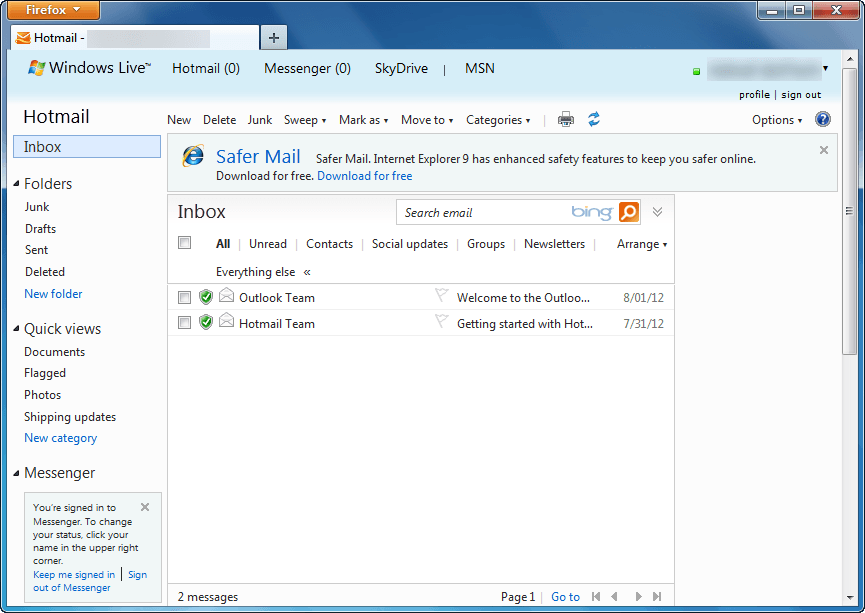
How to switch from Outlook.com to Hotmail [How-To Guide]

August 7, 2012 575 Email article | Print article

Outlook.com is a new free web e-mail service by Microsoft intended to replace Hotmail. Using Outlook.com can be done by creating a new Outlook.com account or upgrading your existing Hotmail account to Outlook.com. If you have used Outlook.com and decided you want to go back to Hotmail, that can be done easily. This guide shows you how to do it.

Before We Begin

Before we being, take note going from Hotmail to Outlook.com does not change your e-mail address. This means if you created a new @outlook.com e-mail, that e-mail will stay with you when you go to Hotmail; if you converted your Hotmail account to Outlook.com, you will still retain the same Hotmail e-mail when you go back.

Also, downgrading from Outlook.com to Hotmail does not result in loss of data. All your e-mails, contacts, folders, etc. are converted with you. The only thing that changes when going from Outlook.com to Hotmail is the user interface; you get the old Hotmail inbox and features back.

Lastly, if you were forced to upgrade to Outlook.com from Hotmail, you cannot revert back to Hotmail. Going from Outlook.com to Hotmail is only for those people that voluntarily upgraded.

UPDATE: It looks like Microsoft is no longer allowing people to revert back to Hotmail from Outlook.com. Sorry people — you are stuck with Outlook.com, you cannot change back!

How To Go Back To Hotmail From Outlook.com (How To Turn Off Outlook.com)

The following are the steps you need to take to covert your Outlook.com account to Hotmail:

Note: To enlarge any images below, simply click on them.

  • Login to Outlook.com.
  • Once logged in, you will be taken to your Outlook.com inbox. From there click on the gear icon located near the top-right corner:

  • Clicking on the gear icon will open a menu. From that menu click on Switch back to Hotmail:

  • Next you will be prompted with a message asking for feedback. If you want to provide feedback, click on Send feedback; otherwise, click on Skip feedback:
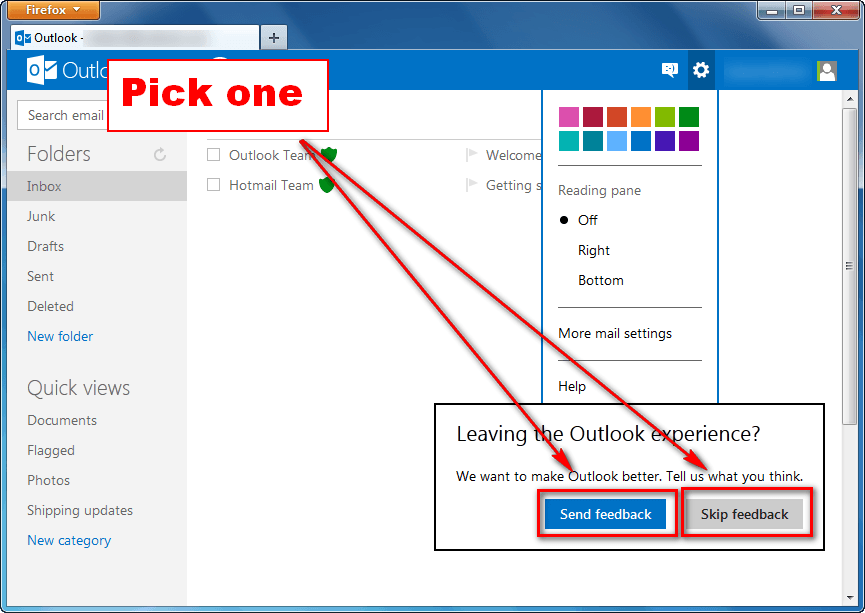
  • Done.

If you opted to send feedback, you will be asked a series of questions after which you will be taken to Hotmail; if you opted to not send feedback, you will be taken directly to Hotmail:

Conclusion

Switching between Hotmail and Outlook.com is very easy and dotTech’s two guides How To Upgrade From Hotmail to Outlook.com and How To Switch from Outlook.com to Hotmail make the process even easier thanks to our step-by-step directions with screenshots. So go, venture into the world of Microsoft e-mail without fear of permanent change. Enjoy!

575 Comments »

  1. brlan December 31, 2012 at 6:34 AM (comment permalink) -

    Microsoft,the customer is king. Do as we ask or we go else where!!

    101
  2. brlan December 31, 2012 at 6:37 AM (comment permalink) -

    Microsoft,the customer is king. Do as we ask or we go somewere else.

    102
  3. JOhn January 5, 2013 at 2:06 PM (comment permalink) -

    Thanks. Hated outlook in hotmail even though i use it everyday at work.

    103
  4. Bill January 13, 2013 at 4:09 PM (comment permalink) -

    I use Micorsoft Hotmail for all my email and I LOVE IT!!

    I NEVER EVER want to ‘UPGRADE’ to Microsoft OUTLOOK!!!!!!!!!!!!!!!!!!!!!

    I asolutely HATE it when I accidentally click on the many adverts for Outlook – and it AUTOMATICALLY UPDATES ME TO OUTLOOK without any prompting or option to cancel!! I have to go in manually and reset it to Hotmail.

    How can I set my system to NEVER upgrade to Outlook? Why does Microsoft not accept any feedback on the subject, and why can we not contact the ‘Outlook Team’ to send our views??

    I want to stay with Hotmail as long as I live, and never ever use Outlook.

    104
  5. brian January 14, 2013 at 1:00 AM (comment permalink) -

    >: microsoft take note

    105
  6. Holly Hutchins January 16, 2013 at 11:51 AM (comment permalink) -

    @Bill:
    Bill, my wife was automatically switched to Outlook and she, too, hates it. But when we went to the gear icon, there was no choice to switch back. Any other suggestions on how to get her back to Hotmail?

    Holly

    106
  7. Kendra farns January 16, 2013 at 12:02 PM (comment permalink) -

    Guys

    It is all over but the shouting. None of us likes it, but what is the alternative. The same thing happened with windows 8. Yahoo, and Gmail have more problems than HM

    107
  8. olga January 23, 2013 at 1:54 AM (comment permalink) -

    @Bill:

    I agree with you I HATE THAT OUTLOOK . . . all you mention is true, I had to go to an Internet Café and I think they automatically transferred me to that horrible Outlook. I wrote 2 complains with my identification to Outlook comments but NOBODY ANSWER ?

    108
  9. christopher dyall January 24, 2013 at 5:41 PM (comment permalink) -

    my hotmail account randomly switched to outlook, i have no idea how this even happened and now nothing works, i cant see my own email or click the gear icon. are there anyways i can remove this crap from my email? or do i have to create a new one just to get away from outlook, im not even sure how i will even do that because NOTHING WORKS NOW.

    109
  10. Richard January 25, 2013 at 12:47 PM (comment permalink) -

    cant even get to the hotmail page. it switches to https://dub002.mail.live.com/default.aspx?id=64855&owa=1&owasuffix=owa%2f

    Access Denied

    You don’t have permission to access “/D/864/193170/000/sslcachekey.bayw.mail.live.com/default.aspx?id=64855&owa=1&owasuffix=owa%2f” on this server.
    Reference #18.6c15434d.1359146711.15580b8c

    HELP PLEASE

    110
  11. Richard January 25, 2013 at 12:58 PM (comment permalink) -

    sorted a filter in comodo was blocking it

    111
  12. Bill January 25, 2013 at 6:09 PM (comment permalink) -

    Why does your Hotmail randomly switch to Outlook? On my Hotmail inbox page there are usually several big blue adverts for Outlook, including a large banner advert on the right. Its all too easy to click on this advert, and if I do – my screen freezes, a message appears at the top saying: ‘We’ve updated Hotmail, so please refresh your browser or close it and sign in again’ (no mention of Outlook, note!)

    When I refresh or sign in again – you’ve guessed, I’ve been ‘updated’ to Outlook. No warning, no option, just WHAM your Hotmail is gone!

    Interesting that no other company would get away with treating their customers like this, they’d probably get hit by a lawsuit. But because we get Hotmail for free, they can do what they like. They could pull the plug on us at any moment and we could do nothing about it.

    How do I get back to Hotmail? I don’t have the gear icon on my screen. But I have found that a friend with a newer system (Windows 7 or 8 i think) does have the gear icon. So I have to take a trip 2 miles down the road, log in and change back to Hotmail using his gear icon. Then back to my house, log in again and my Hotmail is back – yippee!!

    Now I’ve done this too often and so have opened a new account with another provider, and am in the process of changing over all my contacts and address book. A tedious process as I’ve been with Hotmail for 20 years and use it for all my business and personal work and have a huge archive. I’ll miss Hotmail, but worthwhile if I never see Outlook again.

    112
  13. Kendra farns January 25, 2013 at 6:21 PM (comment permalink) -

    @Bill
    What ever you do will be temporary. MS is upgrading everyone over the coming weeks (their phrase) and when it is finished nothing will be able to revert you back to Hotmail. You might want to check the only legitimate support for Hotmail. It is Community.microsoft.com.

    I can tell you here (cant there of course) there are Firefox addons that can prevent the ads, and lock the interface IF they are in ace before you are changed.

    113
  14. Gary January 25, 2013 at 6:24 PM (comment permalink) -

    @Bill: Same exact thing happened to me ,in the same exact way. I too have been with Hotmail for yr’s & use for all my contacts. I will go to the local Library tomorrow,sign in & see if I can switch back. I will the also export my contacts,etc. to another provider & shut down Outlook. They can KMA!!!
    Thanx for thei nfo. Bill.

    114
  15. MN January 27, 2013 at 5:24 AM (comment permalink) -

    I don’t have the Options icon, Go back to Hotmail. Anyone can help me out please?

    115
  16. Glenda Kanashige January 29, 2013 at 6:54 AM (comment permalink) -

    I, too, tried Outlook. I, too, hated it. I was able to switch back to Hotmail, but now, when I reply to an e-mail, the e-mail shows up in my inbox with my name and with the reply attached, and if I try to reply to the same person again, the e-mail goes to me. Each reply is added in front of the previous e-mail. It is annoying, frustrating and a pain in the touchas. Anything I can do to fix it back the way it was?

    116
  17. King February 8, 2013 at 5:50 AM (comment permalink) -

    dear friends..

    I want to back to hotmail.. as mentioned above to click on gear which give u option of switch back to hotmail.. but this option is present in my outlook gear..

    any help and suggestion please

    117
  18. Hates the new outlook February 11, 2013 at 3:03 AM (comment permalink) -

    Some how my hotmail switched to outlook, it is slow, tabs is out of place and not working at all. Thanks for the years of hotmail, it might be time to not use it any more if this is not fix soon.

    118
  19. Kendra farns February 11, 2013 at 4:59 AM (comment permalink) -

    @King
    If you were auto-updated there is no option to revert

    @hates
    Optimize your browser-delete your cookies

    @everyone
    Outlook as bad as it is, is here to stay. Google and Yahoo are doing the same (and having the same problems)

    119
  20. Hal February 11, 2013 at 7:28 AM (comment permalink) -

    @Kendra farns:

    would love to find out more about the Firefox add-ons….like you were speaking of…….have not been lucky in looking
    Anything you could add would be greatly appreciated
    thanks

    120
  21. Kendra farns February 11, 2013 at 12:50 PM (comment permalink) -

    Hal

    The No-script add on prevents them but a better solution is to use this user add-on as it both removes the ads and reclaims the space

    http://userstyles.org/styles/15137/remove-hotmail-outlook-ads-2012

    Good luck

    121
  22. Bhadresh February 14, 2013 at 4:45 AM (comment permalink) -

    I am also not getting “switch back to hotmail” option then what should i do?

    Please give me option if anybody find it again..

    122
  23. ANNA February 14, 2013 at 11:37 AM (comment permalink) -

    What a primitive site— back to the dark ages—- some one has been thinking out side the box again —- HA HA HA ———- STUPID BOY/GIRL

    123
  24. fuck February 14, 2013 at 2:26 PM (comment permalink) -
  25. Kendra farns February 14, 2013 at 4:07 PM (comment permalink) -

    @Bhadresh

    If you were auto-upgraded there is not option to revert. All Hotmail users will be “up-graded” within the next month or two.

    125

Leave A Response »