Free jv16 PowerTools 2009!

2009-12-01_105601Everyone knows about Tuneup Utilities, WinUtilities, Glary Utilities, WinOptimizer, and Advanced SystemCare. However, only a handful, lucky few know about jv16 PowerTools. That is a relative shame because jv16 PowerTools is a powerful, reliable, and feature filled system utility/optimizer similar to the other five I just mentioned. Well no worries; let me introduce you to jv16 PowerTools and then I will tell you how you can get jv16 PowerTools 2009 for free!

As already mentioned, jv16 PowerTools is powerful, and feature filled:

Main Tools

What is not mentioned in the list above is the fact that jv16 PowerTools has a backup/restore system which has you covered in case you delete something, like a registry entry, that you were not supposed to delete.

So are you interested yet? Well this is how to get jv16 PowerTools 2009 for free:

Version being given away for free: v1.9.0.590

Note: The latest version is v1.9.0.606. I was unable to successfully update to the latest version. So if you are ever told to update to the latest version, decline to do so.

Supported OS: Windows 2000/XP/Server 2003/Server 2008/Vista/Win7

  • Visit the promotion page and click on 2009-12-01_110807.
  • Download it.
  • After it finishes downloading (it is 5.9 MB), unzip it. Update: If you are having trouble unzipping it, download and install 7-zip and try again.
  • Open the folder you unzipped it to. A folder named "jv16PowerTools2009" should be located there. Open that folder. In that folder there will be two files:

2009-12-01_1034152

Double click on "jv16pt_setup_hb" and install jv16 PowerTools 2009.

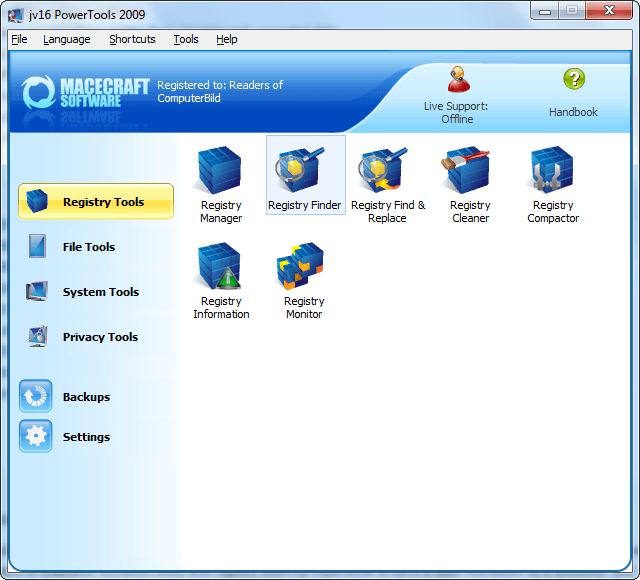
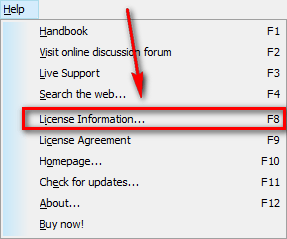
  • After installation run jav16 PowerTools 2009. There will be a short wizard for you to work through. Go through it (don't just click through it; the wizard is for some important house keeping things). Once you are at the main program window, click on "Help" -> "License Information":

2009-12-01_103851

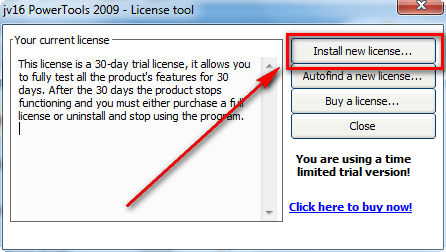
  • Hit the "Install new license..." button:

2009-12-01_103939

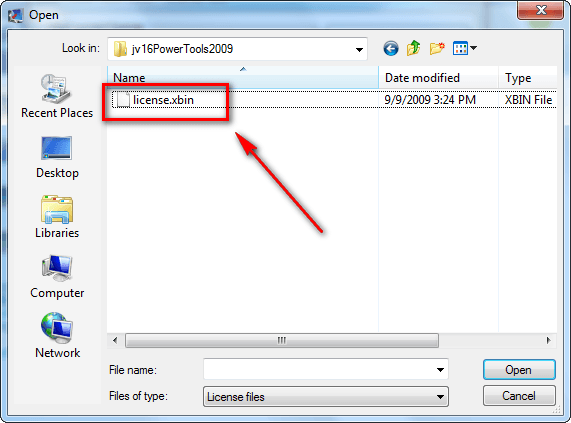
  • Navigate to the folder where you unzipped jv16 PowerTools 2009, find the "License.xbin" file, select it, and hit "Open":

2009-12-01_104003

  • Now you will be told to restart jv16 PowerTools 2009:

2009-12-01_104026

Restart jv16 PowerTools 2009.

  • Enjoy! Now you have a fully registered and functioning jv16 PowerTools 2009! Remember, it does not seem like this comes with free updates so don't try to update to the latest version.

Post below if you have trouble getting this freebie - I will try to help.

[via For-Free-On-Internet.com]

About the Author, Ashraf:

Ashraf is the founder of dotTech. Ashraf spends insane hours on dotTech (usually writing articles but sometimes doing absolutely nothing except staring). Yes he is weird, but he is also very friendly.

45 Responses to “ Free jv16 PowerTools 2009! ”

  1. 1
    December 1 2009 at 12:01 PM
    Numsekrummen.dk

    This is what im looking for thnx for the work. Had no problems installing it

  2. 2
    December 1 2009 at 12:07 PM
    Ron

    Excellent software, Ashraf! I’ve been using it since it was freeware. In 2005 or 2006, Jouni Vuorio (JV) released the first commercial Power Tools version. I didn’t hesitate for a minute. Since then, he and his partner/spouse Jani have formed Macecraft in Finland to handle distribution, etc. As you might expect, I have a 5-computer license for 2009. It’s an indispensable tool, imho.

  3. 3
    December 1 2009 at 12:10 PM
    Helmer

    I am a paying customer of jv16 since years back, and was even using it back in the days when it was free. I regret to say that the 2009 version by no means meet the standards from earlier versions. From the very first release of the 2009 verion there has been numerous bugs, especially if you are using a x64 Windows version. It somewhat hurts to say this because i´ve always been a fan of this software, but i really can´t recommend it for use with x64 systems.

  4. 4
    December 1 2009 at 12:33 PM
    Doug Jones

    Very nice utility package! Thanks again, Ashraf!!

  5. 5
    December 1 2009 at 12:38 PM
    Youngatheart1946

    G’day from “downunder” Ashraf,
    what an awesome piece of software. Installed without a hitch(as per your directions)….as usual I might add!! Keep up the great work you do for us “technically deprived” computer users. Without such hard working and concerned folks like yourself the internet and computers in general would be fraught with dangers. Once again Ashraf…Thanks MATE!

  6. 6
    December 1 2009 at 12:47 PM
    John

    A great find and a big thank you. I hope I don’t experience the bugs that the last poster alluded to.

  7. 7
    December 1 2009 at 1:12 PM
    Ron

    @Helmer:

    Sorry to hear you’re having problems. I’ve only run 32-bit on my machines, so I’m afraid I have no points of reference. Have you emailed Jouni about this?

  8. 8
    December 1 2009 at 1:45 PM
    Joshua

    Hey Ashraf,

    Would you say this program beats CCleaner?

    Thanks for yet another terrific freebie!

  9. 9
    December 1 2009 at 1:53 PM
    Maurizio

    Great find, really appreciate. Easy installation, like a charm.
    Thanks Ashraf.

    Maurizio

  10. 10
    December 1 2009 at 2:22 PM
    Ashraf

    @Everyone: You are all very welcome.

    @Helmer: To be honest that is the first time I heard anything remotely negative about this software. So thanks for being honest and for the warning.

    @Joshua: In terms of registry cleaning and privacy cleaning? I am not 100% sure – I would have to sit down and compare them side by side to find out for sure. However it is worth noting jv16 PowerTools 2009 has a lot more tools/features than CCleaner.

  11. 11
    December 1 2009 at 2:35 PM
    Frank

    Thnx Ray,
    But I seem to have a problem; the :license Tool” window tells me that I have a 30 day trial???

  12. 12
    December 1 2009 at 2:36 PM
    Pehr Lundgren

    Thank you very much for a free update to my favourite Windows utility suite. I have used jv16PT since it had another name and was free. Then I became a paying customer and tried to hang on to new updates by being a Beta tester, but failed. So happy to receive this, THE GOLD STANDARD of registry cleaners.

  13. 13
    December 1 2009 at 3:44 PM
    David Roper

    When this was Freeware in the old days, before he started charging for it, It was my “go To” Utility.

    If you had this one, Irfanview, and a text editor named (Sammie’s) “e” you were king of your 512k PC.

    This is a great giveaway indeed. Thanks for finding it for us “DotTechies”.

    Now, where is my glass cane? There it is… oops. nevermind.

  14. 14
    December 1 2009 at 3:47 PM
    dirigo

    This is my first go-around with jv16 so don’t have extensive experience with it, but, that far, it has been fairly smooth sailing. I say “fairly”, as only one day usage is not a real test, but it is very easy to use. Have not tried all the functionality, but will do so. If I experience any glitches, I’ll report back. Thanks to Ashraf and the jv16 developers for giving me (and others) the opportunity to try it out extensively over the true test of time.

  15. 15
    December 1 2009 at 4:34 PM
    macmov

    I am having a problem with the Licensing tool also.it opens another window of the program and It will not register,

  16. 16
    December 1 2009 at 7:13 PM
    Don McDonough

    Askraf:
    Can’t seem to open “license Xbin” zip on my computer.
    Could you suggest a solution?
    Many thanks!
    Don

  17. 17
    December 1 2009 at 7:25 PM
    macmov

    @macmov: Just in case anyone else is having this problem, you have to move the license folder to your desktop and it will work.

  18. 18
    December 1 2009 at 7:37 PM
    Linda Bellefontaine

    Great program, thanks! I am in the process of setting it but I need to know if this license covers only 1 PC or more.

    And I thought I would let you on a little trick I learned today. Translate Any Web Text on the Fly with a Bookmarklet http://lifehacker.com/5415184/

    But the “cat’s pajamas” is this…… To English Bookmarklet Quickly, Easily Translates Any Text with One Click – Language Translation – Lifehacker – http://lifehacker.com/5168984/to-english-bookmarklet-quickly-easily-translates-any-text-with-one-click

    It translated the entire jv16 page with ONE click. Totally awesome!

  19. 19
    December 1 2009 at 8:04 PM
    ZoeS

    I use Glary Utilities and it’s great.Have no plans to change to another program yet!

  20. 20
    December 1 2009 at 8:05 PM
    ZoeS

    I use Glary Utilities and it’s a great program. So far, I have no plans to change to other ware.

  21. 21
    December 1 2009 at 8:29 PM
    delenn13-Linda Bellefontaine

    Grr, I hate autofill when I am tired. Nevermind, I just installed it and you can install up to 5 computers.

  22. 22
    December 1 2009 at 8:45 PM
    Alalata

    Thank you very much for this excellent software, Ashraf

  23. 23
    December 1 2009 at 9:01 PM
    Helmer

    I am glad to see that so many appreciate this great freebie and as i said i´m a great fan of this piece of software so i basically agree that it is a good one. Nevertheless, this 2009 version had all kinds of problems when it was released and that is also well documented on the support forum for those that want to read up on it.

    The main disappointment for me was the poor performance on x64 systems, even it is said to be fully compatible. It was mainly the registry clean function that had huge problems with the x64 part of the registry if i recall correct.

    To be honest i´ve not been using it since i went Windows 7 and according to Jouni (the author) it´s not optimized for it yet and will not be until version 2010 is released. Meanwhile i´ll use something else, but i will wait some time before i renew my license when the new version comes out.

    As i said, it´s a great piece of software when it works as intended, so people with no problems should of course enjoy the great giveaway. It´s a “swiss knife” with all it´s features and the support is more than excellent. I know that Jouni and the team has been working as hard as a one legged man in a butt kicking contest to rectify the problems and the program might be much more “mature” now, i don´t know. I have the latest 1.91.606 version installed but never uses it. So thank you Macecraft and Ashraf, this IS a good program even if the 2009 version didnt meet my requirements.

  24. 24
    December 1 2009 at 10:22 PM
    Steelers6

    This is great, I’m putting together a nice USB portable drive for a family member.

    JVTools is great for the USB and you can make it into a PAF file as well.

    I’ll certainly make good use of this.

    Vidimo Se!

  25. 25
    December 1 2009 at 11:48 PM
    Obajoshi

    So far it seems like the system optimizer is only configured for Windows XP and Vista and not for Windows 7. I will still keep Perfect Utilities until they fix the compatible issue.
    Anyway muchas gracias to Ashraf and the dotTech team for such awesome software.
    Adios!

  26. 26
    December 2 2009 at 12:58 AM
    Adder

    I haven’t used JV16 Power Tools for quite a few years now, but I’m sure if it does have some bugs, the authors will correct them. JV16PT has been around since the mid ’90s and I used it exclusively for many years. I’m not even sure why I stopped using it, although being a download & utility junkie, I probably switched to something else that caught my fancy and just never re-installed it after a tri-monthly OS re-install. o.O

    I believe I even have an old utilities floppy that was used with the 1stEd Win95 that had JV16PT included on it. I may have to dig it up to verify that for myself (I never throw anything away – I’m the king of Packrats). LOL

    Anyway, thanks Ashraf. I think I’ll download it and give it another spin on my Vista laptop before I finish my new custom puter build which will be running Win7 as the main OS. :)

  27. 27
    December 2 2009 at 3:59 AM
    Nacho

    Lot of thanks, Ashraf

  28. 28
    December 2 2009 at 7:38 AM
    7th Hokage

    Thank you Ashraf for your info about this neat ol’buddy proggy, I haven’t used this since macecraft was born ^_^. Thanks.

    For those who couldn’t install the license included (jv16 keep saying it’s 30 days trial), please try this steps.

    Close jv16PT, then copy your ‘License.xbin’ directly into your installation folder and delete all ‘Old license……..’
    Restart jv16PT.

    Hope this helps.

  29. 29
    December 2 2009 at 11:21 AM
    mofo

    bad tool.. it maked my pc unstable when cleaned registry.. all games losed serials etc… i made backup file but cant restore those things.. sry bad english.. now i have to reinstall my windows. sh*t application.. f**k sake

  30. 30
    December 2 2009 at 8:18 PM
    karen

    If you are having trouble with the Install New License, you can put the license file on the desktop and click the Autofind License button.

  31. 31
    December 4 2009 at 1:10 PM
    buyerbeware

    Great stuff. I’m new to this site, but find most of Ashraf’s information to be on point and very informative. I found GAOTD about six weeks ago and have relied on his insightful reviews before installing the restricted-license software offered there. to add to the post by karen, the license can also be dragged and dropped from the unzipped folder. Thanx.

  32. 32
    December 6 2009 at 1:37 PM
    Todd

    Howdy,

    I have been using “Tune up Utilities” and see that “JV16″ is a similar program (per description up top). My question is, which is better?

    Thanks

  33. 33
    December 9 2009 at 11:34 PM
    sos4ever

    Quick question. Anyone running Windows 7 have it work ok with registry cleaning?

  34. 34
    December 13 2009 at 6:25 AM
    Greg Bernrd

    lic is in xbin ext file and I can not open . searching web for cure.wish was in better ext so not to look for way to open.

  35. 35
    December 13 2009 at 7:13 AM
    Greg Bernard

    found answer in forum, it is the lic not a key number paste this xbin file into blank.

  36. 36
    December 16 2009 at 5:47 PM
    socal70xr7

    It worked fine until I clicked the update/upgrade and tried to install, Came back with bad serial number even for original registered version. Now unusable!

  37. 37
    December 27 2009 at 2:00 AM
    Mark

    Hi Ashraf,
    I am having trouble activating the license for JV16 2009. I can’t open the license xbin file. I just get the following response :- Windows has the following information about this file type. This page will help you find software needed to open your file.

    File Type: Unknown

    Description: Windows does not recognize this file type.

    You may search the following Web site for related software and information:

    Can you please assist…
    Thank you..Mark

  38. 38
    December 30 2009 at 12:16 PM
    Jesus

    TUNE UP UTILITIES 2010 and
    JV16 Power Tools 2009

    Please:

    It is possible to install and use both programs on one computer?

    Thanks!

  39. 39
    January 13 2010 at 6:18 AM
    MikeR

    @socal70xr7

    You’re absolutely correct.

    ANY UPDATE / UPGRADE OF THIS SOFTWARE WILL END ITS LONGTERM USEABILITY.

    As soon as the program has installed its update, it reports that there are only 10 days left (or thereabouts) of the licence.

    If you then go to Help / Licence Information / Install License / licence xbin file and click open, the information is accepted by the program as a 30-day trial.

    You must now re-boot the computer. After re-boot, when you re-start the app, a warning screen is splashed:

    The license you have installed is invalid.

    You’re then back to the ticking clock of the time limited trial.

    Moral: either ignore all update notifications you receive (because to accept ‘em is to render your existing license invalid) or go find another app like Glary etc et al.

    * Glary Utilities is currently offering a 30% discount off the PRO version and a buy-one-get-one-free license deal.

    Rather than mess around with jvPowerTools any more, I’ve Revo’d it completely and installed Glary PRO on a 30-day trial, after which it will revert to the latest free edition.

  40. 40
    January 13 2010 at 12:55 PM
    computersexplore

    dl’d & installed jv16 today and before I could get the license steps done as per your instructions, it came up and offered me a free update so I ran it and then did the license steps afterwards, and now–guess what it looks like I have a valid license (dated last August FWIW) that is good for up to five computers! The moral of that story may be that it seems to make a big difference in what order you do the update esp. if you do it during the main installation process.

  41. 41
    January 15 2010 at 5:07 AM
    Richard Denker

    I can’t find the folder where the License.xbin file is. Can you help?

  42. 42
    January 15 2010 at 5:26 AM
    Richard Denker

    @Richard Denker: Never mind; I got the program licensed.
    Richard

  43. 43
    January 21 2010 at 8:22 AM
    J Hallgren

    Found this via today’s review of ProUtilities in GiveawayOfTheDay.com…VERY happy! I’d used jv16 for quite a while some years ago but stopped when it became shareware…had no trouble installing it by making sure I unchecked the “Chk for new vers” type boxes on install.

    I have Glary Utilites as well, and some other ones, but having this tool helps verify that action is proper.

    Thanks MUCH!!

  44. 44
    January 21 2010 at 8:48 AM
    WayneB

    In order to get the License, I had to drag the license.xbin file to my desktop and then select “Autofind a new license” in the “Help” menu. Thanks.

  45. 45
    January 21 2010 at 4:48 PM
    john connor

    “lic is in xbin ext file and I can not open . searching web for cure.wish was in better ext so not to look for way to open.”

    lic.xbin will open in notepad, the licesnse info is down the page a little.
    owner ,email lic. # etc.
    ashraf should have went into detail on how to open this file.
    if you try to open .xbin file you should get the open with or search web window, choose open with and scroll down to notepad and select that, and it will open as a text file in notepad, then save that as a notepad file to your folder so you will have the text file to use whenever you need.

    also I see now in the software install you can navigate to the .xbin file and click on it and I guess it will auto extract the info.

Leave a Reply :