Update: This promotion has now ended!
This has been a very busy week for dotTech's freebies section, talking about free WinOptimizer 2010, jv16 PowerTools 2009, MAGIX Movie Editor Pro 15 Silver, and many other software. So, lets continue the trend and talk about another awesome freebie: TuneUp Utilities 2009!
Seeing as we have already discussed how to get TuneUp Utilities 2007 and TuneUp Utilities 2008 for free in the past, I feel I should tell you the new features and changes in TuneUp Utilities 2009 before I tell you how to get it for free:
What's New in TuneUp Utilities 2009
TuneUp Utilities 2009 has many great new features and enhancements compared to the previous version. Once again, our goal for the update was to implement the requests of our users in a simple and easy way. The most important changes are listed below.The new Start page
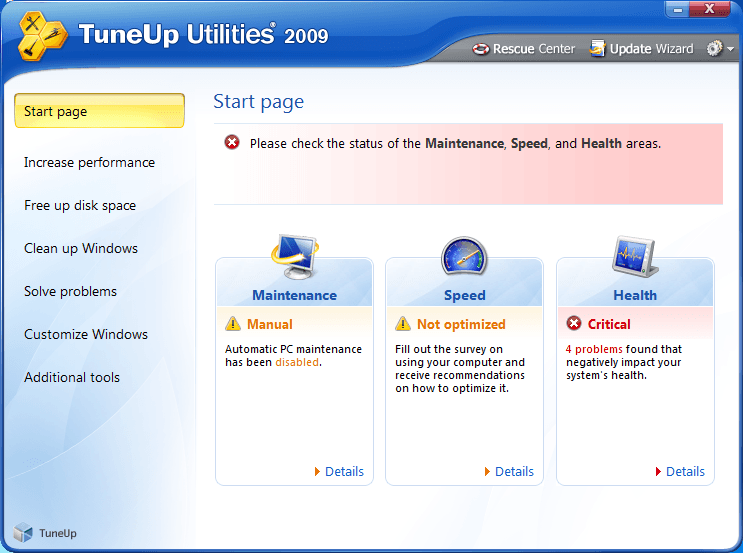
TuneUp Utilities 2009 welcomes you with a completely redesigned Start page, which tells you about the status of your computer. If problems or nonoptimal settings are found, you are only a mouse-click away from resolving them. The Start page also tells you when new tips for increasing computer performance are available and warns you if maintenance tasks are not being taken care of automatically. The Start page also shows you whether new automatic startup programs have been added to Windows since the last time you ran TuneUp Utilities. You can decide whether these programs that start up automatically are really necessary.TuneUp Speed Optimizer
Which settings slow your computer down? Which unnecessary services or programs are running in the background? Is your Internet connection optimally configured? TuneUp Speed Optimizer knows the answers to all these questions. It examines your entire system for bottlenecks, superfluous background programs, and incorrect settings. Great: with just one click you can carry out most optimizations very quickly. In addition, TuneUp Speed Optimizer provides suggestions for speeding up your system.TuneUp Shortcut Cleaner
Cleaning up your working environment is tedious: removing invalid shortcuts from the Start menu, the Desktop, and the Quick Launch bar is very time-consuming. TuneUp ShortCut Cleaner now does the work for you. It checks whether all shortcuts are valid and removes the orphaned ones with just a click of a button. At the same time, empty folders are removed from the Start menu. TuneUp ShortCut Cleaner also checks frequently used programs and cleans up the list of recently opened files.Support for the Opera browser
After hard disk defragmentation, which we introduced in TuneUp Utilities 2008, the feature most requested by customers was support for the Opera browser. TuneUp Utilities 2009 now also includes full support for Opera. Via several special Opera settings, TuneUp System Control now allows you to change the number of Speed Dial entries, conveniently choose your default search engine, and reenable fast backward and forward navigation. Internet optimization lets you optimize Opera's performance for your Internet connection. Free up disk space lets you delete the Opera cache.TuneUp Styler
Now you can also change the Vista logo animation which appears just before logon. You can download a whole series of great animations from the TuneUp website. Or, if you prefer, you can choose your own personal image to display while Vista starts up. With Vista, you can also add your own images to Vista's logon screen: With just a few mouse clicks you can create a truly personal logon experience.TuneUp Uninstall Manager
Redesigned from the ground up, TuneUp Install Manager now runs much faster and has a new, even more intuitive interface so that it is even easier to uninstall unnecessary programs. Unnecessary programs often are forgotten because they were installed a long time ago and then not used. TuneUp Utilities 2009 shows you a list of programs not used for a long time so that you can target for uninstallation those applications that use valuable disk space and in certain circumstances even slow your system down.TuneUp StartUp Manager
A smooth-running system results when there are no unnecessary autostart applications. The improved TuneUp Startup Manager organizes your programs into groups and provides clear explanations to make it easier for you to identify those programs that are not needed.New automatic startup programs are now highlighted so that you can disable unwanted entries more easily. System start tasks are now also listed in TuneUp StartUp Manager In Vista, in particular, scheduled tasks are used in place of autostart entries.Free up disk space
The already rapid display of disk space to be freed up is now even faster on NTFS drives. And now it is so easy to delete even more unnecessary files, like the backup files for the first Windows Vista service pack and the Opera and Safari caches. The second "Free up disk space" module that helps you turn off Windows functions that use excessive disk space has also been enhanced. The Windows Search index can now be disabled and deleted with a single click. This makes particular sense if you are already using a different search engine. In addition, TuneUp Disk Space Explorer now runs faster and no longer requires that an entire drive be analyzed. You can now specify that only those folders be analyzed that you are really interested in.Lots more improvements
Along with the totally new features, there are a series of improvements that are not immediately visible. There are small improvements like Tooltips in the main window, a substantial increase in the number of problems that can be found byTuneUp Registry Cleaner, and better progress feedback from TuneUp Drive Defrag. But there are also big improvements "under the hood". Two good examples are a completely reworked installation program and significant improvements in our update technology.
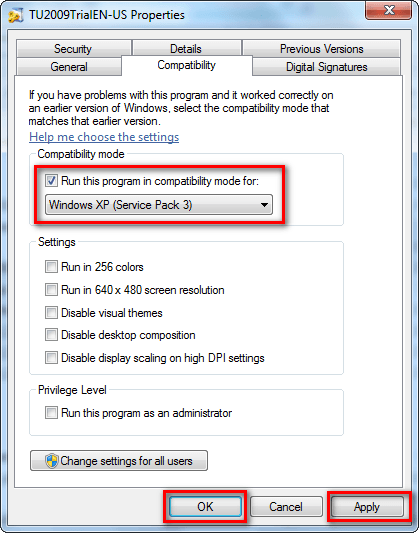
The only bad thing about TuneUp Utilities 2009 is it does not support Windows 7; in fact it won't even install in Windows 7. (TuneUp Utilities 2010 adds in support for Windows 7.) However, as a adhoc fix, if Windows 7 users want to run TuneUp Utilities 2009 on Windows 7, they can right click the installer, select "Properties", go to the "Compatibility", check "Run this program in compatibility mode for:", click "Apply", and click "OK":
During installation, Windows 7 users will be prompted multiple times with this window:
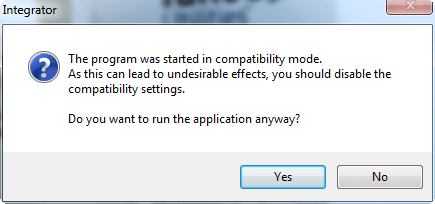
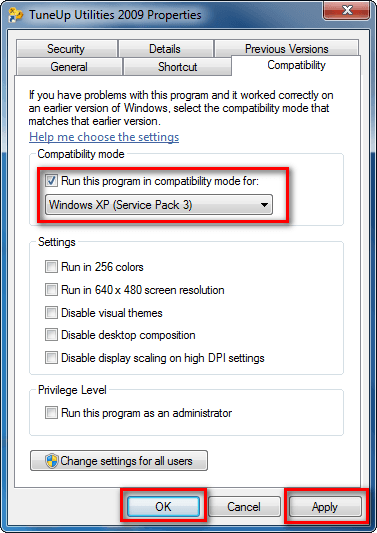
Click "Yes". After installation, Windows 7 users will have to right click on TuneUp Utilities 2009 EXE file, go to "Properties", go to "Compatibility", check "Run this program in compatibility mode for:", click "Apply", and click "OK":
When running TuneUp Utilities 2009, Windows 7 users will then be prompted with this:
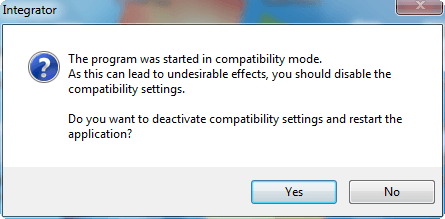
Click "No" otherwise the program won't run.
As a word of caution, it is generally recommended to not force-install a program on a Windows it does not want to install on. That does not mean the program, TuneUp Utilities 2009 in this case, won't work; rather it means don't be surprised if it causes problems on your computer if you are running it on Windows 7.
Anyway, to get TuneUp Utilities 2009 for free, follow these simple steps:
Version being given out for free: v8.0.3310
Free updates available: Unspecified
Supported OS:
- Visit the CHIP.de promotion page and follow all the "Zum Download" links:
Eventually they will take you to the TuneUp Utilities 2009 registration page:

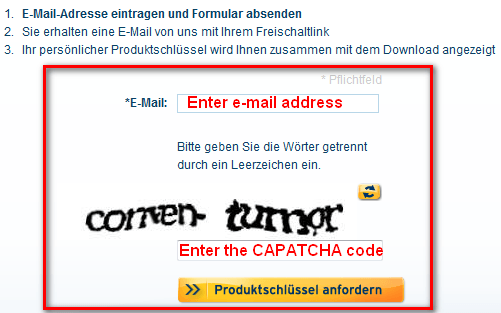
- At the registration page, enter your e-mail address, enter the CAPATCHA code you see, and click on the "Produktschlussel anfordern" button. You should get a confirmation message:

- Check the inbox of the e-mail you entered. You should have an e-mail from "TuneUp Promotion <no-reply@tuneup.de>" with the subject of "TuneUp Utilities 2009 Freischaltlink". In the e-mail there is a URL you have to visit to get your registration code:
Click on the link or copy + paste it on your web browser.
- The webpage that opens will give you your registration code:
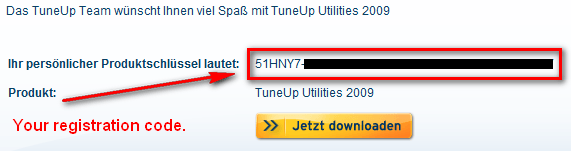
Copy the registration code. There is also a download link given to you; however, it is for the German version of TuneUp Utilities 2009. So if you want the English version of TuneUp Utilities 2009, download it from Tune-up.com (click here to download it).
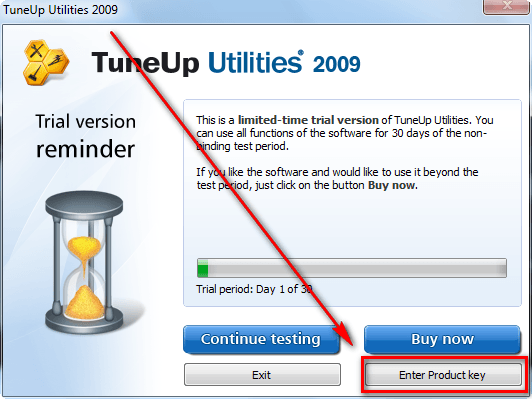
- After TuneUp Utilities 2009 has finished downloading, install it. When you run TuneUp Utilities 2009, you should be prompted to register it. Click on "Enter Product key":
Type in your name, organization, and product key. The name and organization can be whatever you want; the product key is the registration code you received earlier (you can paste it in):
You should get a confirmation message and be asked to restart TuneUp Utilities 2009:
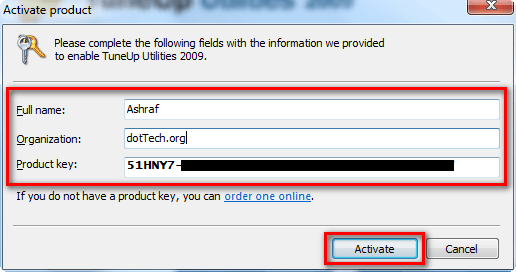
- Once your restart the program, enjoy! You now have a fully functioning TuneUp Utilities 2009!
If you have any trouble getting TuneUp Utilities 2009 for free, post below - I will try to help.
>>Speed up your computer with Auslogics BoostSpeed


AG
Thanks for the scoop on this great app!!!!
John Dye
I don’t know Ashraf, installing a program like Tune Up 2009, which does some Major system changes, on an “officially” unsupported version, Windows 7, could be hazardous. I own it, TU 2009, and have not installed it on my Windows 7 system because of this. And $30 for the upgrade to 2010 is just too much. Jv16 is fine with me. By the way, if you owned Reg Supreme in the past, full paid version of jv16 is the (free) upgrade.
RoseD1st
Ok this worked perfectly THANK YOU Ashraf :^)
Wheezer
@DuanePDX:
Sounds like you may have missed one note in the above information.
“There is also a download link given to you; however, it is for the German version of TuneUp Utilities 2009. So if you want the English version of TuneUp Utilities 2009, download it from Tune-up.com (click here to download it).”
Rocky
Thanks. Replaced 2008 with this 2009 version.
Ryan
Thanks Ashraf, I did it on Win 7. Hope everything is fine. Keeping my fingers cross.
denzel
Hi Ashraf i entered email and code but after i click on “Produktschlussel anfordern” button i dont get confirmation message tryed fyw time but with same result checked my email nothing got.
Charlee
Awesome!! thank you! I love this program and now I have it FREE thanks to you!
siyam
keeeeep pushin pusher meng!!!! thanks!
Adrian
@John Dye:
Know this: Next year you’ll be able to get TU2010 as a freebie – the developers do this annually since 2008, and I’m glad that I finnaly can get TU2009 for free. Thanks Ashraf!
Adrian
Note to everyone:
To reach the registration page, you must click through all of the Chip.de “Zum Download” pages; you cannot just click on the “registration page” link Ashraf posted.
Adrian
Jeanjean
The key works with the french version…
Direct download at Clubic : ftp://ftpclubic9b.clubic.com/logiciel/tuneup-utilities-2009_tuneup_utilities_2009_8.0.3300_francais_14995.exe
amozai
The same as No.7 said.
Raymond
Hi Ashraf. I followed your instructions, entered my email and the required code but after i click on “Produktschlussel anfordern” button it takes me to TU 2010 page. Tried more than 20 times, same result.
Andrew
Hello Ashraf
I have the same problem as 7 and 11.
Jeanjean
@ to 7, 11 and 13
direct link to register :
http://anonym.to/?http://www.tuneup.de/promo/chipxmas09
download in english :
http://anonym.to/?http://download2.tune-up.com/TU2009/TU2009TrialEN-US.exe
amozai
Finally got the email with the link to the license key, installed activated and runs fine. Thanks a lot Ashraf.
Ken M
Thanks Ashraf. By the way, what program do you use to do the arrows, boxes and comments on your review pages? It’s really cool & seems easy. Is that something you have to download separately or is it part of windows?
Alalata
I got my license key after 5 minutes, Thanks Ashraf.
Erkan
Hi Ashraf,
It is same for me too. I mean after entering email and clicking on “Produktschlussel anfordern” button works but still waiting msg from TuneUp.
Hope you can help.
Best regards.
Refpeuk
I still don’t have my email, and I double check the spelling. They won’t let me send another one for 24 hours and the message isn’t even in my spam folder!
Refpeuk
never mind – it finally showed up (15 minutes after I asked for it)
future hacker
Great work Ashraf, as always.
By the way, this is my first comment since I registered, it is an honour to be one of the dottechies =P
DuanePDX
I clicked faster than I read and at first downloaded the German-language version. I uninstalled it with Revo Uninstaller but was unable to install the English-language version because it thought I still had the 2009 version installed. Running the 2008 version, I was able to delete the entry in the installed programs list and then go ahead and install the 2009 version.
Looks wonderful! Sincere thanks, Ashraf.
ba4erik2
please help me get tuneup-utilities 2009 free. cannot find registration page as illustrated in this article. thank you. ba4erik2
Shueygal
Thanks Ashraf, worked like a charm.
Shueygal
jack
Wait till version 2011, and 2010 will be given away.
Kerry
I have the same problem I have the download but when registering I get this:
You can not use this action page directly. Please click on the appropriate link in the e-mail or on the website of our partner’s action.
Please make sure your browser accepts cookies. These are required for use of our action page
Someguy
@Ken M:
Here is a link to the program Ashraf uses http://dottech.org/freewaresr/5238
danl
Outstanding program, thanks, Ashraf! I now have Advanced System Professional, CC cleaner and Glary Utilities. Tune up 2009 seems to be the best of the three? Would anyone care to give a newbie any advice as to which to keep?
Sandeep
Thanks Ashraf for this.
Recently i got the uniblespeedupmyPC 2009 from one of the website as a licensed version. Haven’t had any post from you regarding this software. Is it safe to use as WOT is showing their website as “poor reputation”
Sandeep
@danl: I would say to keep “Advance System Care Professional” and “CCleaner”
Thanks.
Youngatheart1946
G’day “from downunder” Ashraf,once again you have excelled yourself with finding this great FREE piece of software. Although it took quite a while for the email to come through (almost an hour), I guess because it had to travel “downunder”, everything went as planned to end up with a FULL WORKING program. Once again Ashraf Mate thank you for the great work that you and your team do……Kind regards Youngatheart1946
colman alenick
I downloaded the English Version==saw nothing about getting a Registration set=up==now it keeps telling me that I either Pay or lose the Program.
What do I do now??
cole
ecomm
Unfortunatly I can’t register for a free productkey. Downloaded the En-Us Trial, but useless if i can’t register. Basicly I need a productkey so if anyone can help…?
Thx in advance!
flommedrengen
This offer seems to be over. Valid only December 6 (German time). From the promo page: “”TuneUp Utilities 2009″ konnte nur am Nikolaustag aus dem Download-Adventskalender von CHIP Online heruntergeladen werden. Wir bitten um Verständnis.”
G-translates to: “”TuneUp Utilities 2009″ was only on St. Nicholas from the download advent of CHIP Online for download. We ask for understanding”
To bad, TuneUp Utilities 2009 is a great program. If you managed to get it in time, I would stick with it.
normofthenorth
It seems that this program was available only for one day, as part of an Advent Calendar of daily offerings, until Christmas. This program was offered on “Nikolaustag” = Dec. 6th. Today’s offering is Wash something, a utility that deletes unnecessary files (I think).
Some of the “expired” offerings can still be downloaded, but not this one. There’s a little “sorry about that” note, as follows:
“Hinweis: “TuneUp Utilities 2009″ konnte nur am Nikolaustag aus dem Download-Adventskalender von CHIP Online heruntergeladen werden. Wir bitten um Verständnis.”
Roughly, “It was only available on Dec. 6th, hope you understand.”
But Dec. 1 was Everest Utilities, and it still has the “Zum Download” button, so I think it’s still available. I’m getting pretty slow service navigating through their site, so I’m not sure how many others are still available, or what they are.
DanL
@Sandeep: Thank you for the advice. i will follow it.
normofthenorth
It’s an interesting collection of temporary freebies on their Advent Calendar.
EVEREST Ultimate Edition is Dec. 1, I think (click on door #1), and seems to be still available.
Partition Manager 10 Personal Edition is Dec. 2, and may only be still available using a trick through Twitter(?).
Radiotracker 6 is #3 — and I’m grabbing it! I hope I’ll be able to get it in English, ’cause my German is weak!
Ashampoo UnInstaller 2010 is Dec. 4.
CrazyTalk 5 SE (Dec. 5, still available) looks wild!
TuneUp Utilities 2009 WAS Dec. 6, no more.
WashAndGo 2008 is #7, today.
Stay tuned to that Advent Calendar for future offerings, some of which may disappear after a day.
I recall other software vendors offering daily freebies as Advent Calendars in past years, too. Anybody found any? (I should probably look on the forum, huh?)
john murphy
done all the steps but did not get email,can you help please. thank you
Someguy
@john murphy: That is so because this offer is expired.
normofthenorth
Radiotracker 6 (#3 on the Advent Calendar, still available) is in English, though many of the radio stations it finds first are European. Not all. And you can’t use the “wishlist” feature — where it searches the online radio stations for your fave artists, etc. — without upgrading (for $). Still an interesting free intro to Internet Radio, I think.
normofthenorth
As you can see from the new article on PDF Tiger, Ashraf is keeping track of the new daily offerings on this Advent Calendar. Another dozen ’til Christmas!!
Trev
Ashraf! TuneUp Utilities 2009 is working again as at 28-Dec-2009 a chip-Christmas Special! I don’t know how long for.
Your second email link is working again!
TuneUp Utilities 2009 registration page:-
http://www.tuneup.de/promo/chipxmas09
I got the Reg Key via email link and downloaded installed and registered it successfully!
Great Website!
Great work!
Trev.