WinUtilities Advertisement
300x100 advertisement

Free eXPert PDF Pro 4!

Update: You can now grab eXPert PDF 6 Pro for free.

We all work with PDFs nowadays. Good, reliable, and feature filled PDF manipulation programs are hard to come by at an affordable price. Well not anymore. Now you can get an excellent PDF manipulation program...for free.

What exactly can eXPert PDF Pro 4 do? Well...

PDF Creation

eXPert PDF Pro 4 is tightly integrated with Microsoft Word® and Excel® to simplify the process of creating and editing PDF files. You can convert these files into multiple image formats (JPEG, GIF, TIF, PNG, BMP…). And you can also easily manage bookmarks and URL links in each file.

  • One click conversion
    • Just right click on a file to convert it into PDF, without even having to open it.
  • Microsoft Word® and Excel® integration in the menu bar
    • A simple click on the icon launches PDF conversion of one or more documents.
  • Image conversion: JPEG, JPEG 2000, GIF, TIF, PNG, EMF, BMP
    • Transform your documents into images, instead of PDF.
  • Create and manage hypertext and URL links in your PDF files
    • Ideal for sending readers directly to an Internet site from inside your Word® or Excel® document.
  • Automatic email sending
    • In two clicks, convert a document to PDF and send it via email attachment from within the application.
  • Merge conversion
    • Organise and combine multiple documents - even if they have been created in different applications – and create one single PDF file.
  • Create conversion profiles
    • Increase your efficiency and create profiles so you can instantly select all the features you use when you create PDF documents.

Viewing & Editing PDF files

eXPert PDF Pro 4 provides an entire suite of tools to modify, improve and organise your PDF documents. Includes standard editing tools for text, graphics and annotation, plus functionality to add or delete pages and combine PDF files. Security and encryption features give you control over rights to open, copy, edit or print your PDF documents. You can also make the eXPert PDF Pro 4 editor your default PDF viewer so that you can add comments, or modify the original document, all in the same window.

  • Standard editing tools
    • Cut, copy paste, delete and resize text and images in your existing PDF file
  • Text editing tools
    • Ad or edit text; change sizes, fonts and color, all in your PDF document
  • Image editing tools
    • Add images, draw vector images – even Bezier curves – all without leaving the eXPert PDF 4 interface.
  • Add comments and stamps
    • Add notes, comments, stamps (eg. “confidential”, “draft”) and watermarks.
  • Add or delete pages from existing PDF documents
    • Gives you complete control over the final PDF document
  • Document security
    • Protect your PDF document with passwords (128-bit RC4 encryption) You’ll be able to control who has the right to read, copy, edit or print your document.
  • View all your PDF files in the eXPert 4 editor
    • Make eXPert PDF 4 your default PDF editor; that way you can add comments or edit the original document in the same window.

This list of features was attained via Avanquest.

Pretty impressive list of features if I do say so myself. Of course v4 is not the latest version - v6 is. However v6 costs $94.88 for a single license. So for a freebie, v4 is more then welcome in my arsenal. Okay so how to get it? Well getting it is a little tricky because you must attain it from a French website. However, when have I ever left you hanging w/o screenshots? =):

Update: It has been discovered that eXPert PDF Pro 4 will not work with XP x64 or Vista x64. Sorry! However eXPert PDF 4 Pro works just fine on Vista 32-bit.

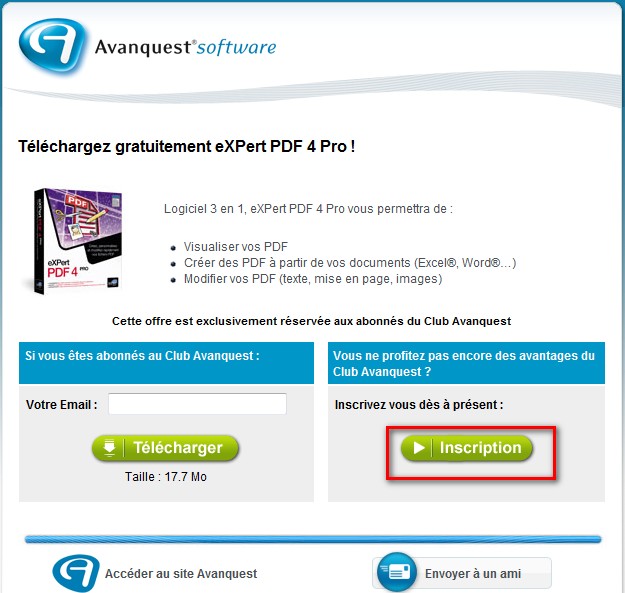
  • Visit Avanquest's promotion page. If you are part of Avanquest's French website, just enter your email in the address box and download the software. However if you are not, like most of us, you must register with them first. So, click on the button that says "Inscription":

2009-03-13_160439

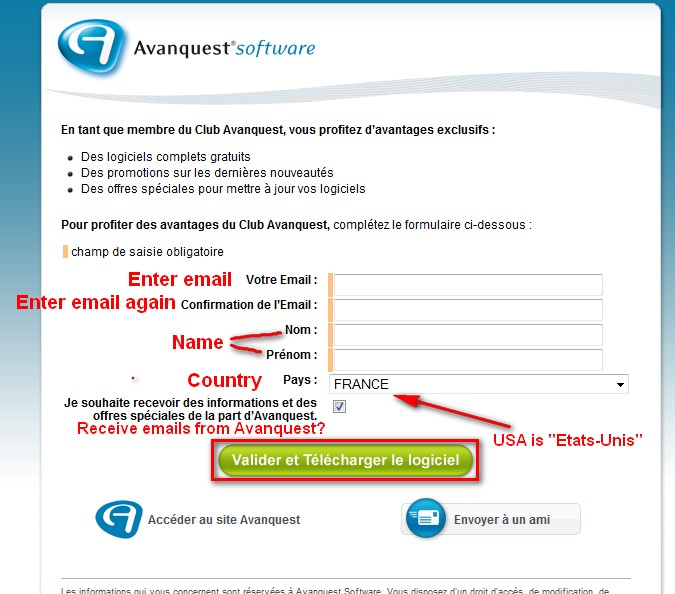
  • At the next page you will have to fill out some information. Fill it out and click on the button that says "Valider et Telecharger le logicel":

2009-03-13_161230

Note: You don't need a valid email address but it is suggested that you enter a valid email address (just use a spam email) because you may need to use your account for future freebies from that website. Plus your registration code will be emailed to you in addition to being displayed to you right on the screen so you can have it stored in your inbox in case you ever have to uninstall/reinstall eXPert PDF 4 Pro.

  • The next page will give you the download link for eXPert PDF 4 Pro and display your registration code. Download the program by clicking on the button that says "Telecharger" and copy your registration code. As mentioned above you registration code will also be emailed to you:

2009-03-13_161429

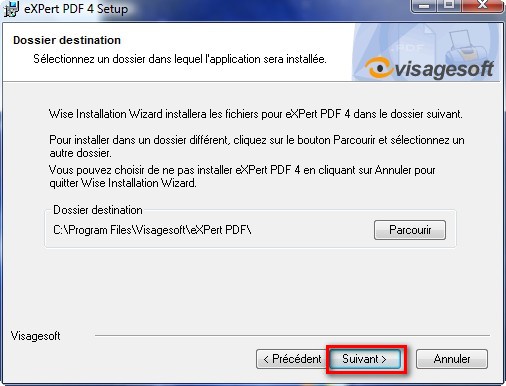
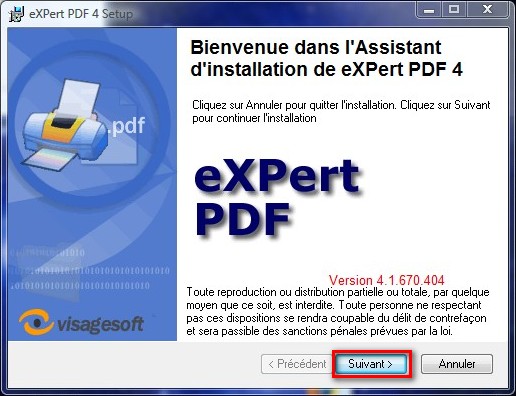
  • After the program is done downloading, install it. The installation process will be in French but it is pretty straight forward:
2009-03-13_162012

Click "Suivant".

2009-03-13_162028

Paste in the registration key that you copied earlier into the box that says "Identification du produit" and click "Suivant".

2009-03-13_162049

Click "Suivant".

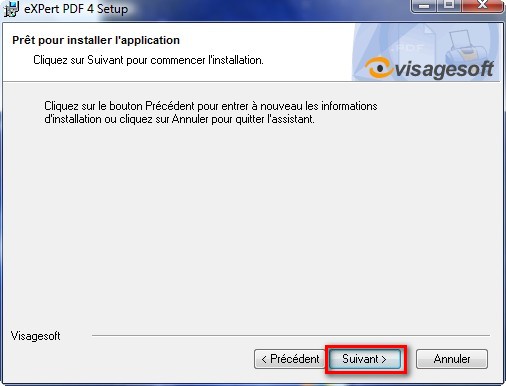
2009-03-13_162056

Click "Suivant". The installation will then start. Wait for the installation to finish. The last window will appear after the installation is done:

2009-03-13_162133

Click "Terminer".

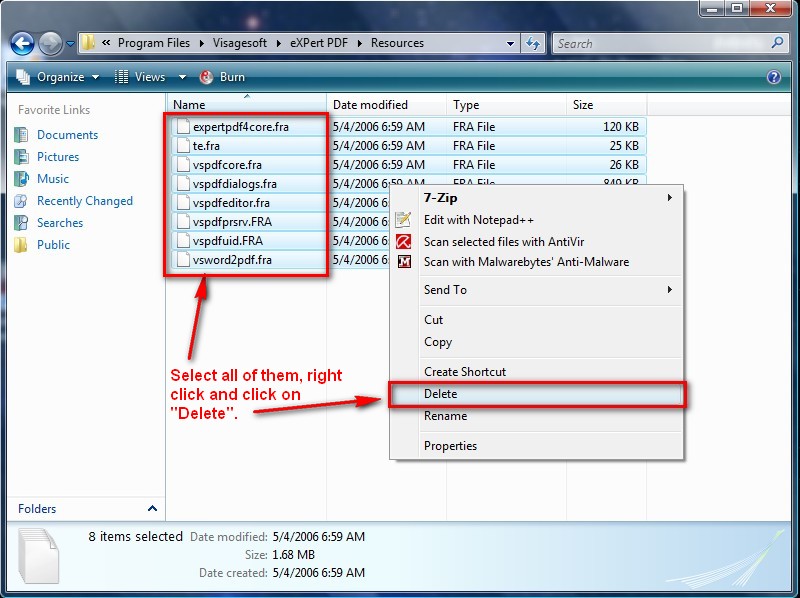
  • After you click "Terminer" you are done installing eXPert PDF Pro 4. However the program will be in French. Therefore to turn in into English, go to the folder where you installed eXPert PDF Pro 4 to and go to the "Resources" folder. For most of us, this will be C:/Program Files/Visagesoft/eXPert PDF/Resources. Delete all the files in the "Resources" folder - they all should end in ".FRA":

2009-03-13_1623311

Update: If you are having trouble deleting the files under "Resources" make sure:

  1. eXPert PDF Pro 4 is not on. Double check under Windows Task Manager.
  2. If you still are not able to delete the files, try logging in to an Administrator account (even on XP) and deleting them.
  • Now if you look under the "Start Menu" you may notice that the shortcuts for eXPert PDF are in French. Well we need to rename them (thx to SC below for reminding me of this). Right click on each shortcut one at a time and click on "Rename". This is what you should rename them to:
  • Accueil eXPert PDF = Purchase eXPert PDF
  • Aide eXPert PDF = eXPert PDF Help
  • Editeur de Filigranes = Watermarks Editor
  • Editeur de paramètres PDF = PDF Settings Editor
  • Serveur d'Impression eXPert PDF = eXPert PDF Creator
  • The last thing you need to do is replace the help files. You see even though you changed eXPert PDF from French to English, the help files are still in French. In order to fix this, I ripped the help files from the English version of eXPert PDF Pro 4. Download them by clicking here (alternative download link here). They are in a .ZIP file. Unzip them and save the "expertpdf.chm" and "pdfeditor.chm" in C:/Program Files/Visagesoft/eXPert PDF. You will be asked if you are sure you want to overwrite "expertpdf.chm" and "pdfeditor.chm". Click yes.

Update: If you are having problems viewing the help files after you download them:

  1. Right-click on "expertpdf.chm"
  2. Click Properties.
  3. Click Unblock.
  4. Double-click on "expertpdf.chm" to make sure it is now working.
  5. Repeat the same for "pdfeditor.chm".

Thanks to Tony for posting the above fix for the help files.

There. Now you are done with everything. Go enjoy your eXPert PDF 4 Pro eXPert PDF 6 Pro! If you have any problems or questions, post below - I will try to help.

This freebie was originally found by For-Free-On-Internet.com.

>>Speed up your computer with Auslogics BoostSpeed

About the Author, Ashraf:

Ashraf is the founder of dotTech. Ashraf spends insane hours on dotTech (usually writing articles but sometimes doing absolutely nothing except staring). Yes he is weird, but he is also very friendly.

86 Responses to “ Free eXPert PDF Pro 4! ”

  1. 51
    March 14 2009 at 11:55 PM
    paul

    Holy Cow I think that you did an incredible job of keeping this process simple, it looks long and intimidating but you make a simple process of following some very easy steps.

    I think I succeeded in completing the process, thanks.

  2. 52
    March 15 2009 at 3:56 AM
    Richard

    Hi everyone, I’m from Nitro and I can confirm that we produce Nitro PDF Professional and have nothing to do with ‘eXPert PDF Pro’. If you’re interested you can get a trial of Nitro Pro from our site and also buy it there. Best of luck.

  3. 53
    March 15 2009 at 9:18 AM
    ocean

    Thanks Ashraf.
    I had to give ‘full control’ permissions for users on expertpdf.chm properties security tab for it to work. No other issue except for this minor hurdle on Vista Home Premium / 32 bit.

    Ocean

  4. 54
    March 16 2009 at 8:00 AM
    alfonso

    italian?
    Alfonso

  5. 55
    March 16 2009 at 8:14 AM
    alfonso

    XGIOVANNI
    è POSSIBILE AVERE UNA TRADUZIONE IN ITaliano DEL PROGRAMMA?
    aLFONSO

  6. 56
    March 16 2009 at 1:30 PM
    Wat

    After installing successfully, there is this file
    vspdfprsrv.exe

    that wants to run on Windows Start up. When I refused to let it run on start up, it keeps coming back to insist to run on start up.

    How can I not allow it? My WinPatrol software is not able to remove it from start up.

  7. 57
    March 16 2009 at 1:31 PM
    Wat

    Very irritating, this vspdfprsrv.exe

  8. 58
    March 16 2009 at 3:24 PM
    Ashraf

    WinPatrol did the same thing for me. So far I have yet to see an option mentioning boot at startup. Have you tried disabling the service under WinPatrol?

  9. 59
    March 16 2009 at 4:33 PM
    Beverly

    Thank you Ashraf, this is invaluable for me.

    I anyone still has a problem viewing the help files after following the instructions above, I downloaded them again then unblocked them before overwriting the existing French files and it works fine now.

  10. 60
    March 16 2009 at 10:33 PM
    Wat

    Ashraf,

    I followed WinPatrol’s instruction to remove persistent programs that insist on running at startup, but without success.

    Anyone knows of any way to remove this vspdfprsrv.exe from startup?

    Frankly, do we need to run vspdfprsrv.exe at startup?

    Sigh!

  11. 61
    March 16 2009 at 11:28 PM
    Ashraf

    vspdfprsrv.exe is the PDF Printer. Why are you so worried about it?

  12. 62
    March 17 2009 at 12:07 AM
    Wat

    Ashraf,

    So it’s alright to allow it to start ar startup?
    Anyway, even Spybot Search and Destroy is not able to remove it.

  13. 63
    March 17 2009 at 12:26 AM
    Kevin

    Tony i just want to say thank you for your extremely clear and easy tutorial. This is Fantastic

  14. 64
    March 17 2009 at 2:20 AM
    Ashraf

    As far as I am concerned, ya it is okay to let it allow it to start up on boot.

  15. 65
    March 19 2009 at 8:12 PM
    Steve

    THANKYOU!! THANKYOU For taking the time to write and post this great helpful instructional tutorial.
    Runs perfectly on my xp machines.

  16. 66
    March 26 2009 at 1:15 AM
    Dennis Pateman

    I installed eXPert PDF 4 Pro but I found that the english help files are not available from FileFront.
    Is there another site I can download them from.

  17. 67
    March 26 2009 at 1:49 AM
    Dennis Pateman

    Re: eXPert PDF Pro 4 english help files.
    My error-I found your link to MediaFire and downloaded them from there.

  18. 68
    March 26 2009 at 2:06 AM
    Ashraf

    Ya I just changed the links because FileFront is going bye bye.

  19. 69
    April 21 2009 at 7:43 PM
    windowsexplorer

    unable to download english help files from Media Fire file hosting page for some reason. Is this going to be fixed at this date or is there a workaround? I can’t believe I may have waited too long to get this.

  20. 70
    April 21 2009 at 7:45 PM
    windowsexplorer

    never mind. I just discovered my NoScript was blocking its scripting.

  21. 71
    April 22 2009 at 10:01 AM
    eli

    422-09W,11:58a
    Ashraf, always enjoy and trust your judgment and advice on GAOTD; yet, last night and today really visited dotTech and followed inst for eXP4 and 6 dnld…French went well and Xp4 in process; but, your link to MediaFire.com is loaded with a demand for cookies; I go to window on right: link to dnload: dotTech.org – eXPertPDFhelpfiles(English).zip : it says NO DESCRIPTION ENTERED…WORKING..WAIT PLEASE; then, an intercept in blocked red demands cookies, I give the allow to FFox, and this thing demands to scan my PC! Now I know it’s a scam from PC Booster, I always run into them this way, but, MAYBE this is an internal scan for viruses, so, I click like an asymptote and allow cookies; http://www.liutilities.com addresses in my URL window; FF blocks again because it is an attempted re-direct; I allow, and this PCBooster site comes up and sure enough they want to scam me into another dnld to find 1000 reg errors to demand I buy the product to clear them. For 1/2 hour, I sit on your WORKING..PLEASE WAIT; Please advise. Eli.

  22. 72
    April 22 2009 at 10:06 AM
    Ashraf

    Huh? I have no idea what is going on with you. The MediaFire link is no scam… You sure you did not click on an advertisement by accident?

    Use the FileFront link instead if you want: http://files.filefront.com/expertpdfhelpfileszip/;13462644;/fileinfo.html

  23. 73
    April 22 2009 at 10:33 AM
    eli

    Ashraf, sorry for the temp headset problem; dropped by MediaFire.com again and the daemon was gone…those flashes must be the latest in bad popup highjacking…totally stopped mf.com. Thanks; Eli. 12:31p

  24. 74
    June 19 2009 at 3:33 AM
    Art

    Hi am having problems in downloading eXPert pro v4 when hitting the Telecharger button it asks for User Name and Password can you please help in what to enter here tried several things but no joy?

  25. 75
    June 19 2009 at 2:20 PM
    Jean-Luc Picard

    Visit Avanquest’s promotion page. If you are part of Avanquest’s French website, just enter your email in the address box and download the software. However if you are not, like most of us, you must register with them first. So, click on the button that says “Inscription”.

  26. 76
    June 19 2009 at 11:23 PM
    Art

    Jean-Luc Picard, Thanks for the feedback however I did go to the “Inscription” page filled in the form “email and confirmed this then Name, surname and country hit the “valider et Telecharger le logiciel” button was then taken to the download page However hitting the yellow Telecharger button it asks for Authentication in the form of User Name and Password for ftp://ftp2.aventquest.com tried my email and name but does not accept any of this else I am very Duh and missing something
    Was wondering if they did not change something. Has anyone downloaded this recently??

  27. 77
    June 19 2009 at 11:35 PM
    Jean-Luc Picard

    @Art:
    Sorry I can’t help right now. However tommorow I can look into this. I seem to recall others experiencing this problem.

  28. 78
    June 20 2009 at 12:59 AM
    Art

    @Jean-Luc Picard: Thanks see forward to the solution.

  29. 79
    June 22 2009 at 4:32 PM
    Art

    @Jean-Luc Picard: Have you possibly manages to resolve the download problem

  30. 80
    June 22 2009 at 6:41 PM
    Jean-Luc Picard

    @Art: No- but if your computer supports it you may want to try eXPert PDF 5- http://dottech.org/freebies/6301. I’m so sorry I can’t help the v.4 download!

  31. 81
    June 22 2009 at 7:00 PM
    Jean-Luc Picard

    @Jean-Luc Picard:
    @Art:
    Then you can upgrade to v6 here according to some.

  32. 82
    September 4 2009 at 10:13 AM
    New Link

    May not help anymore but right now you can get v4 at ftp://ftp2.avanquest.com/pub/ExpertPDF/expertpdf4.exe

  33. 83
    September 23 2009 at 7:16 PM
    ron

    I tried the download, had same problem requesting a userid and password to allow the logon to FTP. No where to define a password.

    Then I tried the V4 download provided by “New Link”, but that download appears to be incomplete, missing “commonfiles.cab”.

    Has anyone tried applying the V6 upgrade to a V5 installation?

  34. 84
    October 15 2009 at 1:50 AM
    zach

    The links you posted to the help files do not seem to work. Is there another place I can get them? Thanks in advance.

  35. 85
    December 30 2009 at 11:54 AM
    Nick

    what is the username and password used to download the expert PDF 4

  36. 86
    December 30 2009 at 10:32 PM
    chinaguy

    It’s been a long time since I got that freebie but I think you need to create a user account with Avanquest then you can get it. You will use the user account you created to get the download info.

Leave a Reply :