Windows 8.1 screenshot leaks, shows a new Start button

May 30, 2013 7 Email article | Print article

blue-desktop

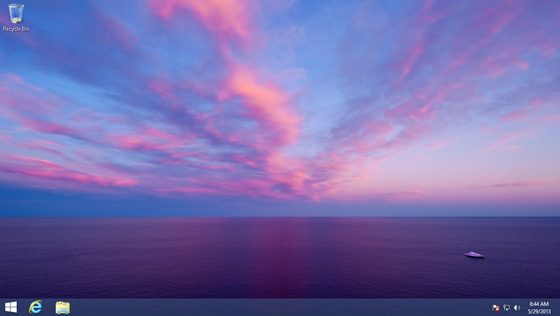
Since Windows 8 made it’s debut last fall, many people have not upgraded from Windows 7 or earlier because they got rid of the Start button. Well Microsoft has received enough criticism about it to add the Start button back in the next major release of Windows which is supposedly going to be Windows 8.1.

Paul Thurrott’s Supersite for Windows posted the screenshot you see above, which shows the Windows 8 logo placed on the left side of the task bar. This is being reported as the new Start button which has been reported before that it would make a reappearance in Windows 8.1. Furthermore, the new version of Windows is said to allow users to boot directly into desktop mode, but that option is turned off by default.

How many of you miss the Start button in Windows 8? Let us know in the comments below.

[via Paul Thurrott's Supersite for Windows]

7 Comments »

  1. JonE May 30, 2013 at 11:07 AM (comment permalink) -

    Hmmmm, looks like a desktop, but what happens when you press that little Flower? Disappointment is what I’m thinkin . . . . . . . My biased opinion, of course.

    1
  2. Coyote May 30, 2013 at 11:33 AM (comment permalink) -

    It takes you to the standard Metro “Start Screen”.

    And yes I call it Metro, it will always be Metro, it’s not a desktop it’s not a start screen. It’s a tablet style home screen on a desktop with very limited customizations compared to the standard desktop. And adding the Start “button” back just to take you to that screen is an insult to everyone that requested an actual Start “menu” be returned.

    2
  3. hail11 May 31, 2013 at 10:11 AM (comment permalink) -

    We don’t need another metro shortcut. We need a proper Start menu.

    3
  4. David Roper May 31, 2013 at 11:09 AM (comment permalink) -

    What ever happened to testing an interface with a study group BEFORE you finalize it? It would not have taken 20 people, $2000 outlay, and 30 minutes for MS to get a clue about the Start Button. Just Sayin’

    4
  5. Jim Van Damme May 31, 2013 at 11:24 AM (comment permalink) -

    If you want a proper menu, use Mint Cinnamon. You can change the icon to a a “windows8″ icon. And change the text to say “Menu”, “Yes, Master” or maybe “W8 Sux”.
    http://www.iconarchive.com/show/windows-8-metro-icons-by-dakirby309/Folders-OS-Windows-8-Metro-icon.html

    5
  6. Col. Panek June 2, 2013 at 5:44 AM (comment permalink) -

    [@Jim Van Damme] Find a suitable icon, edit it to a 72×72 pixel PNG. copy it to /usr/share/cinnamon/theme/, then right click on the Mint start button, and find your new icon and select it. I changed mine to a Minty green “Windows 8.1″ button. Took 3 minutes.

    6
  7. Col. Panek June 2, 2013 at 5:47 AM (comment permalink) -

    [@Col. Panek] Oh, I forgot to mention you need to “open as root” when you copy the icon, because Linux won’t let you mess up your system unless you really WANT to, and you know the password.

    7

Leave A Response »