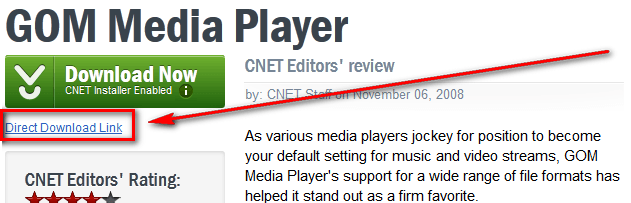
Tip: Avoid CNET Download.com’s ad-supported installer by using the Direct Download Link

February 28, 2012 33 Email article | Print article

Last year CNET started bundling an “ad-supported stub installer” with downloads on Download.com. This installer was CNET’s way to bring Ask Toolbar-like crapware bundles to CNET downloads. The installer wasn’t added to all downloads on Download.com but was added to enough downloads for people to take notice and come up in arms. Back then the only ways to avoid installing crapware courtesy CNET was to either

  • Be very careful when downloading files from CNET, making sure to avoid installing crapware offered by the CNET installer;
  • Create a CNET account, login to that account whenever downloading something, and using a direct download link;
  • Or not using Download.com altogether.

While I’m sure many people opted for option number three, there are still times some people download from Download.com (sometimes we have no option except to use Download.com because some developers only put their files on Download.com). For those of us that still use Download.com, you will be relieved to know Download.com now clearly marks downloads that have the CNET ad-supported stub installer as “CNET Installer Enabled”; and Download.com now allows everyone to download via a Direct Download Link that bypasses the CNET installer — you no longer need a CNET account for a direct download. So the next time you venture to Download.com, keep your eyes open for a direct download link when downloading software that come with CNET installer.

Stay safe everyone.

[via Raymond.cc]

33 Comments »

  1. Pixel-Solitaire October 11, 2012 at 3:58 PM (comment permalink) -

    Cnet is acting just like the ones who are making viruses and Trojan Horses. Or maybe a little notch above. Greed + hypocrisy = shame.

    26
  2. software to extract data from websites December 18, 2012 at 7:55 AM (comment permalink) -

    That is very attention-grabbing, You are an excessively professional blogger.

    I’ve joined your rss feed and stay up for in quest of extra of your wonderful post. Additionally, I have shared your web site in my social networks

    27
  3. techie views December 23, 2012 at 7:13 AM (comment permalink) -

    This is really interesting, You’re a very skilled blogger. I’ve joined your feed and look forward to seeking more of
    your fantastic post. Also, I have shared your
    site in my social networks!

    28
  4. watch live cricket February 22, 2013 at 12:28 PM (comment permalink) -

    Internet television is definitely the wave of the future.
    As broadband speeds get faster, everyone will be watching
    their tv shows on sites like this.

    29
  5. Open Source Software Analytics March 6, 2013 at 3:46 AM (comment permalink) -

    Thanks , I have just been looking for information
    approximately this subject for a long time and yours is the greatest I’ve found out so far. However, what in regards to the bottom line? Are you positive in regards to the supply?

    30
  6. Crystal March 16, 2013 at 6:01 PM (comment permalink) -

    Pretty section of content. I just stumbled upon your blog and in accession capital
    to assert that I acquire actually enjoyed account your blog
    posts. Any way I’ll be subscribing to your feeds and even I achievement you access consistently fast.

    31
  7. J May 16, 2013 at 7:17 AM (comment permalink) -

    looks like they took the direct link away.

    32
  8. davidroper May 16, 2013 at 8:17 PM (comment permalink) -

    [@J]
    J, they did take it away, but do not dispair, mon frere (did I say that right?)
    Anyway, look down and you shall see in blue SEE FULL DESCRIPTION.
    click on that to see all specs and one of them will be the website. Go there to see the download section. I got it that way tonight without getting out and Googling it. Just sayin’

    I know that you know all this already but

    33

Leave A Response »