How To: Force Firefox 7 (and higher) to show HTTP:// in URLs

September 28, 2011 61 Email article | Print article

Firefox 7 was released a few days ago. Among other changes, one of the “improvements” made in Firefox 7 is that Firefox no longer shows the HTTP:// part of a URL when visiting a website, e.g. if going to http://dottech.org, Firefox will show dottech.org in the URL/address bar:

(This behavior does not occur when visiting an HTTPS website, i.e. Firefox still shows HTTPS:// in the URL/address bar when visiting a website that uses HTTPS; so you don’t have to worry about not knowing when you are on a secure site and when you are not.)

Call me a creature of habit, but I find the lack of HTTP:// in my URL/address bar to be very, very annoying. True for all practical purposes I can think of there is no reason to show HTTP://, but it just annoys the heck out of me to not see it there. So I figured out how to force Firefox to show HTTP:// in all URLs and am here to tell you how you can do it, too.

It really is very simple:

  • Open Firefox.
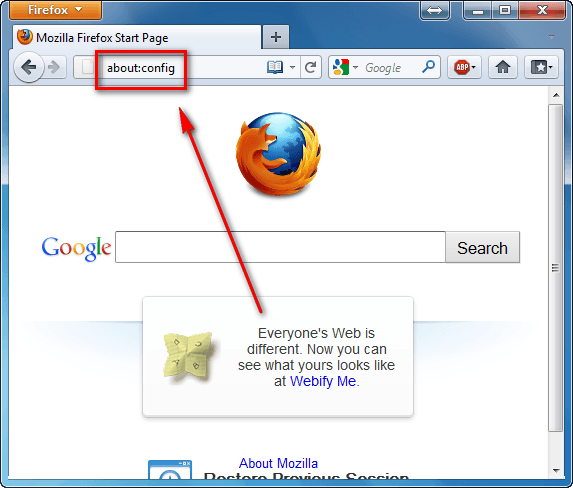
  • Type in about:config in the URL/address bar and tap Enter on your keyboard:
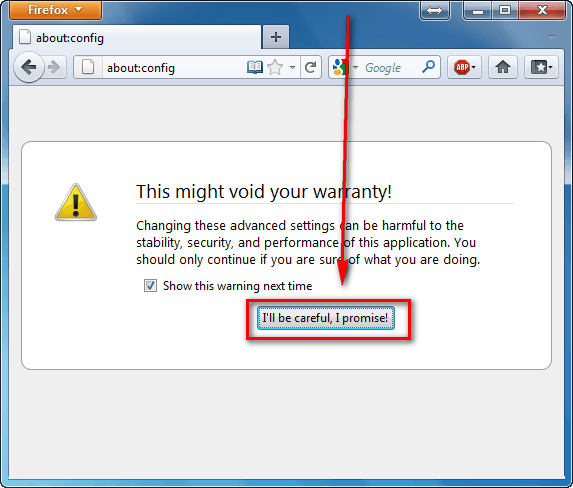
  • At the next page click on the I’ll be careful, I promise! button:
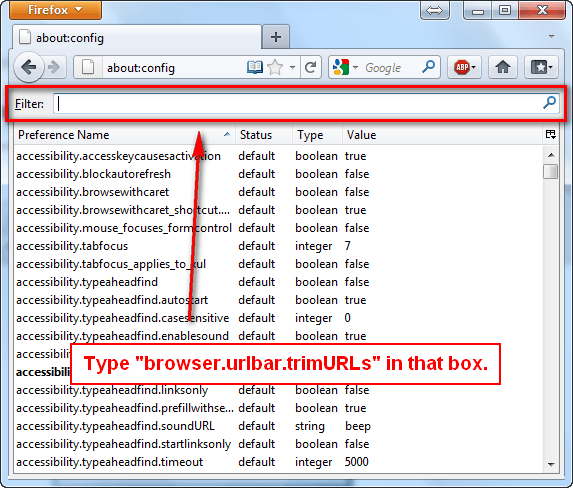
  • At the next page, type browser.urlbar.trimURLs into the “Filter” box:
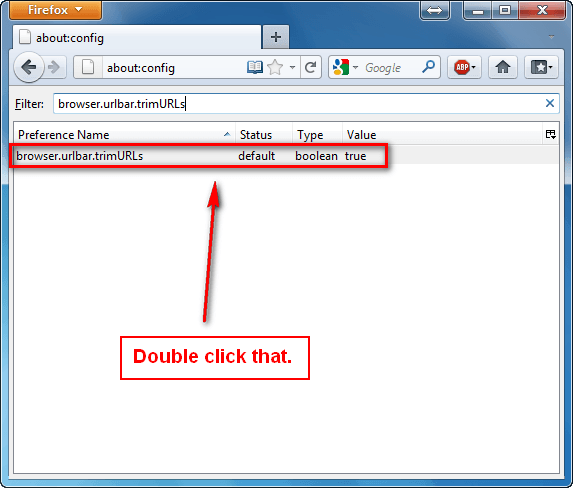
  • You should now see the browser.urlbar.trimURLs setting. Double click on it (you can also right click and then select “Toggle”):
  • After you have double clicked on the browser.urlbar.trimURLs setting, make sure the “Value” is “false”:
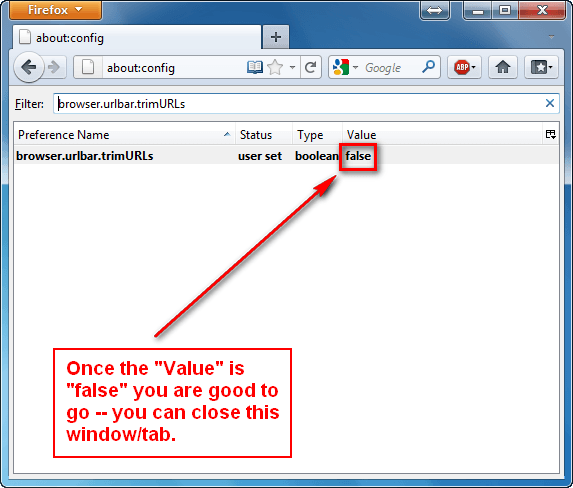
That is it. Once browser.urlbar.trimURLs has been set to “false” Firefox will start showing HTTP:// for all URLs in the URL/address bar.You can close the tab/window you had about:config opened it — it automatically “saves” so there is no need to click any save button.

Old habits die hard.

61 Comments »

  1. Anak December 26, 2011 at 10:32 AM (comment permalink) -

    I updated to FF 9.0.1, and then went to check the “browser.urlbar.trimURLs” setting and it was already set to “false”.
    I am thinking it is a profile carryover from when I changed it in version 8.

    51
  2. Josh January 9, 2012 at 10:47 PM (comment permalink) -

    I copy a lot of URLs out of my address bar using click and drag (saving CTRL-C/V or other such clipboard disrupting methods) to Wiki markup all the time and the loss of HTTP:// meant I had to hand add it back in or the markup wouldn’t render it as an external link correctly.

    Like all such ‘advances’ in software programs, I have no problem with them trying different things, adding features, or trying to clean up the presentation. I just wish they’d leave us the option to return certain ‘features’ to their original functionality more often…and I mean a simple switch in the options, not something you have to dig online for.

    52
  3. sam February 23, 2012 at 1:31 AM (comment permalink) -

    Thanks for explaining it with screenshots. Its worked like a charm!

    53
  4. ddarkocean February 23, 2012 at 2:37 AM (comment permalink) -

    Thanks what a stupid thing for fire fox to do. >:( glad that’s gone.
    Now how about a page to turn off the stupid forum auto fill drop list thing? Sometimes I make typos and having that thing put in the wrong password/member name on sites is another annoyance! Please email me if you have a tip page for that thank you. – vaporlight@netscape.net

    54
  5. Where is the HTTP March 8, 2012 at 3:16 PM (comment permalink) -

    Yes, why in the H*LL does FF not show the http? even worse, it does not copy when you are attempting to copy paste. In fact, I have noticed in FF10 this to be iconsistently copying (sometimes the unseen http:// gets copied with the www url and sometimes not. Everyone who does development uses Firefox and this is one stupid freaking aspect. Put it back, please.

    55
  6. Tedd May 2, 2012 at 1:51 PM (comment permalink) -

    Brilliant! Thanks so much for this tip. I’m going to browse around the about:config page some more and see what other dumb stuff I might be able to fix.

    56
  7. Vipasith May 3, 2012 at 2:57 AM (comment permalink) -

    Thanks so much for your info after I followed that it work complete

    57
  8. Anak May 3, 2012 at 6:35 AM (comment permalink) -

    @Anak: As to my previous post, the manual change to show the prefix http is still holding.
    Changed with the 8.0 version, I am now on FF12.0

    @Where is the HTTP: Haven’t you read the article ? Instead of griping about it, make the change.

    58
  9. Prince Valiant May 5, 2012 at 9:48 PM (comment permalink) -

    More fixes on my quest to make new Firefox like 3.6. Many thanks to the author of the article :D.

    59
  10. Maave June 27, 2012 at 9:15 PM (comment permalink) -

    Thanks. I copy URLs a lot and it bugs me to no end when that invisible http:// appears out of apparently nowhere. Now I can avoid it.

    60
  11. Ryan June 10, 2013 at 4:07 PM (comment permalink) -

    Thanks for the Post. Believe it or not – having this set to true broke some functionality in my SMF Forums!! Glad to have everything working in my favorite browser again.

    ~Cheers

    61

Leave A Response »